Tag: Claude Code

  • MCP Server for Microservices: AI-Powered Debugging

    MCP Server for Microservices: AI-Powered Debugging

    Part 6 in the “Building Event-Driven Microservices with Hazelcast” series


    Introduction

    Over the first five articles, we built an event sourcing framework, a Jet pipeline, materialized views, a choreographed saga pattern, and vector similarity search. That’s a lot of infrastructure. It also means that investigating a problem — say, a failed saga — involves chaining together five or six curl commands across four different services, reading JSON output with your eyes, extracting IDs by hand, and constructing the next request.

    Which is fine. It’s what we’ve always done. But there’s a better option now.

    The Model Context Protocol (MCP) is an open standard that lets AI assistants — Claude, ChatGPT, Copilot, whoever — call tools exposed by external servers. Instead of the assistant guessing at curl commands or asking you to copy-paste output, it directly queries your materialized views, submits events, inspects saga state, and runs demo scenarios.

    In this article, we build an MCP server that bridges AI assistants to our eCommerce microservices. And yes, there is something a little meta about using Claude to build a framework and then building a bridge so Claude can operate the framework. We’re going with it.


    Why Give an AI Access to Your Microservices?

    Consider a typical debugging session. A saga has failed, and you want to know why:

    # Step 1: Find failed sagas
    curl http://localhost:8083/api/sagas?status=FAILED
    
    # Step 2: Copy a saga ID from the JSON output
    curl http://localhost:8083/api/sagas/saga-a7f3e2
    
    # Step 3: Check the order that triggered it
    curl http://localhost:8083/api/orders/ord-12345
    
    # Step 4: Check the event history
    curl http://localhost:8083/api/orders/ord-12345/events
    
    # Step 5: Check if stock was released as part of compensation
    curl http://localhost:8082/api/products/prod-67890
    

    Five commands. Each one requires reading JSON output, finding the right ID, and constructing the next request. You’re doing the orchestration in your head, and — let’s be honest — that’s exactly the kind of tedious mechanical chaining that humans are bad at and computers are good at.

    With MCP, the same investigation is a single sentence:

    “Why did the most recent saga fail?”

    The AI calls list_sagas(status=”FAILED”), then inspect_saga(sagaId=”saga-a7f3e2″), then get_event_history(aggregateId=”ord-12345″, aggregateType=”Order”), interprets all the responses, and gives you a summary:

    “Saga saga-a7f3e2 failed at the payment step. Order ORD-12345 had a total of $15,000 which exceeded the $10,000 payment limit. Compensation ran successfully — stock for product PROD-67890 was released.”

    Five tool calls, zero curl commands, a root-cause analysis, and a recommendation. From one question.


    What Is MCP?

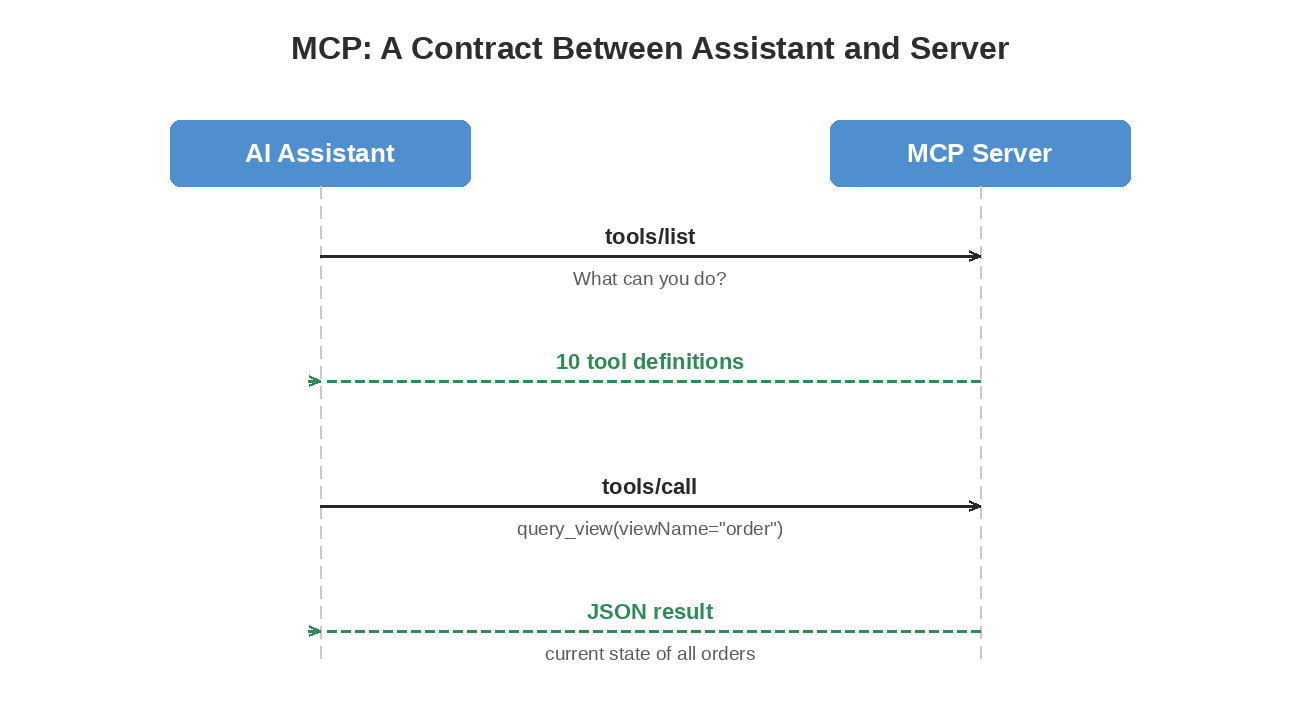
    MCP (Model Context Protocol) is an open specification by Anthropic that defines a standard interface between AI assistants and external tools. Think of it as a contract:

    MCP protocol sequence: the AI assistant sends tools/list and tools/call to the MCP server, which returns tool definitions and JSON results over JSON-RPC

    The protocol uses JSON-RPC 2.0 over one of two transports:

    Transport How It Works Best For
    stdio AI assistant launches the server as a subprocess; communicates via stdin/stdout Local development with Claude Code or Claude Desktop
    SSE (HTTP) Server runs as a web service; AI connects over HTTP with Server-Sent Events Docker, remote deployment, multi-user

    The AI assistant doesn’t need to know anything about Hazelcast, Jet pipelines, or event sourcing. It sees ten tools with descriptions and parameters. The MCP server handles the translation between “query the customer view” and “GET http://account-service:8081/api/customers.”


    Designing Tools Around Event Sourcing

    The hardest part of building an MCP server isn’t the protocol — it’s deciding what tools to expose. Too many and the AI gets confused about which one to use. Too few and it can’t do useful work. We went back and forth on this and started with seven, organized around the three concerns of an event-sourced system. Three more got added later for dead letter queue recovery, which we’ll get to in a moment.

    Queries (Read Current State)

    Tool What It Does
    query_view Read materialized views — current state of customers, products, orders, payments
    get_event_history Read the event log — how an entity reached its current state

    These map to the read side of CQRS. Views give you the “what,” event history gives you the “why.”

    Commands (Produce New Events)

    Tool What It Does
    submit_event Create customers, products, orders; cancel orders; process payments; refund payments
    run_demo Execute multi-step scenarios (happy path, payment failure, saga timeout, sample data)

    Each command produces domain events that flow through the Jet pipeline. run_demo chains multiple commands together to set up investigation targets — a failed payment saga, a timeout scenario, a happy path to compare against.

    Observability (Inspect the System)

    Tool What It Does
    inspect_saga View a saga’s status, steps completed, timing, and failure reason
    list_sagas Browse sagas filtered by status
    get_metrics Aggregated system metrics — saga counts, event throughput, active gauges

    Dead Letter Queue (Investigate and Replay Failures)

    Tool What It Does
    list_dlq_entries List failed events that landed in the dead letter queue, with a pending-count summary for quick triage
    inspect_dlq_entry View a single DLQ entry: event data, failure reason, saga context, replay count
    replay_dlq_entry Republish a DLQ entry’s event for reprocessing — after the cause is fixed

    We hadn’t built the DLQ machinery yet when the MCP server first shipped, so these three were added later. The investigation workflow — list, inspect, then decide to replay or not — turned out to map cleanly onto how a human operator works through a queue of failed events. Asking the AI to walk that with you, one entry at a time, is dramatically less tedious than the curl version.

    Ten tools, four categories, no overlap. The AI handles any reasonable question about the system, and tool selection stays reliable — you’d never call get_metrics when you meant query_view, or list_dlq_entries when you meant list_sagas. The shape of the tool decides which question it answers.


    Architecture: A Pure REST Proxy

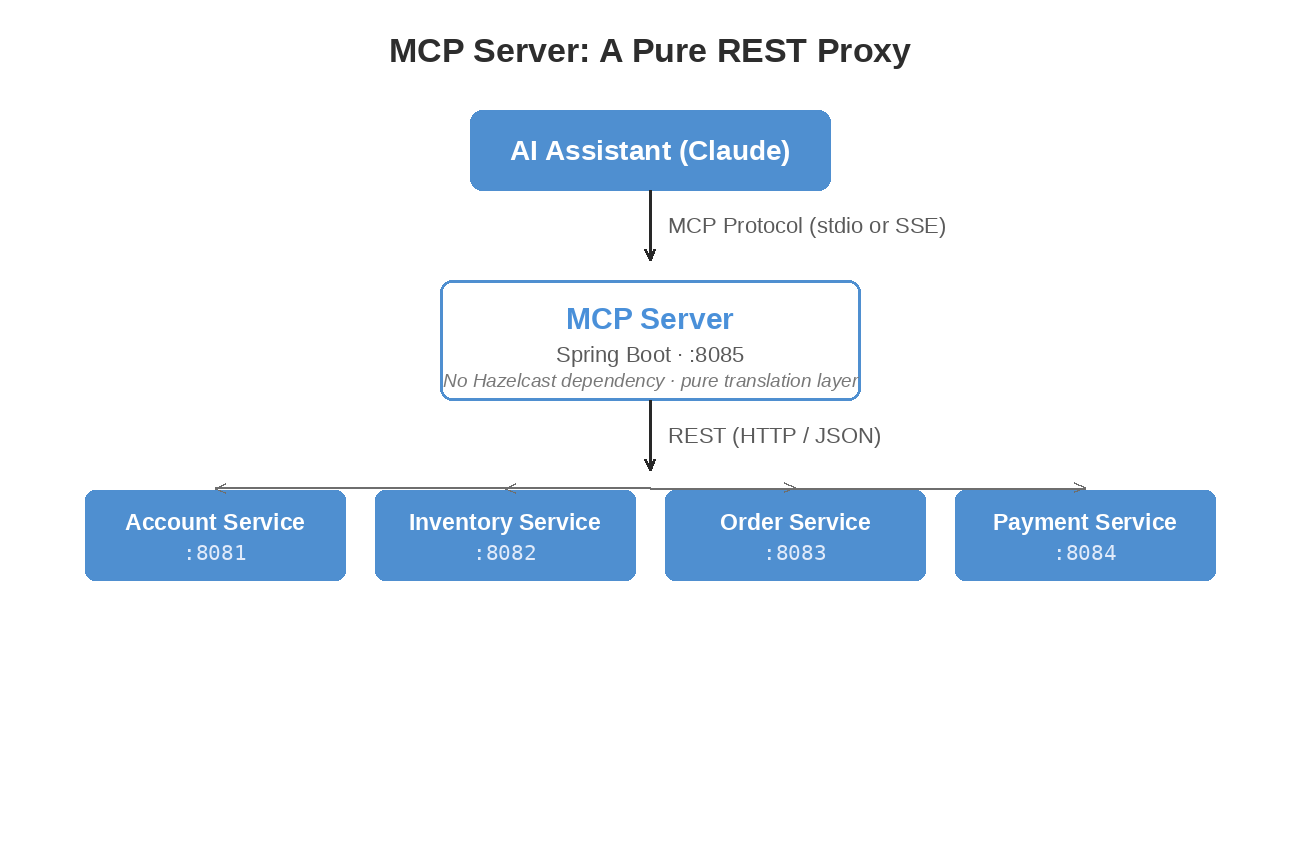
    The MCP server sits between the AI assistant and the microservices:

    MCP server architecture: an AI assistant connects via the MCP protocol to a Spring Boot MCP server on port 8085, which proxies REST calls to the Account, Inventory, Order, and Payment services

    We made a deliberate choice here: the MCP server has no Hazelcast dependency. It doesn’t join any cluster, doesn’t read IMaps, doesn’t run Jet jobs. It’s a thin REST proxy that translates MCP tool calls into HTTP requests against the existing service APIs.

    Why go to the trouble of keeping them separate? Because coupling the MCP server to Hazelcast would mean classpath conflicts with the services, a dependency on the data layer that makes testing painful, and another component that needs Hazelcast configuration. As a pure proxy, the server needs maybe 128-256 MB of heap, has no classpath conflicts, and you can test every tool by mocking REST responses without running a single service.


    Implementation

    The ServiceClient

    All HTTP communication goes through one class:

    @Component
    public class ServiceClient implements ServiceClientOperations {
    
        private final McpServerProperties properties;
        private final RestClient restClient;
    
        public Map<String, Object> getEntity(String viewName, String id) {
            String url = resolveUrl(viewName) + "/" + id;
            String json = restClient.get().uri(url).retrieve().body(String.class);
            return parseMap(json);
        }
    
        String resolveUrl(String viewName) {
            return switch (viewName.toLowerCase()) {
                case "customer" -> properties.getAccountUrl() + "/api/customers";
                case "product"  -> properties.getInventoryUrl() + "/api/products";
                case "order"    -> properties.getOrderUrl() + "/api/orders";
                case "payment"  -> properties.getPaymentUrl() + "/api/payments";
                default -> throw new IllegalArgumentException("Unknown view: " + viewName);
            };
        }
    }
    

    That resolveUrl switch is the only place that knows which service owns which view. Every tool delegates to ServiceClient rather than making HTTP calls directly.

    The ServiceClientOperations interface exists because Mockito’s inline mock maker on Java 25 cannot mock concrete classes. We hit this wall across the framework — the solution every time was to extract an interface so tests can mock it. It’s a slightly annoying pattern, but it works.

    A Tool Implementation

    Each tool is a Spring @Service with a @Tool-annotated method. Here’s QueryViewTool:

    @Service
    public class QueryViewTool {
    
        private final ServiceClientOperations serviceClient;
    
        @Tool(description = "Query a materialized view. "
                + "Available views: customer, product, order, payment. "
                + "Provide a key to get a specific entity, or omit to list entities.")
        public String queryView(
                @ToolParam(description = "View to query: customer, product, order, or payment")
                String viewName,
                @ToolParam(description = "Optional: specific entity ID", required = false)
                String key,
                @ToolParam(description = "Max results when listing (default: 10)", required = false)
                Integer limit) {
    
            if (key != null && !key.isBlank()) {
                return toJson(serviceClient.getEntity(viewName, key));
            } else {
                int effectiveLimit = (limit != null && limit > 0) ? limit : 10;
                List<Map<String, Object>> results = serviceClient.listEntities(viewName, effectiveLimit);
                return toJson(Map.of(
                        "view", viewName,
                        "count", results.size(),
                        "entities", results
                ));
            }
        }
    }
    

    That @Tool description is doing real work. The AI reads it to decide which tool to call and what parameters to provide. If you’re vague — “query data” instead of “Query a materialized view. Available views: customer, product, order, payment” — the AI picks the wrong tool or provides wrong parameters. We learned this the hard way. Be specific. Name the available views. Explain what happens with versus without a key.

    The optional parameters with defaults matter too. When the AI omits key, the tool lists entities. When it omits limit, you get 10. This lets a single tool handle “show me all customers” and “look up customer cust-123” without the AI needing to figure out everything every time.

    Tool Registration

    All ten tools get registered in one place:

    @Configuration
    public class McpToolConfig {
    
        @Bean
        public ToolCallbackProvider mcpTools(QueryViewTool queryView,
                                             SubmitEventTool submitEvent,
                                             GetEventHistoryTool getEventHistory,
                                             InspectSagaTool inspectSaga,
                                             ListSagasTool listSagas,
                                             GetMetricsTool getMetrics,
                                             RunDemoTool runDemo,
                                             ListDlqEntriesTool listDlqEntries,
                                             InspectDlqEntryTool inspectDlqEntry,
                                             ReplayDlqEntryTool replayDlqEntry) {
            return MethodToolCallbackProvider.builder()
                    .toolObjects(queryView, submitEvent, getEventHistory,
                            inspectSaga, listSagas, getMetrics, runDemo,
                            listDlqEntries, inspectDlqEntry, replayDlqEntry)
                    .build();
        }
    }
    

    Spring AI’s MethodToolCallbackProvider scans each object for @Tool methods and registers them with the MCP server. When the AI calls tools/list, it gets back all ten tool definitions with their descriptions and parameter schemas.


    The Event Dispatch Pattern

    SubmitEventTool deserves a closer look because it maps a single tool to seven different service endpoints:

    Map<String, Object> dispatch(String eventType, Map<String, Object> payload) {
        return switch (eventType) {
            case "CreateCustomer"  -> serviceClient.createEntity("customer", payload);
            case "CreateProduct"   -> serviceClient.createEntity("product", payload);
            case "CreateOrder"     -> serviceClient.createEntity("order", payload);
            case "CancelOrder"     -> {
                String orderId = requireField(payload, "orderId");
                yield serviceClient.performAction("order", orderId, "cancel", payload, true);
            }
            case "ReserveStock"    -> {
                String productId = requireField(payload, "productId");
                yield serviceClient.performAction("product", productId, "stock/reserve", payload, false);
            }
            case "ProcessPayment"  -> serviceClient.createEntity("payment", payload);
            case "RefundPayment"   -> {
                String paymentId = requireField(payload, "paymentId");
                yield serviceClient.performAction("payment", paymentId, "refund", payload, false);
            }
            default -> throw new IllegalArgumentException("Unknown event type: " + eventType);
        };
    }
    

    The alternative would be seven separate tools — create_customer, create_product, and so on. We went with a single submit_event tool with an eventType discriminator because it mirrors the event sourcing model (the system is event-driven, the tool should feel event-driven), it keeps the total tool count at ten instead of sixteen, and the AI handles the dispatch naturally. When you say “create a customer named Alice,” it maps that to eventType=”CreateCustomer” without difficulty.


    The Demo Tool

    RunDemoTool is the most complex tool because each scenario chains multiple service calls:

    private Map<String, Object> runHappyPath() {
        // Step 1: Create customer
        Map<String, Object> customer = serviceClient.createEntity("customer", Map.of(
                "name", "Demo Customer",
                "email", "demo-" + shortId() + "@example.com",
                "address", "123 Demo Street"
        ));
    
        // Step 2: Create product
        Map<String, Object> product = serviceClient.createEntity("product", Map.of(
                "sku", "DEMO-" + shortId(),
                "name", "Demo Widget",
                "price", "29.99",
                "quantityOnHand", 100
        ));
    
        // Step 3: Create order (uses IDs from previous steps)
        String customerId = extractId(customer, "customerId");
        String productId = extractId(product, "productId");
        Map<String, Object> order = serviceClient.createEntity("order", Map.of(
                "customerId", customerId,
                "customerName", "Demo Customer",
                "lineItems", List.of(Map.of(
                        "productId", productId,
                        "productName", "Demo Widget",
                        "quantity", 2,
                        "unitPrice", 29.99
                ))
        ));
    
        return Map.of("scenario", "happy_path", "steps", List.of(...));
    }
    

    Each scenario uses shortId() — a UUID fragment — so you can run the same scenario multiple times without naming collisions. The payment_failure scenario creates a $16,500 order that exceeds the $10,000 payment limit, triggering saga compensation. The saga_timeout scenario creates an order with minimal stock, designed to hit the deadline. These are pre-built investigation targets — the AI equivalent of a test fixture.


    Stdio vs. SSE: Two Transport Modes

    Default: stdio (Local Development)

    # application.properties
    spring.main.web-application-type=none
    spring.ai.mcp.server.name=ecommerce-mcp-server

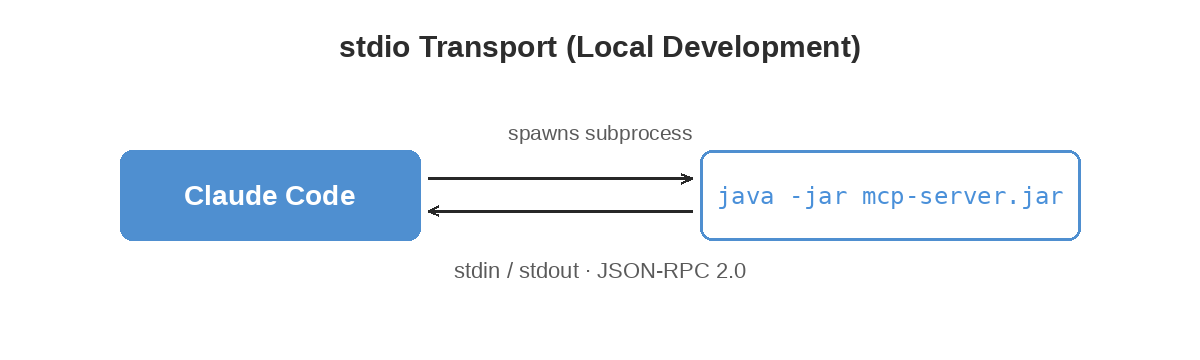
    The AI assistant launches the server as a subprocess and communicates via stdin/stdout using JSON-RPC:

    stdio transport: Claude Code spawns the MCP server as a java -jar subprocess and communicates over stdin and stdout using JSON-RPC 2.0

    No network port needed. This is the default for local development with Claude Code or Claude Desktop.

    Docker: SSE/HTTP (Networked Deployment)

    # application-docker.properties
    spring.main.web-application-type=servlet
    spring.ai.mcp.server.stdio=false
    server.port=8085

    In Docker, the MCP server runs as a web service with Server-Sent Events on port 8085:

    mcp-server:
      build: ../mcp-server
      ports:
        - "8085:8085"
      environment:
        - SPRING_PROFILES_ACTIVE=docker
        - MCP_SERVICES_ACCOUNT_URL=http://account-service:8081
        - MCP_SERVICES_INVENTORY_URL=http://inventory-service:8082
        - MCP_SERVICES_ORDER_URL=http://order-service:8083
        - MCP_SERVICES_PAYMENT_URL=http://payment-service:8084

    The profile switch is the only difference between the two modes. Same tool code, same behavior.


    Testing

    Each tool has unit tests that mock ServiceClientOperations:

    @ExtendWith(MockitoExtension.class)
    class QueryViewToolTest {
    
        @Mock
        private ServiceClientOperations serviceClient;
    
        private QueryViewTool queryViewTool;
    
        @BeforeEach
        void setUp() {
            queryViewTool = new QueryViewTool(serviceClient);
        }
    
        @Test
        void shouldQueryByKey() throws JsonProcessingException {
            when(serviceClient.getEntity("customer", "c1"))
                    .thenReturn(Map.of("customerId", "c1", "name", "Alice"));
    
            String result = queryViewTool.queryView("customer", "c1", null);
    
            verify(serviceClient).getEntity("customer", "c1");
            Map<String, Object> parsed = objectMapper.readValue(result, new TypeReference<>() {});
            assertNotNull(parsed.get("customerId"));
        }
    }
    

    Eleven test classes cover all ten tools plus the ServiceClient. Add another six for the security layer (more on that below) and one integration suite, and the mcp-server module sits at 143 tests total.

    Integration tests use Spring’s ApplicationContextRunner to verify bean wiring without starting the MCP stdio transport (which would block in a test environment):

    @DisplayName("MCP Tool Integration")
    class McpToolIntegrationTest {
    
        private final ApplicationContextRunner contextRunner = new ApplicationContextRunner()
                .withConfiguration(AutoConfigurations.of(McpToolConfig.class))
                .withUserConfiguration(TestServiceClientConfig.class)
                .withBean(McpServerProperties.class);
    
        @Test
        void shouldCreateAllToolBeans() {
            contextRunner.run(context -> {
                assertThat(context).hasSingleBean(QueryViewTool.class);
                assertThat(context).hasSingleBean(SubmitEventTool.class);
                // ... all 10 tools
            });
        }
    
        @Test
        void shouldRegisterToolCallbackProvider() {
            contextRunner.run(context -> {
                ToolCallbackProvider provider = context.getBean(ToolCallbackProvider.class);
                assertThat(provider.getToolCallbacks()).hasSize(10);
            });
        }
    }
    

    Configuration

    The MCP server has exactly four configuration properties:

    mcp.services.account-url=http://localhost:8081
    mcp.services.inventory-url=http://localhost:8082
    mcp.services.order-url=http://localhost:8083
    mcp.services.payment-url=http://localhost:8084

    In Docker, these are overridden by environment variables pointing to container hostnames. That’s it. No Hazelcast configuration, no cluster membership, no pipeline setup.


    Setting Up the AI Assistant

    Claude Code

    Add to ~/.claude/claude_code_config.json:

    {
      "mcpServers": {
        "hazelcast-ecommerce": {
          "command": "java",
          "args": ["-jar", "mcp-server/target/mcp-server-1.0.0-SNAPSHOT.jar"]
        }
      }
    }
    

    Claude Desktop

    Add to claude_desktop_config.json:

    {
      "mcpServers": {
        "hazelcast-ecommerce": {
          "command": "java",
          "args": ["-jar", "/absolute/path/to/mcp-server-1.0.0-SNAPSHOT.jar"]
        }
      }
    }
    

    Docker (SSE)

    Point the AI assistant to the SSE endpoint: http://localhost:8085/mcp

    In all three cases, the AI discovers the ten tools via tools/list and starts using them immediately.


    A Real Conversation

    Here’s what a debugging session looks like with MCP connected:

    You: “Something’s wrong with recent orders. Can you check?”

    Assistant: calls list_sagas(status=”FAILED”)

    calls get_metrics()

    “I found 2 failed sagas out of 142 total. Your overall success rate is 94.4%. Let me investigate the failures.”

    calls inspect_saga(sagaId=”saga-fail-1″)

    calls inspect_saga(sagaId=”saga-fail-2″)

    “Both failures are payment rejections:

    1. saga-fail-1 (Order ORD-088): Total $15,000 exceeded the $10,000 payment limit. Stock was released via compensation.
    2. saga-fail-2 (Order ORD-091): Total $16,500, same payment limit issue. Stock also released.

    These aren’t bugs — the payment service is correctly rejecting orders above the limit. You might want to either raise the limit or add client-side validation to prevent orders over $10,000 from being submitted.”

    Five tool calls, zero curl commands, and a root-cause analysis with a recommendation. From one question. I’ll be honest — the first time I watched the AI chain together the right sequence of calls and arrive at a correct diagnosis, it felt a little eerie. Like watching someone drive your car better than you do.


    Authentication and Tool Authorization

    The first version of this server had no authentication, which is fine for local development and obviously not fine for anything else. So we’ve added API key authentication and role-based tool access — disabled by default to preserve backward compatibility, and enabled with a single property when you need it.

    mcp:
      security:
        enabled: true
        api-keys:
          viewer-key-12345: VIEWER
          operator-key-67890: OPERATOR
          admin-key-99999: ADMIN

    In HTTP/SSE mode the key arrives in the X-API-Key request header. In stdio mode it’s read from the MCP_API_KEY environment variable. Either way, the server resolves the key to a role, and a ToolAuthorizer checks whether the role is permitted to invoke the tool the AI just asked for.

    Three roles are defined:

    • VIEWER — Read-only. Can call query_view, get_event_history, inspect_saga, list_sagas, get_metrics, list_dlq_entries, and inspect_dlq_entry. Cannot modify state.
    • OPERATOR — Read plus write. Adds submit_event, run_demo, and replay_dlq_entry.
    • ADMIN — Same as OPERATOR today, reserved for future admin-only tools.

    run_demo is a good example of why the role split matters — it’s the kind of tool you absolutely do not want firing in production, and the default VIEWER key keeps that off the table. The viewer can do everything an SRE wants to do during an incident — query, inspect, look at metrics — but it can’t accidentally place an order.

    One layer is still missing: the MCP server authenticates its callers, but it doesn’t forward caller identity to the downstream microservices. For a real production deployment you’d want both. We’ll come back to that.


    Where This Goes Next

    A few directions we haven’t explored yet.

    MCP supports streaming responses, which we’d want for large result sets — listing thousands of events as a single JSON blob isn’t great. MCP also has resources, read-only data endpoints that the AI can reference as context without explicitly calling a tool. The materialized views are a natural fit for that.

    OAuth forwarding is the gap mentioned above — the MCP server’s caller identity needs to propagate down to the backend services if we want end-to-end auth in production. The plumbing exists in Spring Security; we just haven’t wired it up.

    And with the MCP server as a foundation, you could build specialized AI agents — an operations agent that monitors sagas and flags anomalies, a demo agent that walks users through the system, a testing agent that creates targeted test data and verifies compensation paths. We haven’t built any of these yet, but the tool layer is there.


    The MCP server adds a natural-language interface to everything we’ve built so far. Ten tools, a thin REST proxy, two transport modes, role-based authorization, 143 tests. It doesn’t add new capabilities to the data layer — it makes the existing capabilities accessible through conversation. And that turns out to matter more than it sounds like it should. The investigation that took five curl commands now takes one sentence. The demo that required a script and documentation now requires “show me the happy path.” The system that was only inspectable by people who knew the API endpoints is now inspectable by anyone who can ask a question.

    That’s where we’ll leave things for today.


    Next up: Circuit Breakers and Retry for Saga Resilience

    Previous: Vector Similarity Search with Hazelcast

    Code: github.com/myawnhc/hazelcast-microservices-framework — clone it, docker-compose up, and the framework boots locally with sample data.
  • On the Vector Store I Didn’t Ask For

    A short interstitial in the “Building Event-Driven Microservices with Hazelcast” series


    AI has been instrumental in bringing this project to fruition — I’m not making any secret of that. The first three posts in this series describe work that was largely pre-existing demo code: domain objects, the Jet pipeline, the materialized view machinery. Claude polished what was already there and helped me write about it. Honest work, but mostly cleanup.

    The saga post (post 4) marked a shift — that’s where the demo’s functionality moved into genuinely new territory. And because Hazelcast had recently added a VectorCollection data structure and vector search capability — still in beta at the time — I was eager to incorporate it. So I asked Claude to design and implement something. I should have kept a close eye at every stage; instead I took more of an “I’ll review everything when you’re done” approach.

    I was in for a surprise.

    What came back was a working vector search implementation. What did not come back was anything built on Hazelcast’s VectorCollection. Claude had built one from scratch — an IMap<String, float[]> for the embeddings, brute-force cosine similarity at query time. No HNSW indexing, no clever data structure, just compute the distance to every vector and sort the results. It worked. The “similar products” endpoint returned plausibly similar products.

    This is exactly the thing creating so much fear and doomsaying around AI in the industry. If a coding assistant can reproduce the functionality of an Enterprise software feature — Enterprise edition, additional license cost — in a few hours, is all enterprise software an endangered species?

    Not quite. Brute-force cosine similarity is O(n) per query — fine for a demo catalog, fine for a small product line, but not the same animal as Hazelcast’s Enterprise VectorCollection, which uses HNSW indexing to stay sub-millisecond at millions of vectors. That’s real engineering, and it took the Hazelcast team a lot longer than a few hours.

    What’s more interesting is that I ended up with both. The accidental implementation became the Community Edition fallback in the framework. The Enterprise implementation took over once I corrected course and built what I’d originally asked for. So the framework now has a VectorStoreService interface with two backends — Enterprise gets HNSW, Community gets brute force, and both work. The Community story is no longer “vector search doesn’t work without a license”; it’s “vector search works fine for modest workloads without a license, and scales seriously if you upgrade.”

    I’m not sure I’d have ended up there if Claude had built what I asked for the first time.

    Code: github.com/myawnhc/hazelcast-microservices-framework — clone it, docker-compose up, and the framework boots locally with sample data.
  • Launching a Claude Code Project: Design Before You Build

    Launching a Claude Code Project: Design Before You Build

    I used Claude’s desktop interface for iterative design, then handed off to Claude Code for implementation.


    After deciding to revive my Hazelcast Microservices Framework (MSF) project, and to do so using Claude AI to do much of the heavy lifting, it came down to figuring out how to actually do this. I had no playbook for it. Nobody does, really — we’re all making this up as we go.

    I wanted to be transparent about my use of Claude, and at the same time I think the development process is interesting enough to be worthy of discussion. (Heck, maybe it’s more interesting than the framework blog posts I set out to write.) So I expect to end up with a dual series of blog posts: the framework posts — started by Claude, co-edited together, and given a final polish by me — interleaved with my observations on how the collaboration effort worked.

    This first “behind the scenes” post covers the design phase: going from a vague idea to a set of design documents and an implementation plan, all before writing a single line of code.

    Starting the Conversation

    Here was my original prompt to Claude:

    I want to use Claude Code to help me finish a demonstration project I started some time ago to show how to implement microservices using Hazelcast. (The main value of Hazelcast is to create materialized views of domain objects to maintain in-memory current state.) If it’s more effective, we can restart with a blank sheet rather than modify the existing project. I’d really like to iterate over the design several times before any coding starts — is that best done in Claude Code, or using this desktop interface? Ideally, creating various specifications or design documents before any coding starts would be perfect, if Claude can use these various documents as a guide to the coding process. How do we start?

    Claude immediately suggested splitting the work across two interfaces: use the desktop/web interface for design discussions and document creation, then move to Claude Code for implementation. Made sense to me — the conversational interface is better for back-and-forth design iteration, while Claude Code excels at multi-file code generation with direct access to the project directory.

    This turned out to be excellent advice. The design phase involved a lot of “what about this?” and “actually, let’s reorganize that” — the kind of exploratory conversation that works much better in a chat interface than in a code-focused tool. I tried doing some design work in Claude Code early on and it was noticeably worse — like trying to brainstorm on a whiteboard that keeps trying to compile your diagrams.

    The Design Phase: A Roadmap in Nine Documents

    What followed was an extended design conversation that produced nine documents over the course of a single session. I’m not going to walk through every one in detail — you can follow the links if you’re curious — but a few of them are worth talking about because of what they reveal about the collaboration process.

    Getting Started: Template and Domain

    Claude’s first move was to produce a comprehensive design document template covering everything from executive summary to demonstration scenarios. We never actually completed it — the conversation quickly moved in a more specific direction — but it served its purpose as a structural starting point. The architectural equivalent of a napkin sketch: useful for getting the conversation going, not meant to survive contact with reality.

    Before we could fill in any template, though, we needed to pick a domain for the demonstration. Claude laid out a comparison between eCommerce and Financial Services, and we settled on a hybrid approach: start with eCommerce (universally understood, clear event flows, and I had existing code to reference) but design the framework to be domain-agnostic so other domains could be plugged in later. We also simplified from four services down to three: Account, Inventory, and Order. (A fourth service, Payment, showed up later when we built out the saga patterns. Scope creep, but the useful kind.)

    That decision led to the eCommerce design document — a detailed Phase 1 design covering all three services, their APIs, events, and materialized views. Three view patterns came out of it: denormalized views (joining customer, product, and order data), aggregation views (pre-computing order statistics), and real-time status views (current inventory levels). If you’ve read the previous posts in this series, you’ll recognize these as exactly the kind of thing that makes Event Sourcing + CQRS worth the effort.

    Where I Pushed Back

    The conversation then turned to longer-term goals. I had ideas for observability dashboards, microbenchmarking, pluggable implementations, saga patterns, and more — far beyond what could fit in a Phase 1. Claude organized all of this into a phased requirements document spanning five phases.

    We iterated over this several times, adding and reorganizing. The most significant change I made was moving Event Sourcing from Phase 2 to Phase 1. Claude had initially positioned it as an advanced feature, but I saw it as the fundamental organizing principle of the entire framework — events are the source of truth, not database rows. Once I explained my existing Hazelcast Jet pipeline architecture (where handleEvent() writes to a PendingEvents map, which triggers a Jet pipeline that persists to the EventStore, updates materialized views, and publishes to the event bus), Claude immediately agreed and restructured the phases accordingly.

    This was one of the more interesting moments in the collaboration. Claude had made a reasonable default assumption about complexity ordering, but I had domain-specific knowledge about how the architecture should actually work. The back-and-forth was natural — I explained my reasoning, Claude incorporated it, and the result was better for it. If I’d just accepted the initial phasing without pushing back, the entire project would have been organized around a less coherent architecture. And honestly, I almost did just accept it. It looked reasonable. Sometimes the most important contribution you make is going “wait, actually…” when the first answer seems fine.

    Other additions during this iteration:

    • Vector Store integration (Phase 3, optional) for product similarity search
    • An MCP Server (Phase 3) to let AI assistants query and operate the system
    • Open source mandate — everything in Phases 1-2 must run on Hazelcast Community Edition
    • Blog post series structure — features developed in blog-post-sized chunks

    Architecture, Code Review, and the Rewrite Decision

    The next few documents came quickly. The Event Sourcing discussion led to a dedicated architecture document detailing the Jet pipeline design — based heavily on my existing implementation, but now formally documented with all six pipeline stages, the EventStore design, and how event replay would work.

    Then I uploaded several key source files from the original project for Claude to review: the EventSourcingController, DomainObject, SourcedEvent (later renamed to DomainEvent), EventStore, and EventSourcingPipeline. Claude produced a thorough code review comparing the existing code against the design documents. The verdict was encouraging — the core implementation was solid and matched the Phase 1 design almost perfectly. Claude recommended incremental enhancement: add correlation IDs, framework abstractions, observability, and tests on top of what was already there.

    I went the other way. After thinking about the package naming, dependency versions, and scope of changes needed, I decided on a clean reimplementation using the existing code as a blueprint. This let us start with the right project structure, package names (com.theyawns.framework.*), and dependency versions (Spring Boot 3.2.x, Hazelcast 5.6.0) from the beginning rather than refactoring them in later. Sometimes — as I’d noted in the previous post — the right move is to stop patching the old cabinets and start fresh.

    I won’t pretend this was a purely rational decision. Part of it was just wanting that clean-slate feeling — new project, new structure, no legacy cruft staring at me from the imports. Developers love a greenfield. We can’t help it.

    The Implementation Plan

    Once the architecture was validated and we’d agreed on the approach, Claude created a detailed Phase 1 implementation plan — a three-week, day-by-day schedule with code templates, success criteria, and task checklists:

    • Week 1: Framework core — Maven multi-module setup, core abstractions, event sourcing controller, Jet pipeline
    • Week 2: Three eCommerce services — Account, Inventory, Order with REST APIs and materialized views
    • Week 3: Integration, Docker Compose, documentation, demo scenarios

    We made a few tweaks (updating Hazelcast from 5.4.0 to 5.6.0, for instance), and then it was time to move to code.

    The Handoff to Claude Code

    Claude provided specific instructions for transitioning to Claude Code, including a context block to paste when starting the session:

    I'm building a Hazelcast-based event sourcing microservices framework.
    
    Project location: hazelcast-microservices-framework/
    Current state: Design documents complete, ready for implementation
    
    Key decisions:
    - Clean reimplementation (no existing code to port)
    - Spring Boot 3.2.x + Hazelcast 5.6.0 Community Edition
    - Package: com.theyawns.framework.*
    - Three services: Account, Inventory, Order (eCommerce domain)
    - Event sourcing with Hazelcast Jet pipeline
    - REST APIs only
    
    Implementation plan: docs/implementation/phase1-implementation-plan.md
    
    Starting with Day 1: Maven project setup + core abstractions
    
    Please read the implementation plan and let's begin.

    The whole point of the “design first” approach: you’re not asking the AI to guess at your architecture. You’re handing it a blueprint. The more detailed the blueprint, the less time you spend arguing about load-bearing walls later.

    Documents 7-9: Claude Code Configuration

    Before making the jump, I asked Claude about setup suggestions for Claude Code. This produced three more documents:

    CLAUDE.md (originally called .clinerules — I’m still not sure where that name came from) is the main configuration file that Claude Code reads automatically. It defines code standards, patterns, pitfalls to avoid, and documentation requirements. This file evolved a lot over the course of the project; looking at the commit history gives a good sense of how the “rules” grew and adapted as we ran into new situations. (More on that in a future post — it turned out to be one of the more interesting aspects of the whole process.)

    claude-code-agents.md defined eight specialized agent personas — Framework Developer, Service Developer, Test Writer, Documentation Writer, Pipeline Specialist, and others — each with specific rules, code patterns, and checklists. The idea was to switch between personas depending on the task at hand (e.g., “Switch to Test Writer agent. Write comprehensive tests for EventSourcingController.”). Whether this actually helped or was just a placebo is something I’m still not sure about, honestly.

    A docs organization guide rounded out the set, providing a recommended directory structure for keeping all the documentation organized as the project grew.

    What Came Next

    The resulting project grew well beyond the original three-week Phase 1 plan. At 150 commits, it now includes four microservices (Payment was added for saga demonstrations), an API Gateway, an MCP server for AI integration, choreographed and orchestrated saga patterns, PostgreSQL persistence, Grafana dashboards, and more. The three-week plan took considerably longer than three weeks. So it goes.

    But all of that implementation work — and the interesting stories about how human-AI collaboration played out during coding — is material for future posts.

    What I’d Do Differently (And What I’d Do Again)

    If you’re thinking about using AI for a non-trivial coding project, here’s what I took away from the design phase.

    Use the right tool for each phase. The conversational interface is great for the messy, exploratory work of figuring out what you’re actually building. Claude Code is great for building it.

    Iterate on design before you write code. We went through multiple rounds of revision on the requirements and architecture documents. Each round caught issues or surfaced priorities (like Event Sourcing belonging in Phase 1) that would have been much more expensive to discover during implementation. Measure twice, cut once. The carpenter’s rule exists for a reason.

    Bring your domain knowledge — and don’t be shy about pushing back. Claude made strong default recommendations, but the most valuable moments came when I disagreed based on my understanding of Hazelcast and the architecture I wanted. The AI is a powerful collaborator, but it doesn’t know what you know. If something feels wrong, say so. That’s where the real value of the collaboration happens.

    And document everything. I mean it. The design documents weren’t just planning artifacts — they became living reference material that Claude Code used throughout implementation. The CLAUDE.md file in particular became a continuously evolving guide that shaped code quality across the entire project. Every hour spent on documentation saved multiples in “no, that’s not what I meant” corrections later. I’ve never been great about documentation discipline, so having an AI that actually reads and follows the docs was a surprisingly effective motivator to keep them current.


    The Hazelcast Microservices Framework is open source under the Apache 2.0 license. You can find it at github.com/myawnhc/hazelcast-microservices-framework.

    Next up: what happened when we actually started coding. Spoiler: the plan did not survive intact.

  • Hazelcast Microservices Framework: Event Sourcing Demo

    How a side project connecting Event Sourcing to Hazelcast sat unfinished for years — and why I decided to bring it back with an AI collaborator.


    In my previous post, I shared some of my thinking about Event-Driven Microservices — the coupling problems, the mental shift toward thinking in events, and the patterns (Event Sourcing, CQRS, materialized views) that make it all work. That post was conceptual. This one is personal.

    I’ve been playing around with design concepts in this area for some time. While I was an employee of Hazelcast, I frequently worked with customers and prospects to show how Hazelcast Jet — an event stream processing engine built into the Hazelcast platform — could be used to build event processing solutions that would scale while continuing to provide low latency. These conversations were always framed around stream processing, though. Even when the intended use case was around microservices, we didn’t explicitly get into the Event Sourcing pattern. As someone coming from a background that was database-centric, the concept of events as the source of truth was a bit much for me.

    The Light Bulb Moment

    It was a light bulb moment when I realized that Hazelcast Jet could fit naturally into an Event Sourcing architecture — and that Hazelcast IMDG (the in-memory data grid, or caching layer) could concurrently maintain materialized views representing the current state of domain objects.

    Think about it: Event Sourcing needs an event log and a processing pipeline. Hazelcast Jet is a processing pipeline. CQRS needs a fast read-side store that’s kept in sync with the event stream. Hazelcast IMDG is a fast read-side store. Event Sourcing + CQRS maps beautifully onto Jet + IMDG (even though that acronym is officially retired — it’s all just “Hazelcast” now).

    And from there, I really wanted to demonstrate this. The original Microservices Framework project began.

    Version 1: The Proof of Concept

    The first version was focused on proving the core idea worked. Could I wire up a Hazelcast Jet pipeline to process domain events, persist them to an event store, and update materialized views — all in a way that was generic enough to work across different services?

    The answer was yes. The central pattern that emerged was straightforward: a service’s handleEvent() method writes incoming events to a PendingEvents map, which triggers a Jet pipeline that persists events to the EventStore, updates materialized views, and publishes to an event bus for other services to consume. It worked, and it was fast.

    Now, the central components of the architecture — the domain object, event class, controller, and pipeline — have survived relatively intact through multiple iterations of the implementation. The bones were good. But a lot of the specific implementation choices I made around those bones haven’t aged all that well.

    You know how it goes with side projects. Technical debt accumulates quietly, one “I’ll fix this later” at a time, until you’re looking at a codebase where you know you’d make different choices if you were starting over — but the sunk cost of time already invested keeps you from actually doing it. It’s the software equivalent of a kitchen renovation where you keep patching the old cabinets because ripping them out feels like too big a project for a weekend.

    That version of the framework is still hanging around on GitHub, although I decided not to link to it here as I may take it down at any time. (Upcoming posts will link to the improved version, so embedding links to the original will inevitably lead to someone grabbing the wrong one.)

    I got it to a working state, but there was a long list of things I wanted to add. Saga patterns for coordinating multi-service transactions. Observability dashboards. Comprehensive tests. Documentation that went beyond “read the code.” Each of these was a meaningful chunk of work, and progress slowed to a crawl.

    The Stall

    Let’s be honest about what happened: the project stalled. Not dramatically — it wasn’t ever really abandoned. It just… stopped moving. Every few months I’d open the codebase, when I had some extra time, and make a few minor, inconsequential changes while thinking of the more ambitious refactorings or added features that I’d get to when time permitted.

    If you’ve ever maintained a passion project alongside a day job, you know this feeling. The ideas don’t go away — they sit in the back of your mind, periodically surfacing with a pang of “I should really get back to that.” But the activation energy to restart is high, especially when the next step isn’t a fun new feature but the grind of scaffolding, configuration, and test coverage. So you close the laptop and tell yourself next month will be different. (It won’t be.)

    Enter AI-Assisted Development

    In early 2025, I started using Claude for various coding tasks and was genuinely surprised by the results. This wasn’t autocomplete on steroids — I could describe an architectural pattern and get back code that understood the why, not just the what. I could say “this needs to work like an event journal with replay capability” and get something that actually accounted for ordering guarantees and idempotency.

    That’s when the thought crystallized: what if I could use this to break through the stall?

    Here’s the thing — the stuff that had been blocking me wasn’t the hard design work. I knew what the architecture should look like. The bottleneck was the sheer volume of implementation grind: scaffolding new services, writing comprehensive tests, wiring up Docker configurations, producing documentation. Exactly the kind of work where you need focused hours, and a side project never has enough of those.

    Now, I want to be clear about what I mean here, because “AI wrote my code” carries a lot of baggage. This wasn’t about handing off the project and checking back in when it was done. It was about having a collaborator who could take high-level design direction and turn it into working code at a pace that made the project viable again. I’d provide the domain expertise, the architectural decisions, and the quality bar. The AI would provide the throughput.

    Making the Decision

    I decided to move forward with a clean reimplementation rather than trying to evolve the existing codebase. The core patterns from the original work — the Jet pipeline architecture, the event store design, the materialized view update strategy — were proven and would carry forward. But the project structure, package naming, dependency versions, and framework abstractions would start fresh. Sometimes the best way to fix a kitchen is to actually rip out the cabinets.

    The plan was to use Claude’s desktop interface for iterative design discussions (requirements, architecture, implementation planning) and then hand off to Claude Code for the actual coding. Design first, then build — with comprehensive documentation at every step so the AI would have rich context to work from.

    What happened next — the design phase, the handoff to Claude Code, and the surprises along the way — is the subject of the next post.

    Code: github.com/myawnhc/hazelcast-microservices-framework — clone it, docker-compose up, and the framework boots locally with sample data.