Part 6 in the “Building Event-Driven Microservices with Hazelcast” series
Introduction
Over the first five articles, we built an event sourcing framework, a Jet pipeline, materialized views, a choreographed saga pattern, and vector similarity search. That’s a lot of infrastructure. It also means that investigating a problem — say, a failed saga — involves chaining together five or six curl commands across four different services, reading JSON output with your eyes, extracting IDs by hand, and constructing the next request.
Which is fine. It’s what we’ve always done. But there’s a better option now.
The Model Context Protocol (MCP) is an open standard that lets AI assistants — Claude, ChatGPT, Copilot, whoever — call tools exposed by external servers. Instead of the assistant guessing at curl commands or asking you to copy-paste output, it directly queries your materialized views, submits events, inspects saga state, and runs demo scenarios.
In this article, we build an MCP server that bridges AI assistants to our eCommerce microservices. And yes, there is something a little meta about using Claude to build a framework and then building a bridge so Claude can operate the framework. We’re going with it.
Why Give an AI Access to Your Microservices?
Consider a typical debugging session. A saga has failed, and you want to know why:
# Step 1: Find failed sagas
curl http://localhost:8083/api/sagas?status=FAILED

# Step 2: Copy a saga ID from the JSON output
curl http://localhost:8083/api/sagas/saga-a7f3e2

# Step 3: Check the order that triggered it
curl http://localhost:8083/api/orders/ord-12345

# Step 4: Check the event history
curl http://localhost:8083/api/orders/ord-12345/events

# Step 5: Check if stock was released as part of compensation
curl http://localhost:8082/api/products/prod-67890
Five commands. Each one requires reading JSON output, finding the right ID, and constructing the next request. You’re doing the orchestration in your head, and — let’s be honest — that’s exactly the kind of tedious mechanical chaining that humans are bad at and computers are good at.
With MCP, the same investigation is a single sentence:
“Why did the most recent saga fail?”
The AI calls list_sagas(status=”FAILED”), then inspect_saga(sagaId=”saga-a7f3e2″), then get_event_history(aggregateId=”ord-12345″, aggregateType=”Order”), interprets all the responses, and gives you a summary:
“Saga saga-a7f3e2 failed at the payment step. Order ORD-12345 had a total of $15,000 which exceeded the $10,000 payment limit. Compensation ran successfully — stock for product PROD-67890 was released.”
Five tool calls, zero curl commands, a root-cause analysis, and a recommendation. From one question.
What Is MCP?
MCP (Model Context Protocol) is an open specification by Anthropic that defines a standard interface between AI assistants and external tools. Think of it as a contract:
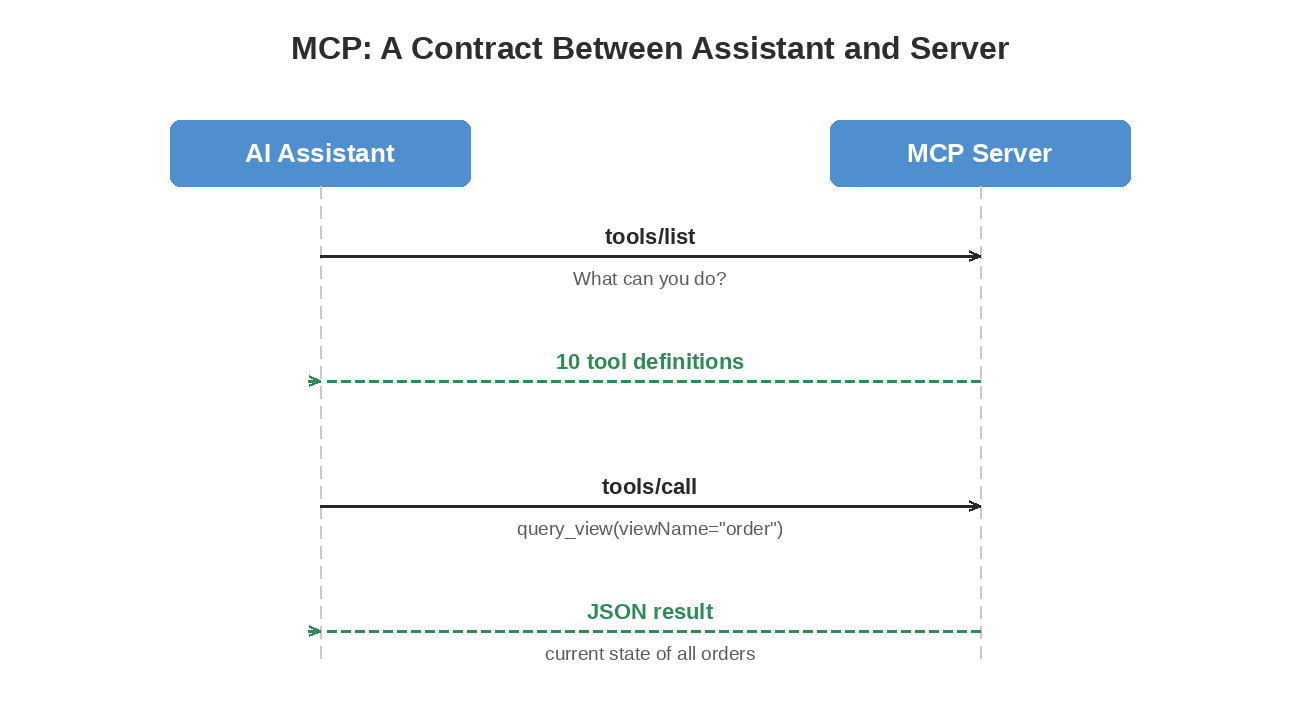
The protocol uses JSON-RPC 2.0 over one of two transports:
| Transport | How It Works | Best For |
|---|---|---|
| stdio | AI assistant launches the server as a subprocess; communicates via stdin/stdout | Local development with Claude Code or Claude Desktop |
| SSE (HTTP) | Server runs as a web service; AI connects over HTTP with Server-Sent Events | Docker, remote deployment, multi-user |
The AI assistant doesn’t need to know anything about Hazelcast, Jet pipelines, or event sourcing. It sees ten tools with descriptions and parameters. The MCP server handles the translation between “query the customer view” and “GET http://account-service:8081/api/customers.”
Designing Tools Around Event Sourcing
The hardest part of building an MCP server isn’t the protocol — it’s deciding what tools to expose. Too many and the AI gets confused about which one to use. Too few and it can’t do useful work. We went back and forth on this and started with seven, organized around the three concerns of an event-sourced system. Three more got added later for dead letter queue recovery, which we’ll get to in a moment.
Queries (Read Current State)
| Tool | What It Does |
|---|---|
| query_view | Read materialized views — current state of customers, products, orders, payments |
| get_event_history | Read the event log — how an entity reached its current state |
These map to the read side of CQRS. Views give you the “what,” event history gives you the “why.”
Commands (Produce New Events)
| Tool | What It Does |
|---|---|
| submit_event | Create customers, products, orders; cancel orders; process payments; refund payments |
| run_demo | Execute multi-step scenarios (happy path, payment failure, saga timeout, sample data) |
Each command produces domain events that flow through the Jet pipeline. run_demo chains multiple commands together to set up investigation targets — a failed payment saga, a timeout scenario, a happy path to compare against.
Observability (Inspect the System)
| Tool | What It Does |
|---|---|
| inspect_saga | View a saga’s status, steps completed, timing, and failure reason |
| list_sagas | Browse sagas filtered by status |
| get_metrics | Aggregated system metrics — saga counts, event throughput, active gauges |
Dead Letter Queue (Investigate and Replay Failures)
| Tool | What It Does |
|---|---|
| list_dlq_entries | List failed events that landed in the dead letter queue, with a pending-count summary for quick triage |
| inspect_dlq_entry | View a single DLQ entry: event data, failure reason, saga context, replay count |
| replay_dlq_entry | Republish a DLQ entry’s event for reprocessing — after the cause is fixed |
We hadn’t built the DLQ machinery yet when the MCP server first shipped, so these three were added later. The investigation workflow — list, inspect, then decide to replay or not — turned out to map cleanly onto how a human operator works through a queue of failed events. Asking the AI to walk that with you, one entry at a time, is dramatically less tedious than the curl version.
Ten tools, four categories, no overlap. The AI handles any reasonable question about the system, and tool selection stays reliable — you’d never call get_metrics when you meant query_view, or list_dlq_entries when you meant list_sagas. The shape of the tool decides which question it answers.
Architecture: A Pure REST Proxy
The MCP server sits between the AI assistant and the microservices:
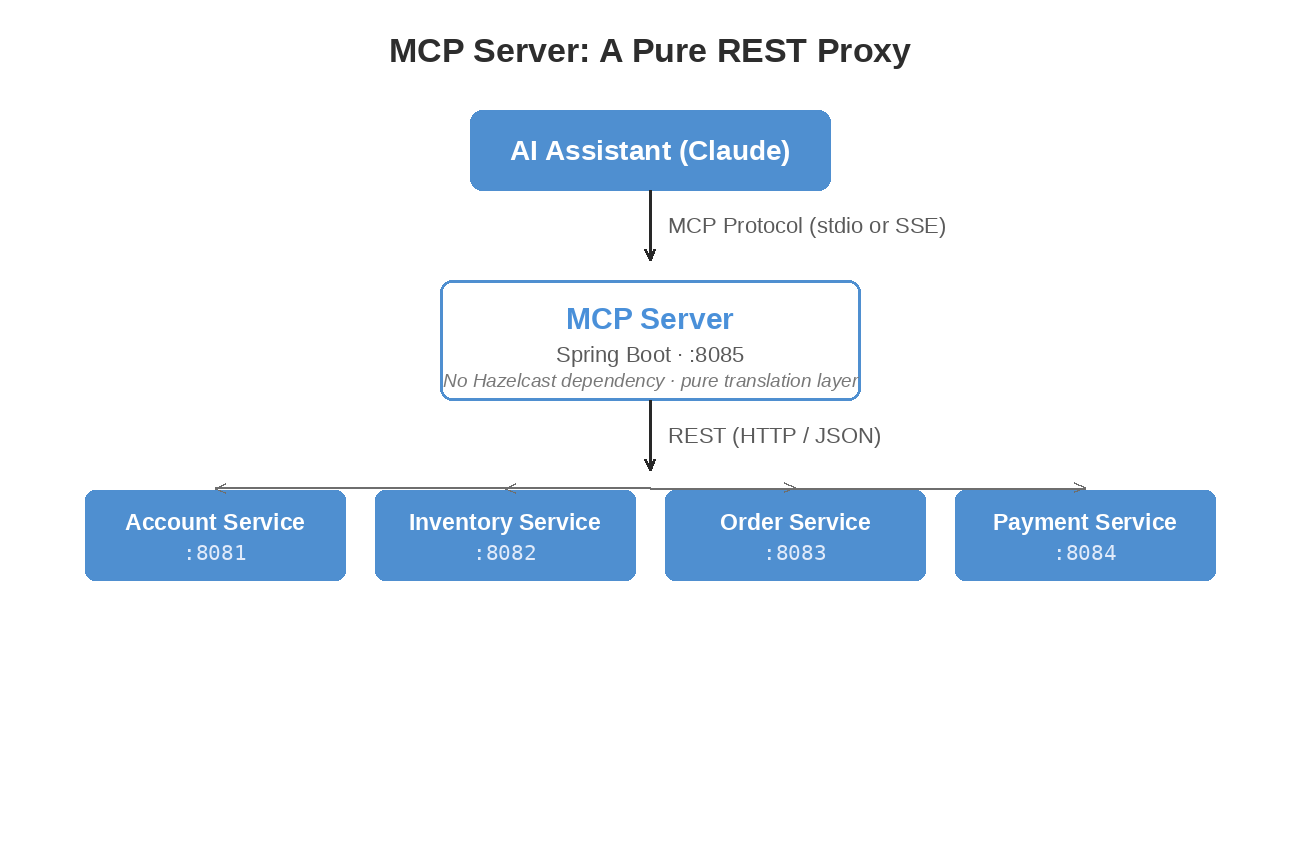
We made a deliberate choice here: the MCP server has no Hazelcast dependency. It doesn’t join any cluster, doesn’t read IMaps, doesn’t run Jet jobs. It’s a thin REST proxy that translates MCP tool calls into HTTP requests against the existing service APIs.
Why go to the trouble of keeping them separate? Because coupling the MCP server to Hazelcast would mean classpath conflicts with the services, a dependency on the data layer that makes testing painful, and another component that needs Hazelcast configuration. As a pure proxy, the server needs maybe 128-256 MB of heap, has no classpath conflicts, and you can test every tool by mocking REST responses without running a single service.
Implementation
The ServiceClient
All HTTP communication goes through one class:
@Component
public class ServiceClient implements ServiceClientOperations {

    private final McpServerProperties properties;
    private final RestClient restClient;

    public Map<String, Object> getEntity(String viewName, String id) {
        String url = resolveUrl(viewName) + "/" + id;
        String json = restClient.get().uri(url).retrieve().body(String.class);
        return parseMap(json);
    }

    String resolveUrl(String viewName) {
        return switch (viewName.toLowerCase()) {
            case "customer" -> properties.getAccountUrl() + "/api/customers";
            case "product"  -> properties.getInventoryUrl() + "/api/products";
            case "order"    -> properties.getOrderUrl() + "/api/orders";
            case "payment"  -> properties.getPaymentUrl() + "/api/payments";
            default -> throw new IllegalArgumentException("Unknown view: " + viewName);
        };
    }
}
That resolveUrl switch is the only place that knows which service owns which view. Every tool delegates to ServiceClient rather than making HTTP calls directly.
The ServiceClientOperations interface exists because Mockito’s inline mock maker on Java 25 cannot mock concrete classes. We hit this wall across the framework — the solution every time was to extract an interface so tests can mock it. It’s a slightly annoying pattern, but it works.
A Tool Implementation
Each tool is a Spring @Service with a @Tool-annotated method. Here’s QueryViewTool:
@Service
public class QueryViewTool {

    private final ServiceClientOperations serviceClient;

    @Tool(description = "Query a materialized view. "
            + "Available views: customer, product, order, payment. "
            + "Provide a key to get a specific entity, or omit to list entities.")
    public String queryView(
            @ToolParam(description = "View to query: customer, product, order, or payment")
            String viewName,
            @ToolParam(description = "Optional: specific entity ID", required = false)
            String key,
            @ToolParam(description = "Max results when listing (default: 10)", required = false)
            Integer limit) {

        if (key != null && !key.isBlank()) {
            return toJson(serviceClient.getEntity(viewName, key));
        } else {
            int effectiveLimit = (limit != null && limit > 0) ? limit : 10;
            List<Map<String, Object>> results = serviceClient.listEntities(viewName, effectiveLimit);
            return toJson(Map.of(
                    "view", viewName,
                    "count", results.size(),
                    "entities", results
            ));
        }
    }
}
That @Tool description is doing real work. The AI reads it to decide which tool to call and what parameters to provide. If you’re vague — “query data” instead of “Query a materialized view. Available views: customer, product, order, payment” — the AI picks the wrong tool or provides wrong parameters. We learned this the hard way. Be specific. Name the available views. Explain what happens with versus without a key.
The optional parameters with defaults matter too. When the AI omits key, the tool lists entities. When it omits limit, you get 10. This lets a single tool handle “show me all customers” and “look up customer cust-123” without the AI needing to figure out everything every time.
Tool Registration
All ten tools get registered in one place:
@Configuration
public class McpToolConfig {

    @Bean
    public ToolCallbackProvider mcpTools(QueryViewTool queryView,
                                         SubmitEventTool submitEvent,
                                         GetEventHistoryTool getEventHistory,
                                         InspectSagaTool inspectSaga,
                                         ListSagasTool listSagas,
                                         GetMetricsTool getMetrics,
                                         RunDemoTool runDemo,
                                         ListDlqEntriesTool listDlqEntries,
                                         InspectDlqEntryTool inspectDlqEntry,
                                         ReplayDlqEntryTool replayDlqEntry) {
        return MethodToolCallbackProvider.builder()
                .toolObjects(queryView, submitEvent, getEventHistory,
                        inspectSaga, listSagas, getMetrics, runDemo,
                        listDlqEntries, inspectDlqEntry, replayDlqEntry)
                .build();
    }
}
Spring AI’s MethodToolCallbackProvider scans each object for @Tool methods and registers them with the MCP server. When the AI calls tools/list, it gets back all ten tool definitions with their descriptions and parameter schemas.
The Event Dispatch Pattern
SubmitEventTool deserves a closer look because it maps a single tool to seven different service endpoints:
Map<String, Object> dispatch(String eventType, Map<String, Object> payload) {
    return switch (eventType) {
        case "CreateCustomer"  -> serviceClient.createEntity("customer", payload);
        case "CreateProduct"   -> serviceClient.createEntity("product", payload);
        case "CreateOrder"     -> serviceClient.createEntity("order", payload);
        case "CancelOrder"     -> {
            String orderId = requireField(payload, "orderId");
            yield serviceClient.performAction("order", orderId, "cancel", payload, true);
        }
        case "ReserveStock"    -> {
            String productId = requireField(payload, "productId");
            yield serviceClient.performAction("product", productId, "stock/reserve", payload, false);
        }
        case "ProcessPayment"  -> serviceClient.createEntity("payment", payload);
        case "RefundPayment"   -> {
            String paymentId = requireField(payload, "paymentId");
            yield serviceClient.performAction("payment", paymentId, "refund", payload, false);
        }
        default -> throw new IllegalArgumentException("Unknown event type: " + eventType);
    };
}
The alternative would be seven separate tools — create_customer, create_product, and so on. We went with a single submit_event tool with an eventType discriminator because it mirrors the event sourcing model (the system is event-driven, the tool should feel event-driven), it keeps the total tool count at ten instead of sixteen, and the AI handles the dispatch naturally. When you say “create a customer named Alice,” it maps that to eventType=”CreateCustomer” without difficulty.
The Demo Tool
RunDemoTool is the most complex tool because each scenario chains multiple service calls:
private Map<String, Object> runHappyPath() {
    // Step 1: Create customer
    Map<String, Object> customer = serviceClient.createEntity("customer", Map.of(
            "name", "Demo Customer",
            "email", "demo-" + shortId() + "@example.com",
            "address", "123 Demo Street"
    ));

    // Step 2: Create product
    Map<String, Object> product = serviceClient.createEntity("product", Map.of(
            "sku", "DEMO-" + shortId(),
            "name", "Demo Widget",
            "price", "29.99",
            "quantityOnHand", 100
    ));

    // Step 3: Create order (uses IDs from previous steps)
    String customerId = extractId(customer, "customerId");
    String productId = extractId(product, "productId");
    Map<String, Object> order = serviceClient.createEntity("order", Map.of(
            "customerId", customerId,
            "customerName", "Demo Customer",
            "lineItems", List.of(Map.of(
                    "productId", productId,
                    "productName", "Demo Widget",
                    "quantity", 2,
                    "unitPrice", 29.99
            ))
    ));

    return Map.of("scenario", "happy_path", "steps", List.of(...));
}
Each scenario uses shortId() — a UUID fragment — so you can run the same scenario multiple times without naming collisions. The payment_failure scenario creates a $16,500 order that exceeds the $10,000 payment limit, triggering saga compensation. The saga_timeout scenario creates an order with minimal stock, designed to hit the deadline. These are pre-built investigation targets — the AI equivalent of a test fixture.
Stdio vs. SSE: Two Transport Modes
Default: stdio (Local Development)
# application.properties
spring.main.web-application-type=none
spring.ai.mcp.server.name=ecommerce-mcp-server
The AI assistant launches the server as a subprocess and communicates via stdin/stdout using JSON-RPC:
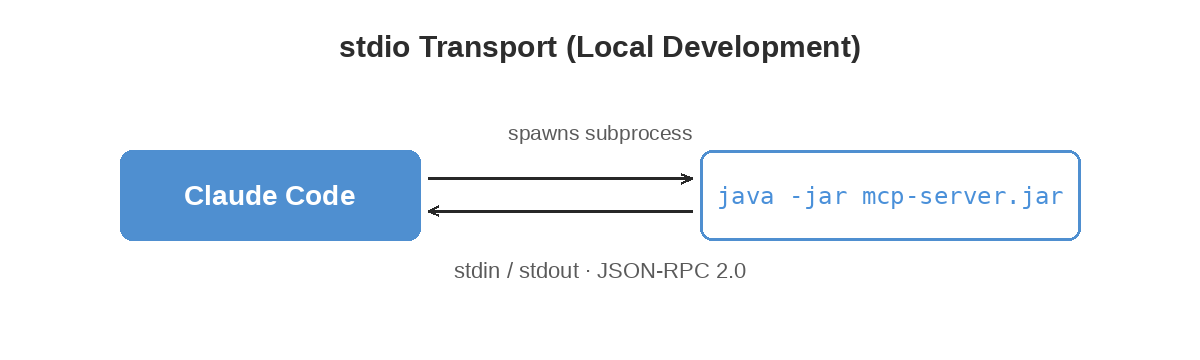
No network port needed. This is the default for local development with Claude Code or Claude Desktop.
Docker: SSE/HTTP (Networked Deployment)
# application-docker.properties
spring.main.web-application-type=servlet
spring.ai.mcp.server.stdio=false
server.port=8085
In Docker, the MCP server runs as a web service with Server-Sent Events on port 8085:
mcp-server:
  build: ../mcp-server
  ports:
    - "8085:8085"
  environment:
    - SPRING_PROFILES_ACTIVE=docker
    - MCP_SERVICES_ACCOUNT_URL=http://account-service:8081
    - MCP_SERVICES_INVENTORY_URL=http://inventory-service:8082
    - MCP_SERVICES_ORDER_URL=http://order-service:8083
    - MCP_SERVICES_PAYMENT_URL=http://payment-service:8084
The profile switch is the only difference between the two modes. Same tool code, same behavior.
Testing
Each tool has unit tests that mock ServiceClientOperations:
@ExtendWith(MockitoExtension.class)
class QueryViewToolTest {

    @Mock
    private ServiceClientOperations serviceClient;

    private QueryViewTool queryViewTool;

    @BeforeEach
    void setUp() {
        queryViewTool = new QueryViewTool(serviceClient);
    }

    @Test
    void shouldQueryByKey() throws JsonProcessingException {
        when(serviceClient.getEntity("customer", "c1"))
                .thenReturn(Map.of("customerId", "c1", "name", "Alice"));

        String result = queryViewTool.queryView("customer", "c1", null);

        verify(serviceClient).getEntity("customer", "c1");
        Map<String, Object> parsed = objectMapper.readValue(result, new TypeReference<>() {});
        assertNotNull(parsed.get("customerId"));
    }
}
Eleven test classes cover all ten tools plus the ServiceClient. Add another six for the security layer (more on that below) and one integration suite, and the mcp-server module sits at 143 tests total.
Integration tests use Spring’s ApplicationContextRunner to verify bean wiring without starting the MCP stdio transport (which would block in a test environment):
@DisplayName("MCP Tool Integration")
class McpToolIntegrationTest {

    private final ApplicationContextRunner contextRunner = new ApplicationContextRunner()
            .withConfiguration(AutoConfigurations.of(McpToolConfig.class))
            .withUserConfiguration(TestServiceClientConfig.class)
            .withBean(McpServerProperties.class);

    @Test
    void shouldCreateAllToolBeans() {
        contextRunner.run(context -> {
            assertThat(context).hasSingleBean(QueryViewTool.class);
            assertThat(context).hasSingleBean(SubmitEventTool.class);
            // ... all 10 tools
        });
    }

    @Test
    void shouldRegisterToolCallbackProvider() {
        contextRunner.run(context -> {
            ToolCallbackProvider provider = context.getBean(ToolCallbackProvider.class);
            assertThat(provider.getToolCallbacks()).hasSize(10);
        });
    }
}
Configuration
The MCP server has exactly four configuration properties:
mcp.services.account-url=http://localhost:8081
mcp.services.inventory-url=http://localhost:8082
mcp.services.order-url=http://localhost:8083
mcp.services.payment-url=http://localhost:8084
In Docker, these are overridden by environment variables pointing to container hostnames. That’s it. No Hazelcast configuration, no cluster membership, no pipeline setup.
Setting Up the AI Assistant
Claude Code
Add to ~/.claude/claude_code_config.json:
{
  "mcpServers": {
    "hazelcast-ecommerce": {
      "command": "java",
      "args": ["-jar", "mcp-server/target/mcp-server-1.0.0-SNAPSHOT.jar"]
    }
  }
}
Claude Desktop
Add to claude_desktop_config.json:
{
  "mcpServers": {
    "hazelcast-ecommerce": {
      "command": "java",
      "args": ["-jar", "/absolute/path/to/mcp-server-1.0.0-SNAPSHOT.jar"]
    }
  }
}
Docker (SSE)
Point the AI assistant to the SSE endpoint: http://localhost:8085/mcp
In all three cases, the AI discovers the ten tools via tools/list and starts using them immediately.
A Real Conversation
Here’s what a debugging session looks like with MCP connected:
You: “Something’s wrong with recent orders. Can you check?”
Assistant: calls list_sagas(status=”FAILED”)
calls get_metrics()
“I found 2 failed sagas out of 142 total. Your overall success rate is 94.4%. Let me investigate the failures.”
calls inspect_saga(sagaId=”saga-fail-1″)
calls inspect_saga(sagaId=”saga-fail-2″)
“Both failures are payment rejections:
- saga-fail-1 (Order ORD-088): Total $15,000 exceeded the $10,000 payment limit. Stock was released via compensation.
- saga-fail-2 (Order ORD-091): Total $16,500, same payment limit issue. Stock also released.
These aren’t bugs — the payment service is correctly rejecting orders above the limit. You might want to either raise the limit or add client-side validation to prevent orders over $10,000 from being submitted.”
Five tool calls, zero curl commands, and a root-cause analysis with a recommendation. From one question. I’ll be honest — the first time I watched the AI chain together the right sequence of calls and arrive at a correct diagnosis, it felt a little eerie. Like watching someone drive your car better than you do.
Authentication and Tool Authorization
The first version of this server had no authentication, which is fine for local development and obviously not fine for anything else. So we’ve added API key authentication and role-based tool access — disabled by default to preserve backward compatibility, and enabled with a single property when you need it.
mcp:
  security:
    enabled: true
    api-keys:
      viewer-key-12345: VIEWER
      operator-key-67890: OPERATOR
      admin-key-99999: ADMIN
In HTTP/SSE mode the key arrives in the X-API-Key request header. In stdio mode it’s read from the MCP_API_KEY environment variable. Either way, the server resolves the key to a role, and a ToolAuthorizer checks whether the role is permitted to invoke the tool the AI just asked for.
Three roles are defined:
- VIEWER — Read-only. Can call query_view, get_event_history, inspect_saga, list_sagas, get_metrics, list_dlq_entries, and inspect_dlq_entry. Cannot modify state.
- OPERATOR — Read plus write. Adds submit_event, run_demo, and replay_dlq_entry.
- ADMIN — Same as OPERATOR today, reserved for future admin-only tools.
run_demo is a good example of why the role split matters — it’s the kind of tool you absolutely do not want firing in production, and the default VIEWER key keeps that off the table. The viewer can do everything an SRE wants to do during an incident — query, inspect, look at metrics — but it can’t accidentally place an order.
One layer is still missing: the MCP server authenticates its callers, but it doesn’t forward caller identity to the downstream microservices. For a real production deployment you’d want both. We’ll come back to that.
Where This Goes Next
A few directions we haven’t explored yet.
MCP supports streaming responses, which we’d want for large result sets — listing thousands of events as a single JSON blob isn’t great. MCP also has resources, read-only data endpoints that the AI can reference as context without explicitly calling a tool. The materialized views are a natural fit for that.
OAuth forwarding is the gap mentioned above — the MCP server’s caller identity needs to propagate down to the backend services if we want end-to-end auth in production. The plumbing exists in Spring Security; we just haven’t wired it up.
And with the MCP server as a foundation, you could build specialized AI agents — an operations agent that monitors sagas and flags anomalies, a demo agent that walks users through the system, a testing agent that creates targeted test data and verifies compensation paths. We haven’t built any of these yet, but the tool layer is there.
The MCP server adds a natural-language interface to everything we’ve built so far. Ten tools, a thin REST proxy, two transport modes, role-based authorization, 143 tests. It doesn’t add new capabilities to the data layer — it makes the existing capabilities accessible through conversation. And that turns out to matter more than it sounds like it should. The investigation that took five curl commands now takes one sentence. The demo that required a script and documentation now requires “show me the happy path.” The system that was only inspectable by people who knew the API endpoints is now inspectable by anyone who can ask a question.
That’s where we’ll leave things for today.
Next up: Circuit Breakers and Retry for Saga Resilience
Previous: Vector Similarity Search with Hazelcast

