A short interstitial in the “Building Event-Driven Microservices with Hazelcast” series
AI has been instrumental in bringing this project to fruition — I’m not making any secret of that. The first three posts in this series describe work that was largely pre-existing demo code: domain objects, the Jet pipeline, the materialized view machinery. Claude polished what was already there and helped me write about it. Honest work, but mostly cleanup.
The saga post (post 4) marked a shift — that’s where the demo’s functionality moved into genuinely new territory. And because Hazelcast had recently added a VectorCollection data structure and vector search capability — still in beta at the time — I was eager to incorporate it. So I asked Claude to design and implement something. I should have kept a close eye at every stage; instead I took more of an “I’ll review everything when you’re done” approach.
I was in for a surprise.
What came back was a working vector search implementation. What did not come back was anything built on Hazelcast’s VectorCollection. Claude had built one from scratch — an IMap<String, float[]> for the embeddings, brute-force cosine similarity at query time. No HNSW indexing, no clever data structure, just compute the distance to every vector and sort the results. It worked. The “similar products” endpoint returned plausibly similar products.
This is exactly the thing creating so much fear and doomsaying around AI in the industry. If a coding assistant can reproduce the functionality of an Enterprise software feature — Enterprise edition, additional license cost — in a few hours, is all enterprise software an endangered species?
Not quite. Brute-force cosine similarity is O(n) per query — fine for a demo catalog, fine for a small product line, but not the same animal as Hazelcast’s Enterprise VectorCollection, which uses HNSW indexing to stay sub-millisecond at millions of vectors. That’s real engineering, and it took the Hazelcast team a lot longer than a few hours.
What’s more interesting is that I ended up with both. The accidental implementation became the Community Edition fallback in the framework. The Enterprise implementation took over once I corrected course and built what I’d originally asked for. So the framework now has a VectorStoreService interface with two backends — Enterprise gets HNSW, Community gets brute force, and both work. The Community story is no longer “vector search doesn’t work without a license”; it’s “vector search works fine for modest workloads without a license, and scales seriously if you upgrade.”
I’m not sure I’d have ended up there if Claude had built what I asked for the first time.
Part 5 in the “Building Event-Driven Microservices with Hazelcast” series
So far we’ve built an event sourcing framework, a Jet pipeline, materialized views, and a saga pattern for distributed transactions. All of that gives us a solid eCommerce backend where orders flow through services, stock gets reserved, payments get processed, and everything recovers gracefully when something goes wrong.
Now we’re going to add something different: “Find me products similar to this one.”
You’ve seen this everywhere. Netflix’s “Because you watched…” Spotify’s discovery playlists. Amazon’s “Customers who bought this also bought…” These features run on vector embeddings — numerical representations of items positioned in high-dimensional space so that similar items cluster together. It sounds exotic, but by the end of this post we’ll have it working in our framework with a real embedding model running locally, no API keys required.
Why Not Just Use Full-Text Search?
If you’ve been doing this for a while, your reflex for “find similar products” is probably full-text search. Elasticsearch, Solr, maybe Postgres full-text indexes. And those are genuinely good tools for what they do — if someone types “gaming laptop,” full-text search finds documents containing the words “gaming” and “laptop.”
But try searching for “portable computer for games.” Or “high-performance notebook for esports.” Semantically identical. Zero shared keywords. Full-text search won’t connect them because it’s matching tokens, not meaning.
Embedding-based similarity works at a different level entirely. A trained model — we’re using all-MiniLM-L6-v2 — has learned from millions of text pairs that “gaming laptop” and “portable computer for games” mean the same thing. It places them near each other in vector space regardless of whether the words overlap. The model doesn’t care about your vocabulary. It cares about your intent.
In production you’d probably combine both approaches: full-text for keyword lookups and structured queries, vector similarity for the “more like this” discovery path. But for recommendations and product discovery, embeddings are the right tool.
What Are Vector Embeddings?
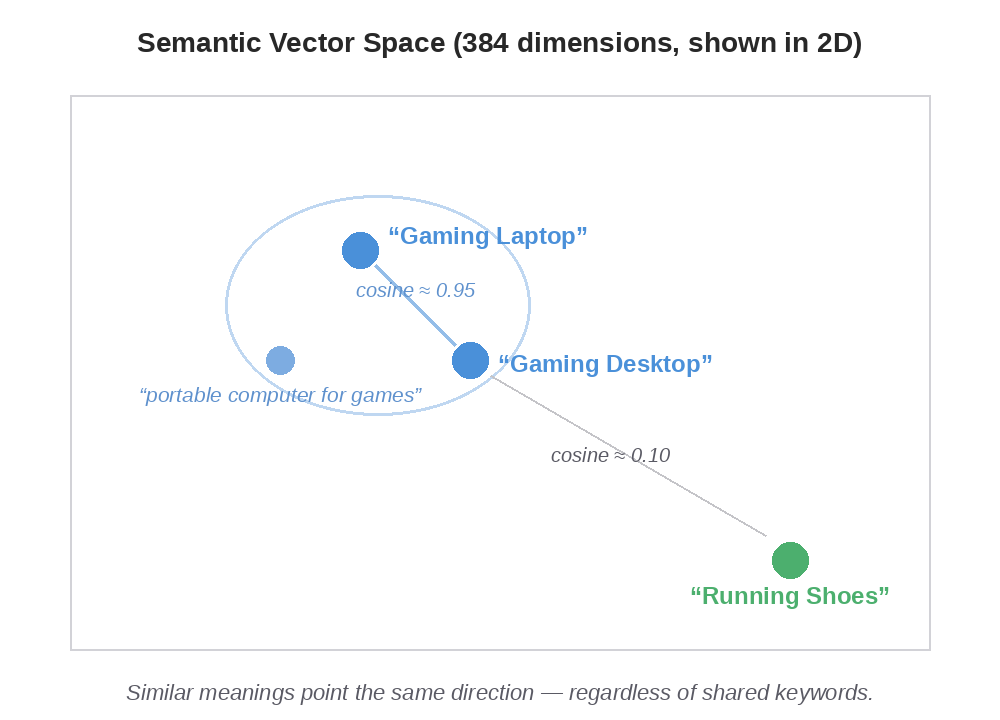
A vector embedding is a fixed-size array of floats that captures an item’s semantic characteristics. Items with similar meaning end up with vectors pointing in similar directions:
“Gaming Laptop” and “Gaming Desktop” are nearby in 384-dimensional space. “Running Shoes” is off in a different neighborhood. You measure similarity by computing the cosine of the angle between two vectors — vectors pointing the same direction score close to 1.0, perpendicular vectors score 0, opposite vectors score -1.0.
Making Embeddings Pluggable
We don’t want the framework married to a specific embedding model. Maybe you’re fine with the default local model. Maybe you need OpenAI’s embeddings for higher accuracy on your domain. Maybe you’ve trained your own. So embedding generation is behind an interface:
public interface EmbeddingProvider {
    float[] embed(String text);
    int getDimension();
    String getModelName();
}
embed() takes text, returns a vector. getDimension() is there so callers can verify compatibility with the vector store’s configured dimension — if you swap models and forget to update the config, you want a clear error, not a silent data corruption. getModelName() is just for logging.
The Default Model
Out of the box, the framework uses LangChain4j’s all-MiniLM-L6-v2. It’s a sentence transformer that runs locally via ONNX Runtime — no API key, no external service, no per-call cost. It produces 384-dimension vectors and captures genuine semantic similarity.
public class LangChain4jEmbeddingProvider implements EmbeddingProvider {

    private final AllMiniLmL6V2EmbeddingModel model;

    public LangChain4jEmbeddingProvider() {
        this.model = new AllMiniLmL6V2EmbeddingModel();
    }

    @Override
    public float[] embed(final String text) {
        return model.embed(text).content().vector();
    }

    @Override
    public int getDimension() {
        return 384;
    }

    @Override
    public String getModelName() {
        return "all-MiniLM-L6-v2";
    }
}
The ONNX runtime takes about a second to load on first call, then it’s thread-safe and fast. The auto-configuration creates it as a @ConditionalOnMissingBean — define your own EmbeddingProvider bean and the default steps aside.
I want to be clear: this is a real model, not a demo placeholder. “Gaming Laptop” and “Portable Computer for Games” genuinely show up as similar even though they share almost no words.
HNSW: Searching Vectors Without Scanning Everything
Once you have vectors, you need to search them. The brute-force approach compares your query vector against every stored vector — O(n) per query. Fine for hundreds of products. Not fine for a million.
HNSW (Hierarchical Navigable Small World) is the standard answer. It builds a multi-layer graph over your vector space — think of it like a skip list but for geometric proximity. The top layers have sparse, long-range connections for coarse navigation. The bottom layers have dense, short-range connections for precision. You search by starting at the top, greedily navigating toward the query vector, then dropping down to finer layers. The result is O(log n) search with high recall.
There are three tuning knobs:
Parameter
Controls
Default
maxDegree (M)
Max edges per graph node
16
efConstruction
Beam width during index build — higher means better recall, slower build
200
metric
Distance function: COSINE, DOT, or EUCLIDEAN
COSINE
For a product catalog, the defaults are fine. You’d tune these if you were indexing millions of items and needed to trade off recall against memory or build time.
Storing and Searching Vectors
The vector store is exposed through VectorStoreService:
public interface VectorStoreService {

    void storeEmbedding(String id, float[] embedding, Map<String, Object> metadata);

    List<SimilarityResult> findSimilar(float[] queryVector, int limit);

    List<SimilarityResult> findSimilarById(String id, int limit);

    boolean isAvailable();

    String getImplementationType();
}
Notice it takes float[]. The vector store doesn’t know or care how the embeddings were generated — the EmbeddingProvider produces vectors, the VectorStoreService stores and searches them. Two concerns, cleanly separated.
SimilarityResult is just a record: (String id, float score, Map<String, Object> metadata).
The Enterprise Path: VectorCollection
Hazelcast Enterprise has a native VectorCollection data structure with built-in HNSW indexing. Our HazelcastVectorStoreService wraps it:
And searching is a single async call to the HNSW index:
@Override
public List<SimilarityResult> findSimilar(float[] queryVector, int limit) {
    SearchResults<String, String> searchResults = collection.searchAsync(
            VectorValues.of(indexName, queryVector),
            SearchOptions.builder()
                    .limit(limit)
                    .includeValue()
                    .build()
    ).toCompletableFuture().join();

    List<SimilarityResult> results = new ArrayList<>();
    for (SearchResult<String, String> hit : searchResults) {
        Map<String, Object> metadata = jsonToMetadata(hit.getValue());
        results.add(new SimilarityResult(hit.getKey(), hit.getScore(), metadata));
    }
    return results;
}
For comparison — brute-force IMap scans are O(n) per query; HNSW is O(log n). For 1,000 products the difference is negligible. For 1,000,000, it’s the difference between usable and not. That same O(n) IMap scan is exactly what the Community fallback uses, which we’ll look at next.
The Community Path: Brute Force, but It Works
Not everyone has Hazelcast Enterprise. The Community fallback is a SimpleVectorStoreService that stores embeddings in an ordinary Hazelcast IMap and answers queries with a brute-force O(n) cosine scan over every stored vector. The EmbeddingProvider still runs — it’s local ONNX, no license needed — and now the vectors it produces actually get stored and searched. It reports isAvailable() = true, so the similarity endpoint returns real results. It’s less scalable than the Enterprise HNSW path — that O(n) scan grows linearly with the catalog — but for development, testing, and small-to-moderate catalogs it’s fully operational.
How It All Wires Together
The module layout keeps the Enterprise dependency isolated:
The Enterprise auto-configuration uses @AutoConfigureBefore so it registers first. If it creates a HazelcastVectorStoreService bean, the core @ConditionalOnMissingBean sees it and skips the Community fallback. If the Enterprise module isn’t on the classpath — which is the default — the SimpleVectorStoreService takes over.
@Configuration
@EnableConfigurationProperties(VectorStoreProperties.class)
@ConditionalOnBean(HazelcastInstance.class)
public class VectorStoreAutoConfiguration {

    @Bean
    @ConditionalOnMissingBean(EmbeddingProvider.class)
    public EmbeddingProvider embeddingProvider() {
        return new LangChain4jEmbeddingProvider();
    }

    @Bean
    @ConditionalOnMissingBean(VectorStoreService.class)
    public VectorStoreService vectorStoreService(HazelcastInstance hazelcast,
                                                 VectorStoreProperties properties) {
        return new SimpleVectorStoreService(hazelcast, properties);
    }
}
Build with mvn clean install for Community (the default). Build with mvn clean install -Penterprise to include the Enterprise module. The runtime figures out the rest.
This is the same edition-aware pattern we use for other Enterprise-only features — CP Subsystem, HD Memory, TLS. Define the interface in framework-core, put the Enterprise implementation in framework-enterprise, let Spring’s auto-configuration ordering handle the selection. Community Edition always works. Enterprise features activate when you add the module and license.
From Product Creation to Searchable Embedding
When a product is created, the InventoryService builds a text representation from its name, description, and category, then asks the EmbeddingProvider to turn that into a vector:
private void storeProductEmbedding(final Product product) {
    StringBuilder text = new StringBuilder();
    text.append(product.getName());
    if (product.getDescription() != null) {
        text.append(" ").append(product.getDescription());
    }
    if (product.getCategory() != null) {
        text.append(" ").append(product.getCategory());
    }

    float[] embedding = embeddingProvider.embed(text.toString());

    Map<String, Object> metadata = new HashMap<>();
    metadata.put("name", product.getName());
    metadata.put("category", product.getCategory());

    vectorStoreService.storeEmbedding(product.getProductId(), embedding, metadata);
}
The whole thing is wrapped in a try/catch as a best-effort operation. On either edition the embedding gets stored — in the Enterprise VectorCollection or the Community IMap — and if the vector store somehow isn’t available, the failure is swallowed so product creation still succeeds. The similarity feature is additive, not load-bearing.
The REST Endpoint
The Inventory Service exposes a similarity search endpoint:
@GetMapping("/{productId}/similar")
public ResponseEntity<SimilarProductsResponse> findSimilarProducts(
        @PathVariable String productId,
        @RequestParam(defaultValue = "5") int limit) {

    if (!productService.productExists(productId)) {
        return ResponseEntity.notFound().build();
    }

    if (!vectorStoreService.isAvailable()) {
        return ResponseEntity.ok(new SimilarProductsResponse(
            productId, false,
            vectorStoreService.getImplementationType(),
            "Vector similarity search is not available.",
            List.of()
        ));
    }

    List<SimilarityResult> results = vectorStoreService.findSimilarById(productId, limit);

    List<ProductDTO> similarProducts = new ArrayList<>();
    for (SimilarityResult result : results) {
        productService.getProduct(result.id())
            .ifPresent(product -> similarProducts.add(product.toDTO()));
    }

    return ResponseEntity.ok(new SimilarProductsResponse(
        productId, true,
        vectorStoreService.getImplementationType(),
        "Found " + similarProducts.size() + " similar products",
        similarProducts
    ));
}
The response shape is the same regardless of edition — the client gets vectorStoreAvailable: true/false and the getImplementationType() string so it knows which backend answered. Both editions return real similar products with similarity scores; the difference is underneath — Enterprise serves them from an HNSW index in O(log n), while Community runs the brute-force O(n) IMap scan. Same results, different scaling characteristics.
Configuration
All the vector store parameters live under framework.vectorstore in your application YAML:
framework:
  vectorstore:
    collection-name: product-vectors
    dimension: 384               # Must match EmbeddingProvider.getDimension()
    max-connections: 16          # HNSW maxDegree (M)
    ef-construction: 200         # HNSW build beam width
    metric: COSINE               # COSINE, DOT, or EUCLIDEAN
    index-name: default          # HNSW index name
The dimension has to match whatever your EmbeddingProvider produces. The default (384) matches all-MiniLM-L6-v2. If you swap in OpenAI’s text-embedding-3-small (1536 dimensions), update this property or you’ll get index errors that are confusing to debug.
Trying It Out
With the Docker stack running:
# Load sample products (creates embeddings automatically)
./scripts/load-sample-data.sh

# Find products similar to a known product
curl http://localhost:8082/api/products/<product-id>/similar?limit=5

# Or run the demo scenario
./scripts/demo-scenarios.sh 4
Demo scenario 4 detects the edition, looks up a product, calls the similarity endpoint, and displays results with appropriate messaging for either edition.
What’s Next
Bring your own model. The EmbeddingProvider interface makes swapping models easy. Define a bean, return vectors, done:
@Bean
public EmbeddingProvider embeddingProvider() {
    return new EmbeddingProvider() {
        private final OpenAiEmbeddingModel model = /* your config */;

        @Override
        public float[] embed(String text) {
            return model.embed(text).content().vector();
        }

        @Override
        public int getDimension() { return 1536; }

        @Override
        public String getModelName() { return "text-embedding-3-small"; }
    };
}
OpenAI, Cohere, any Sentence-Transformer via LangChain4j’s ONNX integration — just update framework.vectorstore.dimension to match.
Hybrid search is the obvious next step: “find products similar to this laptop, but only in Electronics and under $1000.” That combines a VectorCollection similarity search with IMap predicate filtering. It’s also exactly the kind of natural-language query that works well with AI-driven orchestration — an LLM can decompose that request into a similarity lookup plus attribute filters, call the right APIs, and merge the results. We’ll get into that in an upcoming post on the Model Context Protocol (MCP), which gives AI models structured access to our microservices.
Multi-modal search is possible too. Hazelcast’s VectorCollection supports multiple named indexes on a single collection — one for text embeddings, another for image embeddings. Same data structure, different similarity dimensions.
Next up: AI-Powered Microservices with the Model Context Protocol