Part 13 in the “Building Event-Driven Microservices with Hazelcast” series
Over the previous twelve articles, we built an event-sourced microservices framework with Hazelcast: a Jet-powered event pipeline, materialized views, saga orchestration, circuit breakers, a transactional outbox, dead letter queues, and durable persistence with write-behind MapStore. The framework works. But “works” and “works under load” are different things.
This post covers what happened when we subjected the framework to serious performance engineering: flame graphs, micro-benchmarks, sustained load tests, A-B testing of Enterprise features, and scaling from a single Docker Compose host to a 5-node AWS EKS cluster. We found (and fixed) real bottlenecks, learned where time actually goes in an event-sourced system, and discovered that the biggest performance breakthrough came not from code optimization but from an architectural decision about clustering.
The Measurement Stack
Before optimizing anything, we needed to measure. Four tools, each covering a different level.
k6 handles HTTP load generation. The critical design choice: constant-arrival-rate executor, which sends requests at a fixed rate regardless of response time. The alternative — constant-vus — hides latency. When responses slow down, it sends fewer requests, which makes latency appear stable when it’s actually degrading. This is called coordinated omission, and it’s the most common load testing mistake. We almost made it.
async-profiler produces CPU and allocation flame graphs. We baked it into a Docker profiling image so we could capture 30-second flame graphs under load without restarting services. On macOS Docker Desktop, perf_events isn’t available, so we used itimer (wall-clock) mode.
Prometheus and Grafana handle time-series metrics. The framework registers 46 application-level Micrometer metrics across pipeline, saga, persistence, and gateway components. Six pre-built dashboards cover everything from event flow to JVM heap usage.
JMH handles micro-benchmarks. When we needed to isolate the cost of a single operation — serialization, IMap write, FlakeIdGenerator — we used JMH’s rigorous warmup-and-fork methodology to get microsecond-accurate measurements.
We also built supporting infrastructure: a Bash 3.2-compatible A-B test harness that automates clean-slate Docker Compose restarts, load generation, and comparison reports; a 30-minute sustained load orchestrator with automated Grafana dashboard screenshot capture; and a K8s TPS sweep script that tests across multiple concurrency levels.
Finding Bottlenecks with Flame Graphs
The first real surprise came from async-profiler. We ran a CPU flame graph on order-service at 25 TPS and found this:
Subsystem
CPU %
Hazelcast (IMap ops, Jet, serialization)
52%
Spring/Tomcat HTTP
32%
Outbox polling
24%
Compact serialization
10%
Jet pipeline
9%
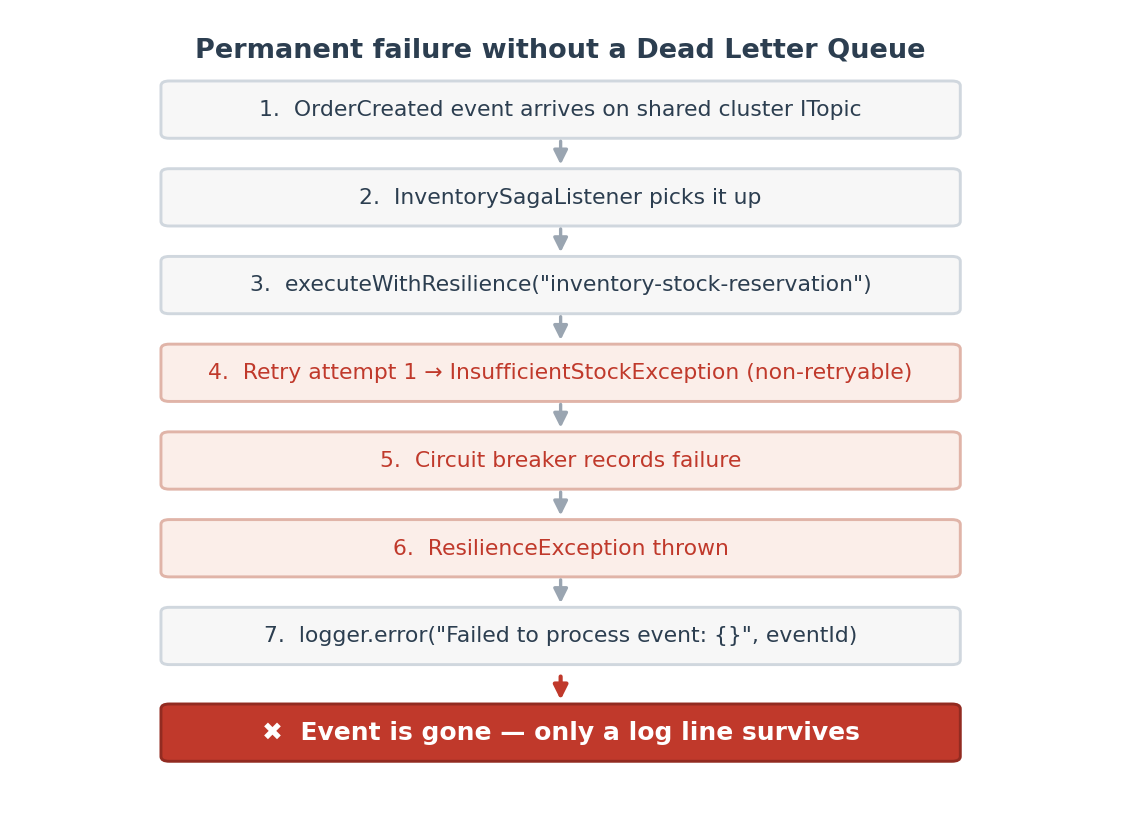
The outbox publisher — the component that reads pending outbox entries and publishes them to ITopic — was consuming nearly a quarter of all CPU. A background scheduled task. It doesn’t appear in HTTP latency metrics at all.
Why? It was calling IMap.values(predicate) on a map with no indexes, forcing a full partition scan and deserialization of every entry on every poll cycle.
The fix was three changes:
Add a HASH index on status and a SORTED index on createdAt
Switch from values(predicate) to a PagingPredicate with server-side sort and page limit
Use keySet(predicate).size() instead of values(predicate).size() for count queries
CPU halved. Total allocations dropped by a third. And no new hotspot emerged — the post-optimization profile showed a healthy distribution across Hazelcast internals, Spring HTTP handling, and Jet pipeline processing.
Without the flame graph, I probably would have guessed that serialization or Jet was the bottleneck. Would have been wrong.
Measuring What Matters: JMH Micro-Benchmarks
After identifying system-level hotspots, we wanted to know the per-operation cost of framework internals. Twenty JMH benchmark methods, measuring every operation in the event processing pipeline:
Operation
Cost (us)
% of Total
FlakeIdGenerator.newId()
15.6
42%
EventStore.append (IMap.set)
11.2
30%
ViewStore.executeOnKey
9.3
25%
Event.toGenericRecord (14 fields)
1.1
3%
Total per-event
~37
Total per-event framework cost: 37 microseconds. Pipeline end-to-end p50: 8.7 milliseconds. Framework internals account for less than 0.5% of pipeline latency. The other 99.5% is system overhead — Jet scheduling, thread context switching, HTTP processing, cross-service saga coordination.
The surprise was FlakeIdGenerator. At 15.6 us per call, it’s the single most expensive operation — more than the IMap write it precedes. And it scales poorly under contention: 4 threads = 69 us (4.4x slower), 8 threads = 151 us (9.7x). The batch allocation mechanism (default 100 IDs per batch) amortizes this, but at high concurrency it becomes a real bottleneck. Fix: increase setPrefetchCount() for high-throughput services.
We also benchmarked the shared 3-node Hazelcast cluster. Network operations cost 270-340 us each — about 30-40x more than the equivalent embedded operation. A full saga cycle (8 cluster operations) costs ~2.4 ms, or 28% of pipeline latency. The remaining 72% is Jet + HTTP + thread coordination.
Hazelcast is a significant cost contributor at ~28%, but it’s not the bottleneck. The optimization opportunities are in system-level overhead, not in Hazelcast or framework code.
The Enterprise Edition Question
We built a reusable A-B testing harness and ran three head-to-head comparisons at 50 TPS:
Test
Verdict
Community vs HD Memory
Community wins 4/4 p95 metrics. HD Memory adds serialization overhead crossing the JVM heap boundary. At small scale (~200 entries), the per-access cost outweighs GC savings.
Community vs TPC
TPC wins 3/4 p95 metrics but by only 0.5-1.1ms. 14% lower max latency. Marginal at this scale.
Community vs High Memory (512→1024M)
No meaningful difference. Services aren’t memory-constrained at 50 TPS for 3 minutes.
The honest answer: at 50 TPS with a few hundred entries, Enterprise features don’t help. HD Memory’s native off-heap storage adds measurable per-access overhead that only pays off when GC pressure from millions of on-heap entries causes latency spikes. TPC’s event-loop architecture shows promise for higher concurrency but is marginal at this scale.
Enterprise Edition becomes valuable at much larger scale — millions of entries for HD Memory, hundreds of TPS per service for TPC, or when you need CP Subsystem for distributed locking (though that doesn’t apply in our dual-instance architecture). We’re not there yet with this demo workload.
Scaling to Production: Docker Compose to AWS EKS
We tested four deployment tiers across six TPS levels (10 to 500):
Tier
Nodes
Max TPS
Saga p95
Cost/hr
Local (Docker Desktop)
1
50
< 300ms
$0
AWS Small (2x t3.xlarge)
2
100
< 650ms
$0.76
AWS Medium (3x c7i.2xlarge)
3
200*
Timeout*
$1.18
AWS Large (5x c7i.4xlarge)
5
200
< 1s
$3.50
*Without per-service clustering.
The Medium tier told a puzzling story. HTTP request latency was excellent — sub-120ms p95 — and HPA scaled services to 3 replicas. But saga end-to-end completion hit the 10-second polling timeout at 50+ TPS. HPA was scaling pods, but the new replicas weren’t helping.
We spent a while staring at this before the root cause clicked: each embedded HazelcastInstance was running as a cluster-of-1. Kubernetes load-balanced saga poll requests across replicas, but only one pod owned the saga state IMap. About 50% of polls missed — they hit a replica that didn’t have the data.
The fix was per-service embedded clustering (ADR 013): same-service replicas form their own Hazelcast cluster via Kubernetes DNS discovery. Different service types remain isolated.
The results:
Metric
Without Clustering
With Clustering
Saga E2E p95 (10 TPS)
10,161ms (timeout)
513ms
Saga E2E p95 (50 TPS)
10,197ms (timeout)
644ms
200 TPS sub-1s saga
Impossible
Yes
Service CPU at 500 TPS
9-10% (idle)
86-98% (utilized)
HPA replicas (25+ TPS)
Stuck at base
2 → 5
A 95% improvement in saga latency. Larger than all code optimizations combined. The clustering change didn’t make any individual operation faster — it made the entire system’s resources actually usable. The CPUs that were sitting at 9% utilization were now doing real work.
Sustained Load: What Breaks After 30 Minutes
Short load tests — 3 minutes — miss the slow killers. We ran a 30-minute sustained test at 50 TPS and found the problems that only surface over time:
Order-service hit the 512Mi memory ceiling at 12 minutes and ran under continuous GC pressure for the remaining 18 minutes. CPU spiked from ~30% to 60% at the ceiling — GC thrashing. Max latency spikes of 5.6 seconds, almost certainly Full GC pauses. Remarkably, no OOM kills. The JVM GC kept services alive. Barely.
All four services showed the same pattern: rapid memory growth, hit ceiling, GC-capped plateau. The root cause: IMap data grows monotonically (event store, views, completions) with EvictionPolicy.NONE.
We bumped container memory from 512Mi to 1Gi (JVM heap 512m → 768m), added MaxSizePolicy.PER_NODE with 50K entries as a safety net on the completions map, and — when PostgreSQL persistence is active — LRU eviction turns IMaps into bounded hot caches. After the fixes, services run comfortably at 50 TPS for 30+ minutes without approaching the memory ceiling.
What We Learned
Always profile before optimizing. The #1 CPU hotspot was a background task that doesn’t appear in HTTP latency metrics. Without flame graphs, we would have optimized the wrong thing.
Framework code is less than 1% of latency. Total per-event cost of serialization, IMap writes, and FlakeIdGenerator: ~37 us. Pipeline p50: 8.7 ms. System overhead dominates by 200x.
Architecture beats optimization. Per-service clustering improved saga latency by 95% — more than all code optimizations combined. When your code is fast but your system is slow, the answer is usually architectural.
constant-arrival-rate is non-negotiable for load testing. The difference between it and constant-vus is the difference between measuring real latency and measuring a fiction.
Enterprise features have a scale threshold. HD Memory and TPC don’t help at 50 TPS with 200 entries. They’re designed for datasets and concurrency levels 10-100x larger than our demo.
Memory limits need sustained testing. A 3-minute test at 512Mi looks fine. A 30-minute test reveals services running at 99.9% memory under GC pressure. Always test for the duration you’ll actually run.
Measure at every layer. HTTP latency, pipeline latency, saga latency, and per-operation cost tell different stories. Saga E2E can time out at 10s+ while HTTP p95 is 30ms. You need all four layers to understand what’s happening.
Tools and Resources
Tool
Purpose
Location
k6 load tests
HTTP load generation at constant arrival rate
scripts/perf/
async-profiler
CPU and allocation flame graphs
docker/profiling/
JMH benchmarks
Micro-benchmark framework internals
framework-core/src/jmh/
A-B test harness
Automated configuration comparison
scripts/perf/ab-test.sh
Grafana dashboards
6 pre-built dashboards (46 metrics)
docker/grafana/dashboards/
K8s perf test
Multi-tier TPS sweep
scripts/perf/k8s-perf-test.sh
Performance tuning guide
Full adopter guide
docs/guides/performance-tuning-guide.md
Production checklist
Quick-reference for deployment
docs/perf/production-checklist.md
Every one of the findings in this post was invisible without measurement. The outbox was burning a quarter of the CPU. The clustering was the real bottleneck. The memory was quietly filling up. Enterprise features we expected to matter didn’t. That’s the point of performance engineering — your intuition about what’s slow is usually wrong. Measure first.
Part 12 in the “Building Event-Driven Microservices with Hazelcast” series
Over the past eleven posts, we’ve built an event sourcing framework, a Jet pipeline, materialized views, sagas, circuit breakers, an outbox, dead letter queues, and durable persistence. That’s a lot of moving parts.
Now: how do you observe what’s happening inside all of them?
Event sourcing changes the observability game. Traditional request-response applications have easy metrics — request rate, error rate, latency. In an event-sourced system, a single API call triggers an asynchronous pipeline that writes to an event store, updates a materialized view, publishes to subscribers, and potentially kicks off a multi-service saga. A latency spike could be hiding in any of those stages. You need to see into all of them.
This post builds a complete observability stack: Prometheus + Micrometer for metrics, Grafana for dashboards and alerting, Jaeger for distributed tracing.
How It Fits Together
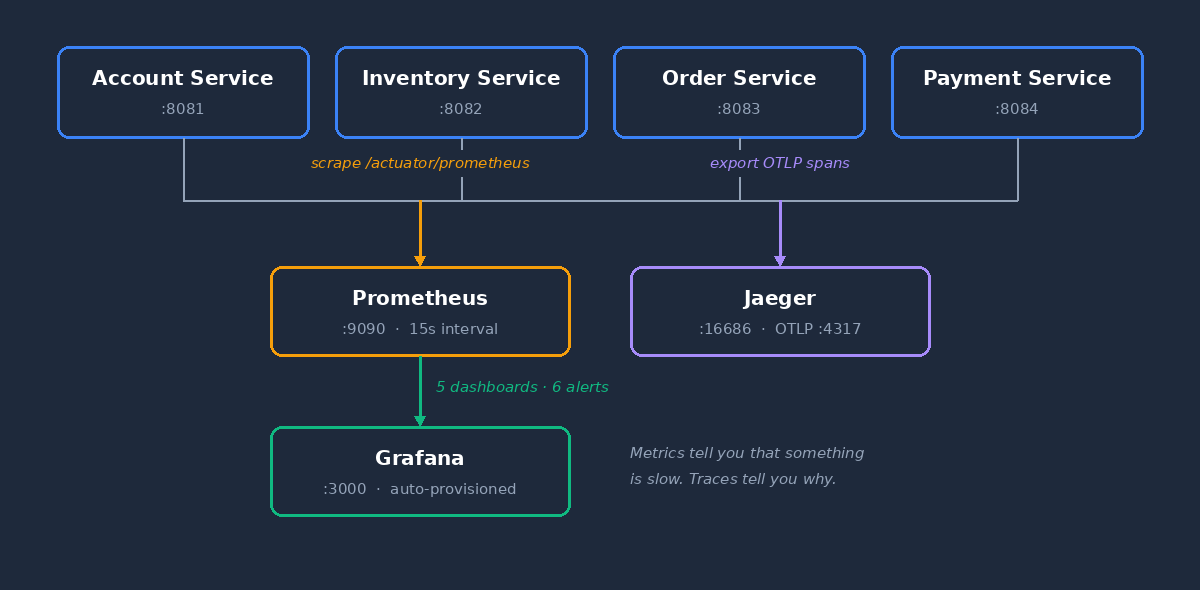
Each service exposes /actuator/prometheus. Prometheus scrapes all four every 15 seconds. Grafana reads from Prometheus and renders dashboards. Jaeger collects distributed traces via OTLP.
Instrumenting the Framework
Metrics Architecture
An event-sourced system has a lot of moving parts, and each one needs its own instrumentation. The framework provides roughly 70 metrics across a dozen categories. They’re organized around two core subsystems — the event pipeline and the saga layer — plus several supporting categories for everything else.
Pipeline Metrics
PipelineMetrics tracks every event through the 6-stage pipeline:
public class PipelineMetrics {

    private final MeterRegistry registry;
    private final String domainName;

    // Events entering and leaving the pipeline
    Counter eventsReceived;   // "eventsourcing.pipeline.events.received"
    Counter eventsProcessed;  // "eventsourcing.pipeline.events.processed"
    Counter eventsFailed;     // "eventsourcing.pipeline.events.failed"

    // End-to-end latency histogram with percentiles
    Timer endToEndLatency;    // "eventsourcing.pipeline.latency.end_to_end"
    Timer queueWaitLatency;   // "eventsourcing.pipeline.latency.queue_wait"

    // Per-stage timing
    Timer stageDuration;      // "eventsourcing.pipeline.stage.duration"
                              // Tagged with stage: persist, update_view, publish
}
Every metric is tagged with domain (e.g., “Customer”, “Order”) and eventType (e.g., “CustomerCreated”), so you can filter as narrowly as you need:
The per-stage timer is the one I find most useful for debugging. If P99 spikes, you can see which stage is the bottleneck — is it the event store write, the view update, or the publication step?
Pipeline and saga metrics tell you how events flow and how transactions coordinate. But a production system has more to watch. The framework instruments several additional subsystems:
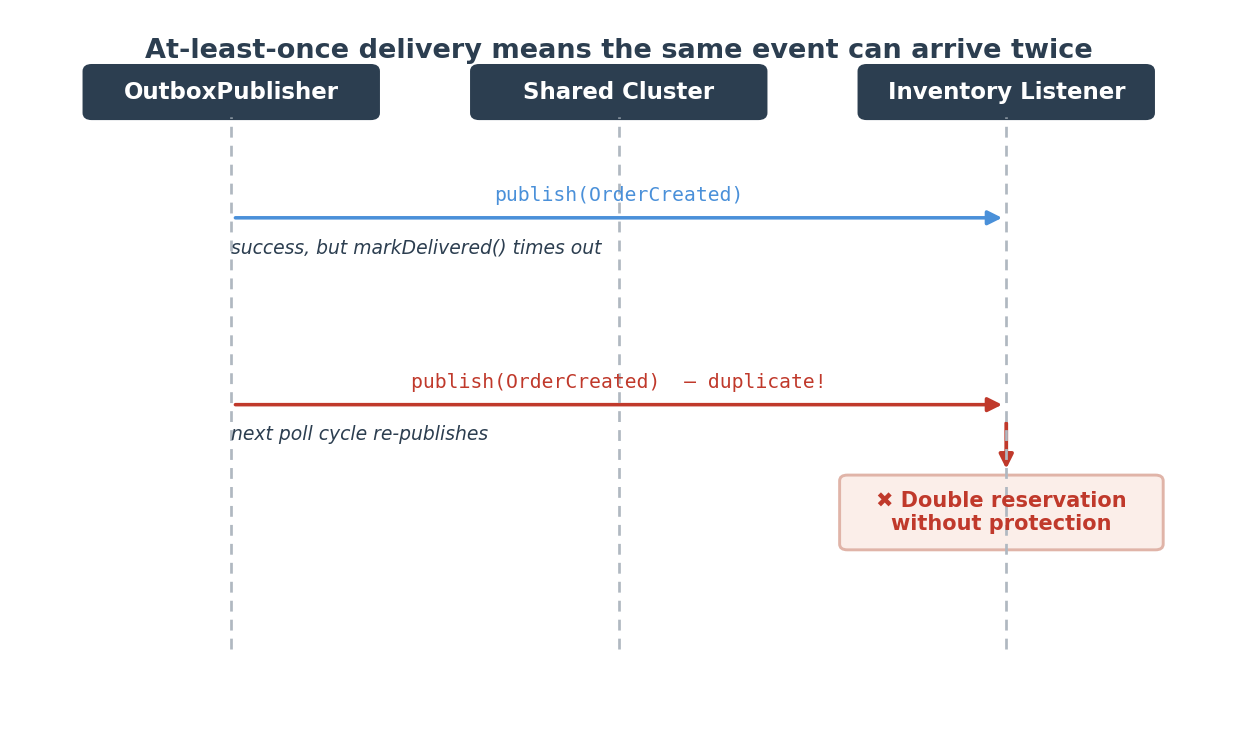
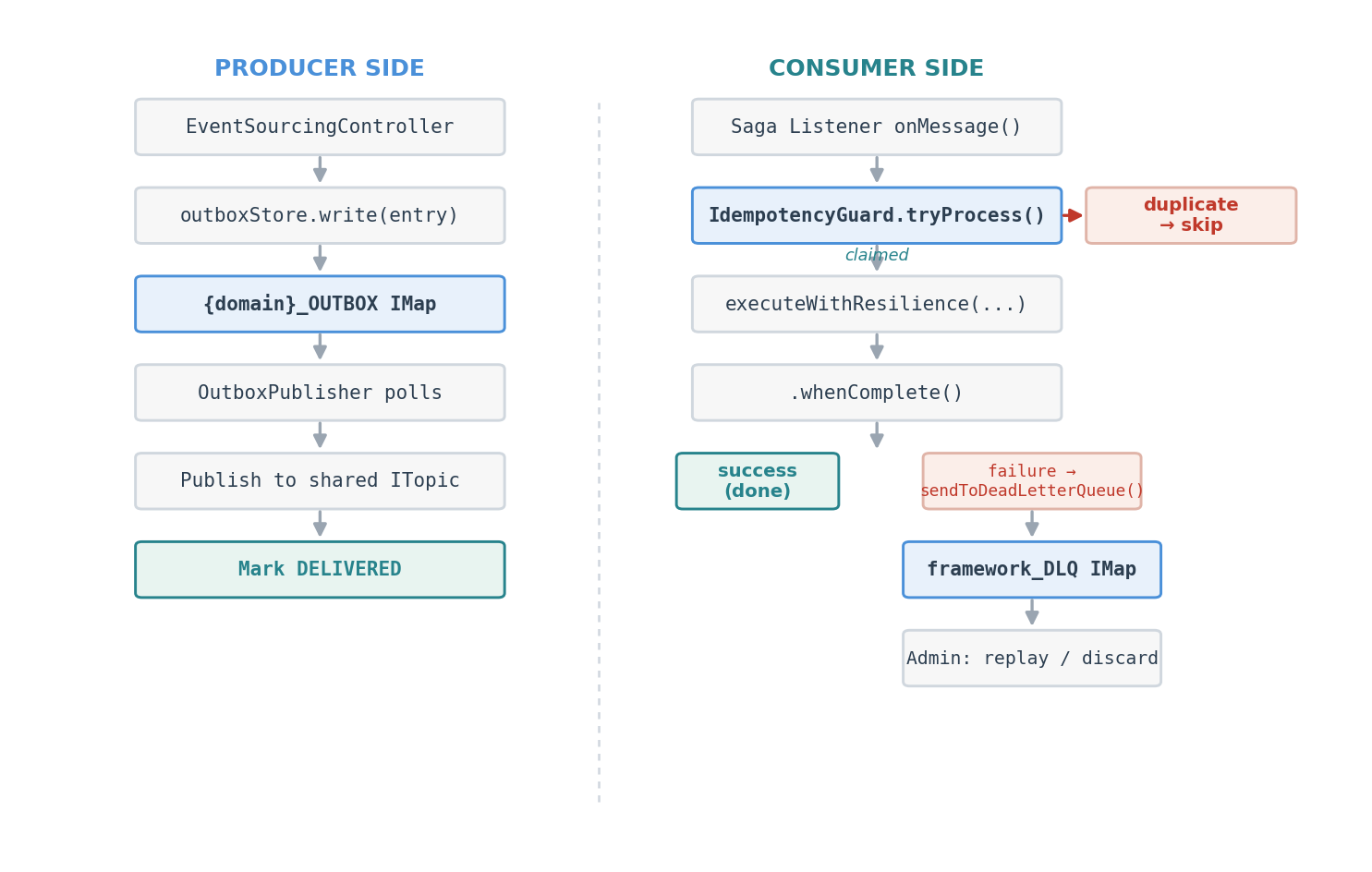
The outbox pattern guarantees at-least-once delivery to the shared cluster. Metrics track entries written, claimed, delivered, and failed. If outbox.entries.written is climbing faster than outbox.entries.delivered, your delivery pipeline is falling behind.
Events that fail delivery repeatedly land in the DLQ. Three counters — dlq.entries.added, dlq.entries.replayed, dlq.entries.discarded — tell you whether poison messages are accumulating or getting resolved.
When PostgreSQL persistence is enabled, write/read latency, batch sizes, and error counts are tracked per map. High persistence.store.duration points to database bottlenecks.
The idempotency guard tracks duplicate detection tagged hit (duplicate blocked) or miss (new event). A high hit ratio under normal operation is actually good news — it means at-least-once delivery is working and duplicates are being caught.
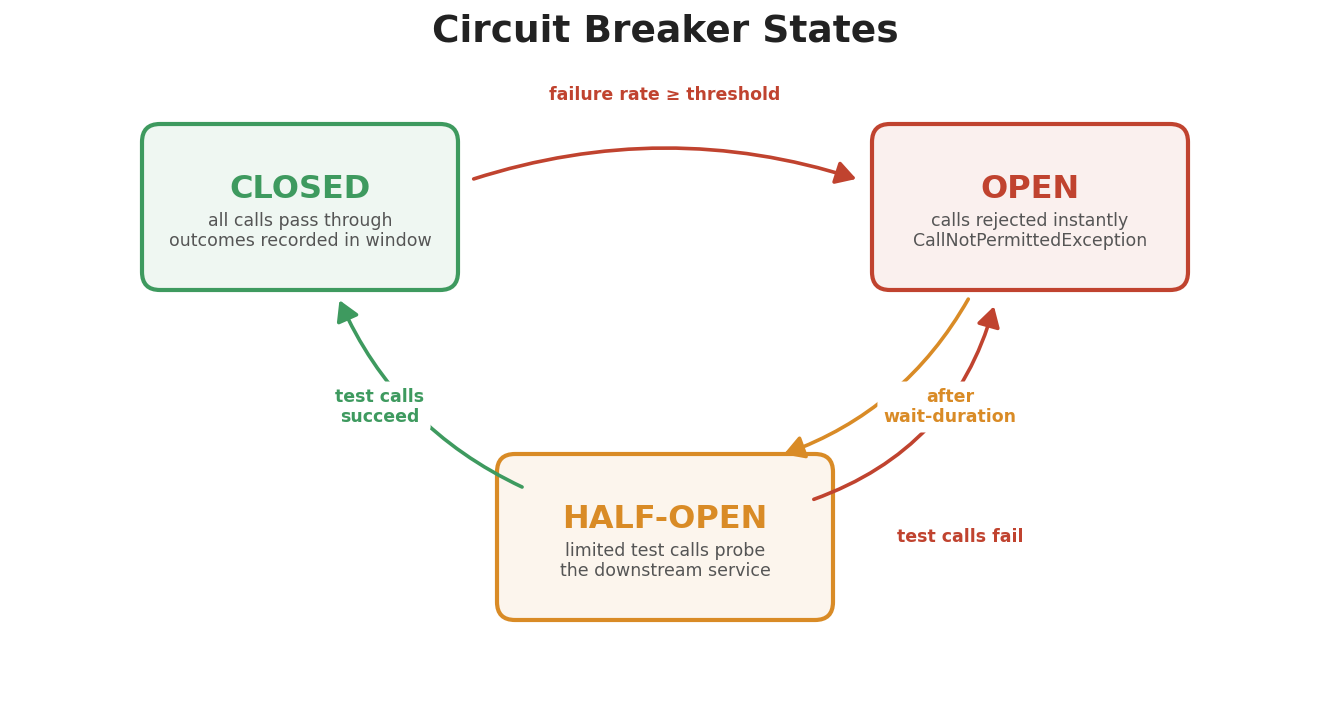
Circuit breaker state, failure rates, and retry outcomes from Resilience4j are exposed automatically. When resilience4j_circuitbreaker_state flips to OPEN, a downstream service is in trouble.
And then there are business metrics — revenue, order item counts, customer totals, inventory replenishment. These are the ones business stakeholders actually care about. They bridge the gap between “pipeline is fast” and “orders are generating revenue.”
The complete catalog of every metric name, tag, Prometheus mapping, and troubleshooting guide is in the Metrics Reference Guide.
Caching Metric Instances
At 100,000+ events per second, looking up a Counter in Micrometer’s registry on every event is measurable overhead. SagaMetrics caches metric instances in a ConcurrentHashMap:
private final ConcurrentMap<String, Counter> counterCache;
private final ConcurrentMap<String, Timer> timerCache;

private Counter getCounter(String name, String sagaType) {
    String key = name + ":" + sagaType;
    return counterCache.computeIfAbsent(key, k ->
            Counter.builder(PREFIX + "." + name)
                    .tag("sagaType", sagaType)
                    .register(meterRegistry)
    );
}
Small detail, but at high throughput every nanosecond in the hot path matters.
JVM and System Metrics
Beyond application metrics, the framework auto-registers JVM metrics via MetricsConfig:
@Configuration
public class MetricsConfig {

    @Bean public JvmMemoryMetrics jvmMemoryMetrics()   { return new JvmMemoryMetrics(); }
    @Bean public JvmGcMetrics jvmGcMetrics()           { return new JvmGcMetrics(); }
    @Bean public JvmThreadMetrics jvmThreadMetrics()    { return new JvmThreadMetrics(); }
    @Bean public ClassLoaderMetrics classLoaderMetrics() { return new ClassLoaderMetrics(); }
    @Bean public ProcessorMetrics processorMetrics()    { return new ProcessorMetrics(); }
}
Common tags applied to every metric enable cross-service filtering:
No manual setup. docker-compose up and the dashboards are ready.
Key Dashboard Panels
System Overview
At-a-glance health for the whole system: service health indicators (green/red per service based on up{job=”…”}), event throughput by service, HTTP request rates, pipeline P95 latency, and a saga summary showing started, completed, failed, and timed out counts.
Saga Dashboard
Deep visibility into distributed transactions. Active saga count and compensating count — how many are in flight right now. Throughput charts for start, complete, and compensate rates, filterable by sagaType. Duration percentiles at P50, P95, P99. Success rate as a percentage. Timeout detection rate. Compensation breakdown — are any compensation steps failing?
The dashboard supports a $sagaType variable, so you can filter to just “OrderFulfillment” or “OrderFulfillmentOrchestrated” or view everything at once.
Event Flow
The pipeline performance dashboard: events published per second by service, end-to-end latency percentiles, queue wait latency (are events sitting around before processing starts?), a stacked stage duration breakdown at P95 for persist, update_view, and publish, and failed events by stage and type.
Business Overview
This one bridges technical and business concerns. Cumulative revenue over time, order rate with item counts, customer growth, saga success rate (what percentage of orders complete without compensation?), and end-to-end saga duration.
Alerting
Pre-Configured Alerts
Six alerts that cover the most common failure modes:
Saga Alerts
Alert
Severity
Condition
For
High Saga Failure Rate
Critical
increase(saga_failed_total[5m]) > 0
2 min
Saga Timeouts Detected
Warning
increase(saga_timeouts_detected_total[5m]) > 0
2 min
Saga Compensation Failures
Critical
increase(saga_compensations_failed_total[5m]) > 0
1 min
Low Saga Success Rate
Warning
Success rate < 90% over 10 minutes
5 min
Service Health Alerts
Alert
Severity
Condition
For
Service Down
Critical
up < 1 for any service
1 min
High Event Processing Error Rate
Warning
Error rate > 5% over 5 minutes
3 min
The “For” duration prevents flapping — a brief network blip won’t page you at 3am. Compensation failures fire fastest (1 minute) because a failed compensation means money or inventory is in an inconsistent state.
Distributed Tracing with Jaeger
Metrics tell you that something is slow. Tracing tells you why.
In our system, a single order placement can touch four services: Order creates the order, Inventory reserves stock, Payment processes the charge, Order confirms. With metrics alone, you see “P99 saga duration increased.” With tracing, you see “Payment Service is taking 2 seconds to respond to StockReserved events.” That’s the difference between knowing there’s a problem and knowing where it is.
Configuration
Tracing is enabled via Spring Boot’s OpenTelemetry integration:
management:
  tracing:
    enabled: true
    sampling:
      probability: 1.0   # Sample 100% of requests (reduce in production)
  otlp:
    tracing:
      endpoint: ${OTEL_EXPORTER_OTLP_ENDPOINT:http://localhost:4317}
Jaeger runs as an all-in-one container in the Docker stack, receiving traces via OTLP on port 4317. In the Jaeger UI (http://localhost:16686), you pick a service, find traces for a time window, click into a trace to see the span waterfall across all four services, and identify which operation is contributing to latency.
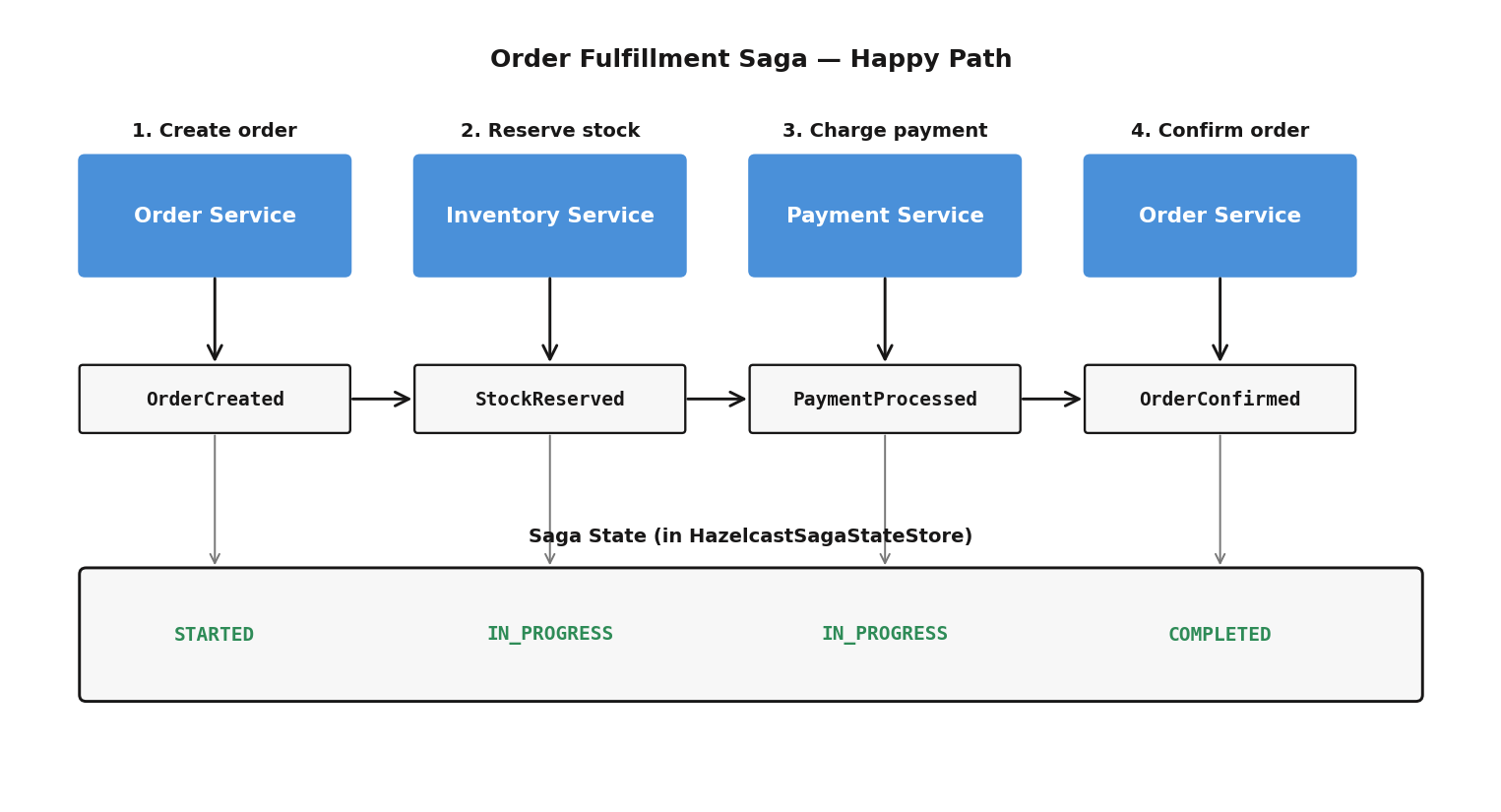
The most valuable traces in an event-sourced system: the full path from API request to pipeline completion, saga flows (OrderCreated → StockReserved → PaymentProcessed → OrderConfirmed), and compensation flows — where did the failure occur, and how long did compensation take?
Useful PromQL Queries
Queries you can run in Prometheus or use in custom Grafana panels:
Service Health
# Are all services up?
up{job=~".*-service"}

# HTTP request rate by service
sum by (application) (rate(http_server_requests_seconds_count[5m]))
Event Pipeline
# Event throughput
rate(eventsourcing_pipeline_events_processed_total[5m])

# End-to-end P99 latency
histogram_quantile(0.99, rate(eventsourcing_pipeline_latency_end_to_end_seconds_bucket[5m]))

# Queue wait time (events waiting to be processed)
histogram_quantile(0.95, rate(eventsourcing_pipeline_latency_queue_wait_seconds_bucket[5m]))
# Cumulative revenue
order_revenue_total

# Orders per second
rate(order_items_count_total[5m])

# Current customer count
account_customers_total
JVM
# Heap memory usage
jvm_memory_used_bytes{area="heap"}

# GC pause time
rate(jvm_gc_pause_seconds_sum[5m])
Lessons Learned
Don’t just measure HTTP latency. In an event-sourced system, the interesting latency is inside the pipeline — from event submission to view update. HTTP latency includes that but hides where the time is spent.
Multi-dimensional tags (domain, eventType, sagaType, stage) are not optional. A P99 spike in “pipeline latency” is useless without knowing which domain and stage are affected.
Cache your Counter and Timer instances at high throughput. Registry lookups add up. ConcurrentHashMap.computeIfAbsent works well.
Provision everything as code. Don’t create dashboards by hand — provision them from JSON files. Your observability stack is version-controlled, reproducible, and deploys automatically. When someone clones the repo and runs docker-compose up, they get the same dashboards as everyone else.
Alert on business outcomes, not just infrastructure. “Service Down” is an infrastructure alert. “Saga Failure Rate” is a business outcome alert. Both matter, but the business alerts catch problems that don’t manifest as service crashes — like a payment gateway returning errors, causing saga compensations to spike while all four services stay green.
The framework provides roughly 70 metrics organized into a dozen categories — pipeline throughput and per-stage latency, saga lifecycle tracking, outbox delivery, dead letter queues, persistence latency, circuit breaker state, business KPIs, JVM health, HTTP request rates. Combined with auto-provisioned Grafana dashboards, pre-configured alerts, and distributed tracing via Jaeger, you get complete visibility into a system where a single API call can trigger asynchronous processing across four services.
Event sourcing makes observability both harder and more important. Events are asynchronous, distributed, and flow through multiple stages. Without good metrics and dashboards, you’re flying blind. The Metrics Reference Guide has the complete catalog.
Part 11 in the “Building Event-Driven Microservices with Hazelcast” series
In Part 9 and Part 10, we finished the reliability and coordination layer — dead letter queues, idempotency guards, two saga patterns. But there’s been a fundamental gap this whole time: every piece of data lives exclusively in Hazelcast IMaps. A full cluster restart erases everything. The event store, the materialized views, the saga state. Gone.
For a demo that runs 30 minutes, that’s fine. For a production system — or even a trade show booth running for hours — it’s not. Events are the source of truth in an event-sourced system. Losing them means losing business history.
This post covers how we added durable persistence to the framework, primarily through Hazelcast’s MapStore mechanism but with one notable exception, without changing a single line of service business logic.
The Problem
Our event sourcing pipeline writes to several types of IMaps: the event store (Customer_ES, Product_ES, etc.), materialized views (Customer_VIEW, Order_VIEW, etc.), and supporting maps for saga state, the outbox, and the DLQ. All in-memory. Hazelcast’s IMap is fast precisely because it avoids disk I/O.
But that creates two problems. First, data loss on restart — the event log is gone, you can’t rebuild views or replay events or audit what happened. Second, unbounded memory growth — during a long-running demo, events accumulate indefinitely, the JVM runs out of heap, and the pod gets OOMKilled. We saw this happen at about the 45-minute mark under sustained load.
We need to persist to a durable store (PostgreSQL) while keeping the in-memory performance characteristics intact.
Why MapStore?
Hazelcast’s MapStore interface is the natural integration point. It’s a callback mechanism — Hazelcast calls your code whenever entries are written to or read from an IMap:
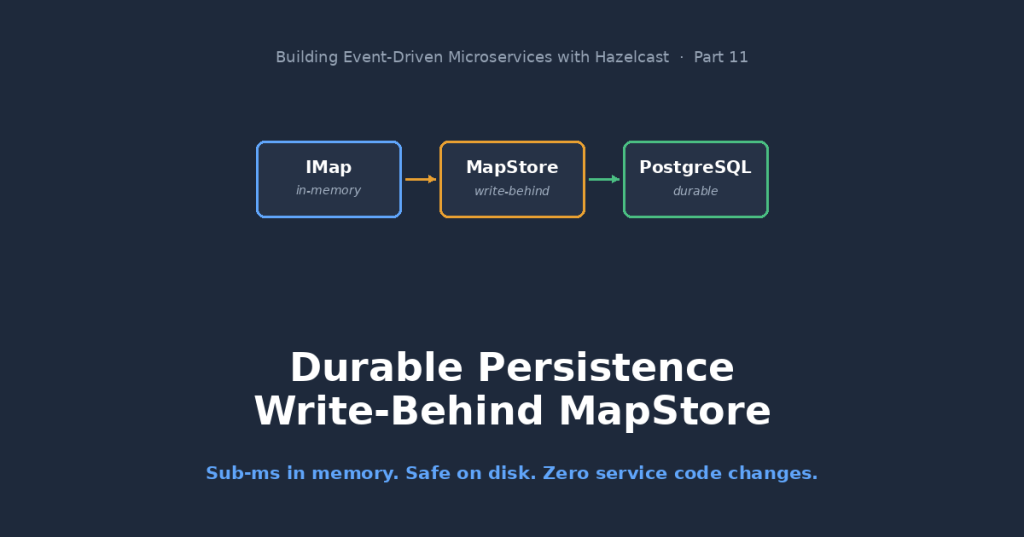
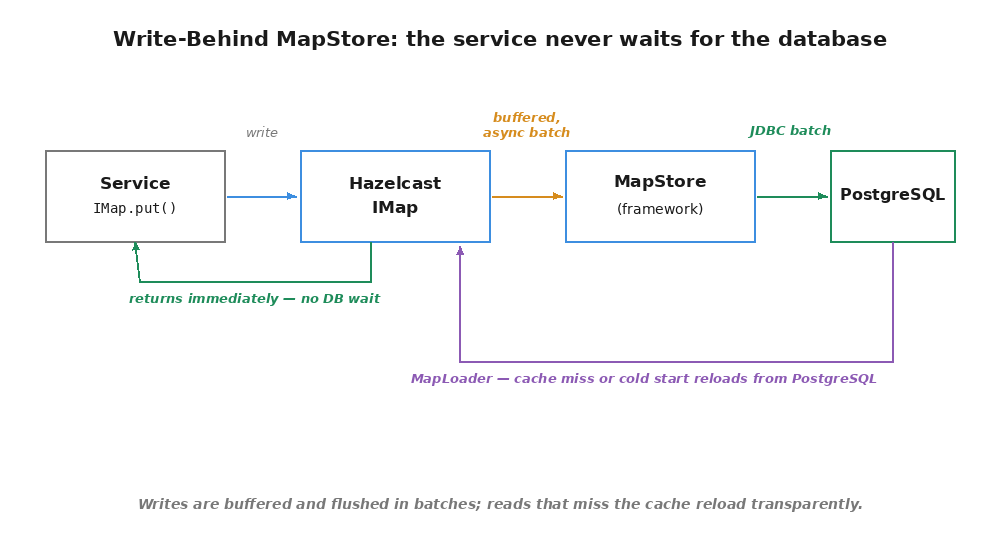
We use write-behind mode. Hazelcast buffers writes and flushes them asynchronously in batches. The IMap.put() call returns immediately — the service never waits for PostgreSQL. This matters because our Jet pipeline calls put() on every event, and we can’t afford database latency in the hot path.
There’s also write-through mode (writeDelaySeconds=0), where every put() synchronously writes to the database. We don’t use it. It would negate the entire point of in-memory processing.
The MapStore also implements MapLoader, which Hazelcast calls on cache misses and cold starts. This gives us automatic rehydration: if a service restarts, the views reload from PostgreSQL without any special recovery code. No replay, no rebuild — the data is just there.
Architecture
The persistence layer splits across two modules, with provider-agnostic interfaces in framework-core and database-specific implementations in framework-postgres. The full design rationale is in ADR 012.
ViewStorePersistence follows the same shape but uses upsert semantics — newer entries replace older ones for the same key. OutboxStorePersistence adds loadNonDeliveredKeys() for recovering in-flight entries on restart. DlqStorePersistence adds loadPendingKeys() for the same reason.
These interfaces know nothing about Hazelcast, GenericRecord, or Compact serialization. They operate on portable record types — PersistableEvent, PersistableView, PersistableOutboxEntry, PersistableDeadLetterEntry — simple Java records containing strings and longs. Clean enough for any JDBC-compatible database.
MapStore Adapters (framework-core)
EventStoreMapStore, ViewStoreMapStore, and OutboxMapStore implement Hazelcast’s MapStore interface and delegate to the persistence interfaces above. They handle key serialization (converting PartitionedSequenceKey<String> to a string format like seq:12345|key:cust-001), GenericRecord-to-JSON conversion via GenericRecordJsonConverter, and metadata extraction from GenericRecord fields.
There’s no DLQ MapStore adapter. The DLQ can’t use MapStore at all — more on why below.
PostgreSQL Implementation (framework-postgres)
PostgresEventStorePersistence uses JPA for single-record operations and JdbcTemplate.batchUpdate() for batches. Events use ON CONFLICT DO NOTHING (append-only — if it’s already there, leave it alone). Views and outbox entries use ON CONFLICT DO UPDATE (upsert — latest state wins).
Flyway manages the schema:
CREATE TABLE domain_events (
    map_name       VARCHAR(255) NOT NULL,
    map_key        VARCHAR(512) NOT NULL,
    aggregate_id   VARCHAR(255) NOT NULL,
    sequence       BIGINT NOT NULL,
    event_type     VARCHAR(255) NOT NULL,
    event_data     JSONB NOT NULL,
    timestamp_millis BIGINT NOT NULL,
    correlation_id VARCHAR(255),
    created_at     TIMESTAMPTZ DEFAULT NOW(),
    PRIMARY KEY (map_name, map_key)
);
In-Memory Fallback (framework-core)
Each of the four persistence interfaces has a ConcurrentHashMap-backed in-memory implementation: InMemoryEventStorePersistence, InMemoryViewStorePersistence, InMemoryOutboxStorePersistence, InMemoryDlqStorePersistence. When framework.persistence.enabled=true but no PostgreSQL driver is on the classpath, the auto-configuration falls back to these. The persistence pipeline runs — good for testing the wiring — without requiring an actual database.
How Write-Behind Works
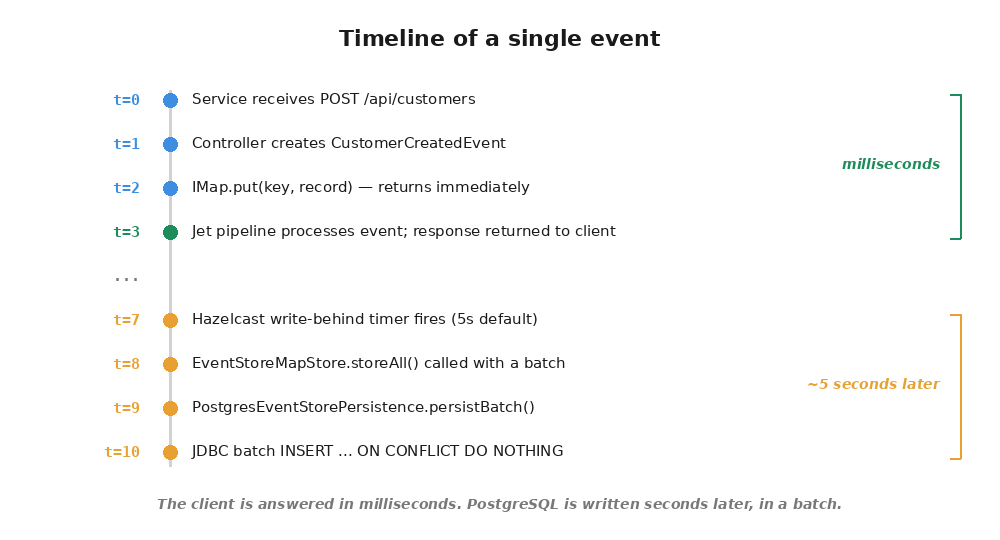
The timeline of a single event being persisted:
The service responds in milliseconds. The database write happens 5 seconds later, batched with other events.
MapStore Behavior by Map Type
Aspect
Event Store (_ES)
View Store (_VIEW)
Outbox (framework_OUTBOX)
Write semantics
INSERT (append-only)
UPSERT (latest wins)
UPSERT (status transitions)
Coalescing
Disabled — each event is unique
Enabled — only latest state per key
Enabled — only latest status per entry
Initial load
LAZY — events loaded on demand
EAGER — all keys loaded on cold start
LAZY — non-delivered entries on demand
Coalescing is worth explaining. If a customer’s address changes three times during the five-second write-behind window, only the final state gets persisted. That’s correct for views — they represent current state, not history. Events are never coalesced because each one is a distinct historical fact. The outbox coalesces because entries transition through statuses (PENDING → CLAIMED → DELIVERED) and only the latest status matters for recovery.
Bounded Memory with Eviction
Persistence unlocks something else: IMap eviction. Without a backing store, evicting an entry means losing it permanently. With a MapStore behind the map, evicted entries can be reloaded on demand via MapLoader.load().
When the map reaches 10,000 entries, the least recently used ones get evicted. If a subsequent get() hits an evicted key, Hazelcast calls MapLoader.load(), reads from PostgreSQL, and puts the entry back. The service code never knows the difference — it’s the same IMap.get() call either way.
Memory stays bounded. No OOMKill after hours of continuous load. Hot data stays in-memory at sub-millisecond latency. Cold data reloads transparently.
The DLQ Exception: Direct Writes Instead of MapStore
The event store, view store, and outbox all live on the embedded Hazelcast instance — the standalone one that runs Jet pipelines inside each service. MapStore is a server-side configuration: you attach it to a map on a Hazelcast member, Hazelcast calls your code when entries change. Works great because the embedded instance is a full member that the service controls.
The DLQ lives on the shared cluster — the external 3-node Hazelcast cluster that services connect to as clients. Services write to the DLQ via hazelcastClient. MapStore is configured on the server side, and the shared cluster nodes don’t have the service’s persistence beans. You simply cannot attach a MapStore to a map accessed through a client connection.
So the DLQ does direct persistence writes. When HazelcastDeadLetterQueue.add(), replay(), or discard() is called, it writes to the IMap and calls DlqStorePersistence.persist() in the same method:
public void add(DeadLetterEntry entry) {
    GenericRecord record = toGenericRecord(entry);
    dlqMap.set(entry.getId(), record);
    persistIfAvailable(entry);
}
Synchronous, not write-behind. The trade-off is fine: DLQ entries are rare — they represent failures — so a database write in the hot path is negligible. If persistence itself fails, the entry is still in the IMap. The failure gets logged, but it doesn’t block the DLQ operation.
On startup, loadFromPersistence() hydrates the IMap with PENDING entries from PostgreSQL. Terminal entries (REPLAYED, DISCARDED) aren’t recovered — they’ve already been handled.
Metrics and Observability
Every MapStore operation is instrumented with Micrometer, following the same ConcurrentHashMap-cached counter/timer pattern used by PipelineMetrics and SagaMetrics:
Metric
Type
Description
persistence.store.count
Counter
Single write operations
persistence.store.batch.count
Counter
Batch write operations
persistence.store.batch.entries
Counter
Total entries across all batches
persistence.load.count
Counter
Load operations (cache misses)
persistence.load.miss
Counter
Load misses (not in DB either)
persistence.delete.count
Counter
Delete operations
persistence.errors
Counter
Errors by operation
persistence.store.duration
Timer
Write latency (p50/p95/p99)
persistence.load.duration
Timer
Load latency (p50/p95/p99)
A pre-built Grafana dashboard (persistence-dashboard.json) auto-provisions alongside the existing ones and shows throughput by map, latency percentiles, batch sizes, and error rates.
Metrics are optional — MapStore constructors accept a nullable PersistenceMetrics parameter. No MeterRegistry in the context (unit tests, for instance), no metrics. Nothing breaks.
Zero Code Changes in Services
The design goal I cared about most: enabling persistence shouldn’t require touching business logic. The complete diff in a service’s application.yml:
# Add to any service to enable persistence
framework:
  persistence:
    enabled: true

spring:
  datasource:
    url: jdbc:postgresql://localhost:5432/ecommerce
    username: ecommerce
    password: ecommerce
And add framework-postgres as a Maven dependency. That’s it.
The auto-configuration chain handles everything else. PostgresPersistenceAutoConfiguration detects the PostgreSQL driver and creates persistence beans for all four map types. PersistenceAutoConfiguration creates MapStore adapters for event, view, and outbox maps and wires them to the persistence beans. Each service’s config class detects the adapters via @Autowired(required = false) and attaches them to the IMap configurations. DeadLetterQueueAutoConfiguration passes the optional DlqStorePersistence bean directly to HazelcastDeadLetterQueue. Hazelcast handles the write-behind scheduling, batching, and MapLoader callbacks for the MapStore-backed maps.
If framework-postgres isn’t on the classpath, the in-memory fallback kicks in. If framework.persistence.enabled is false (the default), nothing changes at all.
Custom Providers
Swapping PostgreSQL for another database means implementing four interfaces: EventStorePersistence, ViewStorePersistence, OutboxStorePersistence, and DlqStorePersistence. Create an @AutoConfiguration class with @AutoConfigureBefore(PersistenceAutoConfiguration.class), register the beans as @ConditionalOnMissingBean, and add to AutoConfiguration.imports.
The in-memory implementations are about 50 lines each — they serve as a decent reference.
The framework now has a complete data lifecycle: events created in-memory for speed, persisted to PostgreSQL for durability, evicted when memory is constrained, reloaded on demand. The in-memory event sourcing performance is unchanged — PostgreSQL is strictly write-behind, never in the hot path.
The Persistence Guide has the full reference including PostgreSQL setup, custom provider implementation, eviction tuning, and troubleshooting.
Part 3 of a series on what I learned shipping BaseballScorer. Part 1 was the arc; Part 2 was the release workflow and the skills that mechanize it. This one is about memory — and more broadly, about the question every Claude Code user ends up arguing about: what goes in the context window, what goes in CLAUDE.md, what goes in persistent memory, and when to clear the whole thing and start fresh.
In late June, Apple’s upload API lied to me. I ran my TestFlight release lane, the build uploaded, and then fastlane reported a failure — a 500 “internal server error” from something called ASSET_SPI. The natural move is to retry the upload. I did, through Apple’s Transporter app, and Apple rejected the retry as a duplicate: the build was already there. The 500 hadn’t been the upload failing. It was Apple’s status check failing after the upload had already succeeded. The error was, not to put too fine a point on it, a lie — and figuring that out cost me a chunk of an evening.
Here’s the part that matters for this post. Two weeks and three releases later, that lesson was still operative. Every subsequent release, the assistant flagged it unprompted: if the lane reports an ASSET_SPI 500, don’t re-upload — verify whether the build actually landed first. I never re-explained it. I never re-derived it. A war story from June was still standing guard in July, across dozens of fresh sessions, each of which started — as every Claude session starts — knowing absolutely nothing about me or my project.
That’s what a memory system buys you. But “use memory” is not actually the interesting advice, because every AI-assisted developer I talk to is wrestling with a more tangled set of questions: How often should I clear my context? Does compaction make the model dumber? Should CLAUDE.md be lean or loaded? What’s the actual difference between telling Claude something in the prompt, putting it in CLAUDE.md, and saving it to memory? People have strong opinions about all of these, usually derived from one bad experience and generalized into doctrine.
So this post is my attempt at a working mental model — the one that’s held up across three-plus months and five TestFlight-and-App-Store releases of BaseballScorer. It’s not doctrine. But it’s been load-tested.
The memory hierarchy
If you’ve been an engineer for more than about a week, you already know this shape: registers, cache, RAM, disk. Small-fast-expensive at the top, big-slow-cheap at the bottom, and the whole game is putting each piece of data in the right tier.
Working with Claude Code has exactly this structure. Four tiers:
Tier 1: The conversation context. This is working memory — everything said and done in the current session, including the contents of every file Claude has read. It’s the most powerful tier, because everything in it directly shapes what the model does next. It’s also finite, expensive, and it decays (more on compaction in a minute). Crucially, influence cuts both ways: stale or wrong material in context doesn’t sit there neutrally. It competes with the truth.
Tier 2: CLAUDE.md. Standing orders. This file is loaded at the start of every session, which makes it the most expensive durable real estate you own — every line you put here is a line Claude reads before every single task, forever. It’s also checked into the repo, which turns out to matter more than it first appears.
Tier 3: Persistent memory. The judgment journal. In my setup this is a directory of small markdown files plus an index — the index is loaded every session (like CLAUDE.md, but for accumulated lessons rather than standing orders), and the detail files are pulled in only when relevant. This is where the ASSET_SPI story lives.
Tier 4: The repo itself. Ground truth. The code, the docs/ directory, the git history, the test suite. Effectively unlimited, fully durable, shared with every collaborator — and, critically, verifiable. Claude can read it fresh anytime and trust what it finds, because it’s not a note about the code; it is the code.
And the rule that organizes everything — if you take one sentence from this post, take this one:
Push every fact down to the cheapest tier that preserves it, and treat the conversation as disposable.
If losing your context window right now would hurt, something important is living in the wrong tier. The conversation is where work happens, not where knowledge lives. The moment something in a session turns out to be durably true — a gotcha, a decision, a preference — it should flow downward: into memory, into CLAUDE.md, into a doc in the repo, wherever it belongs. What remains in the conversation should be only the work in progress.
Baseball version, since this is nominally a baseball-app series: the conversation is what’s in the scorer’s head during the play. CLAUDE.md is the ground-rules card taped inside the scorebook. Memory is the scorebook itself. The repo is the rulebook and the league’s official records. Nobody tries to keep the whole season in their head, and nobody should have to reread the rulebook to remember that the ballpark has a short porch in right.
With the model in place, let’s take the contested questions one at a time.
When should you clear the context?
Liberally, and specifically: between unrelated tasks.
The instinct to preserve a long-running conversation comes from a reasonable place — the model feels smarter mid-session, because it has all that context. And it genuinely is, while the context is relevant. The problem is what happens when you pivot. Finish a gnarly print-layout investigation, then start a networking feature in the same session, and all that layout reasoning is still sitting in working memory. It isn’t neutral filler. It’s noise with authority — hundreds of lines of intermediate hypotheses, half of which were wrong (that’s what investigation is), all still whispering to the model while it tries to think about something else.
Old context doesn’t just waste space. Wrong-but-confident material in context is precisely the raw ingredient hallucinations are made of. The model has no typographic marker distinguishing “conclusion we verified” from “hypothesis we abandoned twenty minutes ago”; both are just tokens it once said.
The discipline that makes clearing cheap is the push-down rule. When the print investigation concluded, the conclusion — “the scorecard print is height-bound, not width-bound; future size complaints should target row heights, not column widths” — went into memory. Two sentences. The eight hundred lines of measurement and dead ends that produced those two sentences got thrown away with the session, unmourned. Next time print size comes up, the two sentences come back and the dead ends don’t. That’s not lost information; that’s distilled information.
If clearing your context feels scary, that fear is diagnostic. It means knowledge is trapped in tier 1 that belongs in tier 3 or 4. Fix the filing, and the fear goes away.
Does compaction hurt accuracy?
Some. Here’s the mechanism, because knowing why tells you what to do about it.
When a session runs long, the harness compacts it: older conversation gets replaced by a summary. Summarization is lossy in a very particular way — it preserves narrative and drops precision. “We fixed the auto-advance bug and merged to main” survives compaction beautifully. The exact tag name, the specific line number, the precise flag that carried the fix — those are exactly the details a summary rounds off.
So the practical rule: after a compaction, trust the story, re-verify the specifics. If post-compaction work depends on an exact value — a version number, a build setting, a function signature — the move is to look it up fresh from the repo (tier 4), not to trust the summary’s recollection of it. Ground truth is one file-read away, and unlike the summary, it can’t have rounded anything off.
I can offer this series itself as evidence. These posts have been written across many sessions with the same assistant, through multiple compactions, spanning weeks of feature work in between. The continuity you’re reading — callbacks to Part 2’s war stories, the running motifs — survived not because the context window is heroic but because everything load-bearing lives in files: the draft posts themselves, a memory note tracking the series plan, the repo’s docs. The conversations were disposable, so losing detail from them cost nothing. The hierarchy is what makes compaction survivable, the same way it makes clearing safe. They’re the same insurance policy.
How much belongs in CLAUDE.md?
Less than you’re putting there, probably — but the reason matters more than the rule.
Every line of CLAUDE.md is read at the start of every session, before every task, for the life of the project. That’s its superpower and its cost. The budget question for any candidate line is: does this change Claude’s behavior often enough to justify being read every single time?
Things that clear that bar, from my actual file: the exact build and test commands (with the environment-variable gotcha that makes them work on my machine); the instruction to read the workflow doc before non-trivial work; the warning to never edit the Xcode project file directly while Xcode is open, because that way lies corruption; a note that a particular category of tooling is unreliable for builds so use the command line instead. Every one of those redirects behavior on a large fraction of tasks. They’ve each paid their rent many times over.
Things that don’t clear the bar: architecture narratives, feature history, aspirational coding standards nobody consults, and anything that reads like documentation. The tell is exactly that — if a section reads like documentation, it is documentation, and it belongs in docs/ with a pointer. My CLAUDE.md doesn’t contain my branching and release policy; it contains one line saying “read docs/workflow.md before starting non-trivial work.” The policy lives in tier 4, where it’s versioned, diffable, and readable by humans too. CLAUDE.md just makes sure Claude knows the pointer exists.
So in the great “edit down vs. fill up” debate: edit down, but not out of minimalist aesthetics — out of budget discipline. It’s the most expensive real estate you own. Spend it on behavior, link to everything else.
Memory vs. CLAUDE.md vs. the prompt
This one has the cleanest answer of the bunch, and it comes down to scope and authorship.
CLAUDE.md is checked into the repo. That makes it true-for-anyone: any collaborator, any future contributor, any other agent that clones the project gets the same standing orders. It describes how to work in this codebase. It’s also curated deliberately — you edit it the way you edit code, on purpose, in commits.
Memory is specific to a collaboration. Mine holds things that would be presumptuous or meaningless in a checked-in file: my preferences (I want a high bar for what earns a point release; I’m skeptical of elaborate persona prompts), corrections I’ve issued and why, the current state of in-flight work (“build 31 is on TestFlight awaiting tester assignment”), lessons that encode judgment rather than procedure. It accrues conversationally — “remember this” mid-session — rather than being edited like a source file. If CLAUDE.md is the ground-rules card, memory is the relationship.
The prompt is for this task only. Anything you find yourself typing into prompts repeatedly is a filing error — it’s a durable fact living in the most ephemeral tier, at the cost of your typing it forever. Promote it: repo-truths into CLAUDE.md, collaboration-truths into memory.
The taxonomy of what earns a memory slot, from three months of practice — three categories carry nearly all the value:
Corrections, saved with the why. Not “don’t edit project.pbxproj directly” but “don’t edit it while Xcode is open, because external edits can corrupt Xcode’s in-memory state — ask me to make the change in the Xcode UI instead.” The why is what lets the lesson generalize instead of becoming a cargo-cult rule.
Validated approaches. When something works and we confirm it worked, that’s as valuable as a correction. The best example from this project: Siri integration silently failed with one Apple API pattern and worked with another (Part 2 readers will remember the AppEnum saga). The memory doesn’t just say which one won; it says what the failure looked like, so the next occurrence gets recognized in minutes instead of hours.
Project state that isn’t in the code. What shipped in which build, what’s awaiting whose decision, what the tester feedback said. Git knows what changed; it doesn’t know what we’re waiting on.
And one anti-category: never save what the repo already records. A memory that duplicates the code is a stale copy waiting to mislead. If Claude can look it up in tier 4, it should — which brings us to the sharpest knife in the drawer.
Memory is not live state
Here’s the discipline that separates a memory system that compounds from one that slowly poisons you: a memory is a point-in-time observation, not a fact about the present.
Code moves. Files get renamed, functions get refactored, flags get removed. A memory that says “the fix is the flag on line 600 of such-and-such service” was true the day it was written and gets falser every week. The rule we run: when a memory names a file, a function, a line, a setting — verify it against the current repo before acting on it. The memory’s job is to point; the repo’s job is to be true.
This is the same principle as the compaction rule, and it’s worth saying why: stale information is worse than no information, because it arrives wearing the costume of authority. A model with no memory of your build system will go read the config and get it right. A model with a confident eight-week-old memory of your build system may not think to check. The failure mode of memory isn’t forgetting — it’s remembering wrong, fluently.
Two small hygiene habits fall out of this. First, absolute dates: a memory that says “last Tuesday” is gibberish in a month, so relative time gets converted to real dates at save time. Second, aggressive pruning: when a memory turns out to be wrong or obsolete, it gets deleted, not annotated. Memory is a working set, not an archive — the archive is git.
The payoff: judgment that compounds
Part 2 argued that skills turn workflows into things that happen the same way every time. Memory does the same thing one level up: it makes judgment repeatable. Every war story costs you once and then pays dividends forever — but only if the distillation is good. Three examples from just the past two weeks of BaseballScorer work, because recency is the point:
The ASSET_SPI lie you already know. One bad evening in June; every release since has carried the antidote in its pocket.
The print investigation ended with a two-sentence memory — “height-bound, not width-bound; target row heights” — that converts every future “can the print be bigger?” request from an afternoon of measurement into a thirty-second answer.
Best of all, the batting-around bug. A live game exposed a display bug: when a team bats around, a player can reach base twice in one inning, and any code that matched events to players without also checking sequence mixed the two trips together. We fixed the two places it bit us. But the memory doesn’t record the fix — the commit records the fix. The memory records the pattern: any player-keyed scan over inning events breaks under batting-around unless it’s sequence-bounded. That’s a lesson about a whole class of latent bugs, some of which probably exist in code we haven’t stressed yet. When one surfaces next April, the diagnosis is pre-loaded.
That’s the compounding: fixes accumulate in the repo, but pattern recognition accumulates in memory. One is what happened; the other is what to watch for.
Tutorial mode, briefly
The prescriptions, in the spirit of the previous posts:
Treat the conversation as disposable, and act accordingly. Distill conclusions downward the moment they’re conclusions. Then clear without fear, especially between unrelated tasks.
After compaction, trust the narrative and re-verify the numbers. Exact values should come from the repo, not from a summary’s memory of them.
Budget CLAUDE.md like the expensive real estate it is. Behavior-changing lines only; anything that reads like documentation moves to docs/ and leaves a pointer.
Scope decides the tier. True for anyone in the repo → CLAUDE.md. True for this collaboration → memory. True for this task → the prompt. Typing it repeatedly → you’ve filed it wrong.
Save the why with every correction, and save validations, not just failures. Both halves of the feedback signal matter.
Verify memories before acting on them. Point-in-time observations, not live state. Stale-but-confident is the failure mode.
Prune as aggressively as you save. Wrong memories don’t age into harmlessness; they age into ambushes.
What’s next
The final post in this series is the one I most wish had existed when I started: moving from standalone Claude Code in a terminal to the Xcode-integrated version — what’s different, what’s missing, what to do instead. If this post was about where knowledge should live, that one is about where the assistant lives, and it turns out the answer changes more than you’d expect.
Part 10 in the “Building Event-Driven Microservices with Hazelcast” series
Back in Part 4, we built a choreographed saga for order fulfillment. Four services — Order, Inventory, Payment, and Account — coordinate through Hazelcast ITopic events. Each service reacts independently, no central coordinator. The flow is implicit, spread across three saga listeners, a compensation registry, and a timeout detector.
That works. It works well, actually, for loosely coupled flows where services don’t need to know about each other. But I kept running into the same questions: what if you need the whole saga visible in one place? What if you need per-step timeout and retry? What if the caller wants to wait for the saga to finish before responding?
So the framework now supports a second saga architectural pattern — the orchestrated saga. This post compares both, walks through the implementation, and shows how they run side by side in the same system.
When to Use Which
Neither pattern wins across the board. It depends on what you need:
Requirement
Choreography
Orchestration
Services should be fully decoupled
Best
Need the whole flow in one readable file
Best
Caller needs a synchronous response
Best
High throughput (thousands of sagas/sec)
Best
Per-step timeout and retry
Best
Services evolve independently
Best
Complex branching or conditional logic
Best
No single point of failure
Best
Choreography is the better fit when services publish events for many consumers, not just one saga. Adding a new saga consumer doesn’t require changing any existing service — you just stand up a new listener.
Orchestration is the better fit when the saga is a well-defined workflow with a clear owner and the caller (a REST endpoint, typically) wants to return the result directly. Order fulfillment is a textbook example.
Architecture Comparison
Choreographed Flow
Every arrow is an asynchronous event on the shared Hazelcast cluster. The caller gets back a 202 Accepted immediately. The saga completes whenever it completes.
Orchestrated Flow
Every arrow is a synchronous HTTP call. The orchestrator waits for each step to finish before moving to the next. The caller gets the final result — success or failure — in the response.
The visual difference tells you most of what you need to know. Choreography is a chain. Orchestration is a hub with spokes.
Implementation Comparison
Choreography: Saga Listeners
In the choreographed pattern, each service has a listener subscribed to events on the shared Hazelcast cluster:
@Component
public class InventorySagaListener {

    public InventorySagaListener(
            @Qualifier("hazelcastClient") HazelcastInstance hazelcast,
            InventoryService inventoryService,
            SagaStateStore sagaStateStore) {

        ITopic<GenericRecord> topic = hazelcast.getTopic("OrderCreated");
        topic.addMessageListener(message -> {
            GenericRecord event = message.getMessageObject();
            String sagaId = event.getString("sagaId");

            // Guard: only process OrderFulfillment sagas
            if (!"OrderFulfillment".equals(event.getString("sagaType"))) return;

            // Perform local action
            inventoryService.reserveStockForSaga(productId, quantity, ...);

            // Update saga state and publish next event
            sagaStateStore.updateOrAddStep(sagaId, 1, StepStatus.COMPLETED);
            hazelcast.getTopic("StockReserved").publish(nextEvent);
        });
    }
}
Three listeners across three services, wired together only by event names. To understand the full flow, you read code in three different modules. Compensation is handled by a CompensationRegistry that maps forward events to their compensating counterparts:
Four steps, forward actions, compensations, timeouts — all readable in one file. You pay for that readability: the Order Service now has direct knowledge of the Inventory and Payment services’ HTTP endpoints.
The Orchestrator State Machine
HazelcastSagaOrchestrator is the engine that executes a SagaDefinition. The execution flow:
Internally, a SagaExecution instance tracks the running state: current step index, completed step names, an AtomicBoolean for compensation (preventing a race between step failure and the saga-level timeout firing at the same moment), and step start timestamps for duration metrics.
Per-Step Retry
Each SagaStep can configure maxRetries and retryDelay. When a step fails, the orchestrator checks if retries remain. If so, it waits retryDelay milliseconds and re-executes. If not, compensation kicks in.
This is separate from the Resilience4j circuit breakers that the choreographed saga listeners use. Different communication styles, different retry mechanisms.
Why HTTP Instead of ITopic?
You might wonder why the orchestrator makes HTTP calls to the other services instead of publishing events on Hazelcast ITopic.
Two reasons.
First, request-response semantics. The orchestrator needs to know whether each step succeeded before proceeding to the next. ITopic is fire-and-forget — there’s no built-in way for a publisher to wait for a consumer’s response. HTTP gives you synchronous request-response for free.
Second, our dual-instance architecture. Each service runs an embedded Hazelcast instance for Jet pipelines and a client to the shared cluster for cross-service events. Jet pipeline lambdas reference service-specific classes that can’t serialize across services — that’s the whole reason for the dual-instance design (see Part 5 for where this architecture first bit us). HTTP sidesteps Hazelcast serialization entirely. Each service processes the request in its own JVM with full access to its own classes.
The SagaServiceClient wraps these calls:
public class SagaServiceClient implements SagaServiceClientOperations {

    public OrchestratedStepResponse reserveStock(
            String productId, int quantity, String orderId) {
        // POST /api/saga/inventory/reserve-stock
        return restTemplate.postForObject(
                inventoryServiceUrl + "/api/saga/inventory/reserve-stock",
                request, OrchestratedStepResponse.class);
    }

    public OrchestratedStepResponse processPayment(
            String orderId, String customerId,
            double amount, String currency, String method) {
        // POST /api/saga/payment/process
        return restTemplate.postForObject(
                paymentServiceUrl + "/api/saga/payment/process",
                request, OrchestratedStepResponse.class);
    }
}
Each remote service exposes dedicated saga endpoints (like /api/saga/inventory/reserve-stock) that return an OrchestratedStepResponse — a success/failure envelope. The SagaServiceClient implements the SagaServiceClientOperations interface, which exists so Mockito can mock it on Java 25. (Mockito’s inline mock maker can’t mock concrete classes there. We hit this in several places — extract an interface, move on.)
Compensation: Two Approaches
Choreography: Event-Based
When a step fails, the SagaCompensator looks up the CompensationRegistry and publishes compensation events via ITopic:
Each service processes its own compensation event independently. The SagaTimeoutDetector can also trigger this if a saga exceeds its deadline.
Orchestration: Lambda-Based
When a step fails, the orchestrator walks completed steps in reverse and executes their compensation lambdas directly:
No events, no registry. The compensation logic sits right next to the forward action in the SagaDefinition. The final step (ConfirmOrder) uses .noCompensation() — there’s nothing to undo once you’ve confirmed.
If a compensation step itself fails, the orchestrator marks the saga as FAILED rather than COMPENSATED. That means manual intervention. It’s not a situation you want, but at least you know about it immediately rather than discovering it later in an audit.
Running Both Simultaneously
Both patterns coexist in the same system. No interference.
Pattern
Saga Type
REST Endpoint
Choreography
OrderFulfillment
POST /api/orders
Orchestration
OrderFulfillmentOrchestrated
POST /api/orders/orchestrated
The key to coexistence is the sagaType field. Choreographed saga listeners filter on it — when the orchestrated flow creates an OrderCreated event, the InventorySagaListener ignores it because the type is “OrderFulfillmentOrchestrated”, not “OrderFulfillment”.
Both patterns write to the same SagaStateStore (a Hazelcast IMap), so you can query across both or filter:
# All sagas
curl http://localhost:8083/api/sagas

# Only choreographed
curl http://localhost:8083/api/sagas?type=OrderFulfillment

# Only orchestrated
curl http://localhost:8083/api/sagas?type=OrderFulfillmentOrchestrated
Tagged with sagaType and stepName, so you can query individual steps:
# p95 duration for the ProcessPayment step
histogram_quantile(0.95,
  rate(saga_step_duration_seconds_bucket{
    sagaType="OrderFulfillmentOrchestrated",
    stepName="ProcessPayment"
  }[5m]))
Choreographed sagas track overall saga_duration_seconds but not per-step timing — the flow is distributed across services, so there’s no single place to measure each step. That’s a genuine observability trade-off between the two patterns.
The Grafana saga dashboard has a Choreography vs Orchestration row: p50/p95 duration comparison, success/failure rates per pattern, and an orchestrated step breakdown showing where time goes across CreateOrder, ReserveStock, ProcessPayment, and ConfirmOrder.
The MCP run_demo tool includes orchestrated scenarios:
Scenario
Pattern
Expected Outcome
happy_path
Choreographed
Order confirmed via events
payment_failure
Choreographed
Stock released via compensation events
orchestrated_happy_path
Orchestrated
Order confirmed via HTTP, sync response
orchestrated_payment_failure
Orchestrated
Stock released via reverse compensation, 409 response
The Summary Table
Choreography
Orchestration
Communication
Hazelcast ITopic events
HTTP calls
Flow definition
Distributed across listeners
Centralized in SagaDefinition
Compensation
CompensationRegistry + event publishing
Reverse-order lambda execution
Timeout handling
SagaTimeoutDetector (scheduled)
Per-step + saga-level timeouts
Response model
Async (202 Accepted)
Sync (201 Created or 409 Conflict)
Retry
Resilience4j (circuit breaker + retry)
Built-in per-step retry with delay
Metrics
Saga-level duration
Saga-level + per-step duration
Saga type
OrderFulfillment
OrderFulfillmentOrchestrated
Choreography is still the right default for most event-sourced systems — it preserves service independence and scales naturally. Orchestration earns its place when you need the flow readable in one file, synchronous responses, and fine-grained per-step control.
Both patterns share the same SagaStateStore, the same Grafana dashboards, and the same MCP tools. Pick the right one for each saga, or run both and compare.
Part 2 of a 4-post series on what I learned shipping BaseballScorer. Part 1 was the arc — first commit to App Store in eighteen days. This one is the machinery underneath: the release workflow, and the handful of custom Claude Code skills I actually use.
Here’s a confession to start with, because it sets up everything else in this post: on my pre-retirement Java projects, I had eight specialized Claude agents. I had config-manager and debugging-helper and documentation-writer and framework-developer and performance-optimizer and pipeline-specialist and service-developer and test-writer. Each had its own persona prompt. Each was going to be the expert in its lane. I built a little org chart of robots and felt very clever about it.
In hindsight: overkill. Almost all of it.
On BaseballScorer I have five skills — bug-fix, release, commit, testflight-upload, and security-review — and I’d argue four of them earn their keep and one is borderline. That’s the whole roster. No personas. No “you are a senior iOS architect with twenty years of experience” preamble. The main agent is already a senior iOS architect with twenty years of experience, or near enough; telling it to pretend to be one is theater.
So if you came here for “here are the twelve agents you need to ship an app,” I’m going to disappoint you on purpose. The thesis of this post is that the highest-leverage Claude Code artifacts on a real project aren’t clever — they’re boring. They encode the multi-step, error-prone, do-it-the-same-way-every-time workflows that you’d otherwise wing each Friday and get subtly wrong. A good skill isn’t a personality. It’s a checklist with teeth.
Let me show you what I mean.
What earns a skill
Here’s the test I landed on, after the Java over-engineering taught me what not to do: a workflow earns a skill when it’s multi-step, painful to do by hand, and — this is the one people skip — dangerous to do inconsistently.
That third criterion is where the value actually lives. A one-step task doesn’t need a skill; you just ask. A multi-step task you do once a year doesn’t need a skill; you look it up. But a multi-step task where doing the steps in the wrong order, or skipping one, quietly corrupts something — that’s where you want the steps welded together so neither you nor Claude can freelance them at 11pm.
Releasing a build is the canonical example. So let’s start there.
fastlane: one place that talks to Apple, and only one
Quick detour for anyone who hasn’t met it — and if you’re new to iOS, you probably haven’t: fastlane is an open-source toolkit that automates the tedious parts of shipping an app. Building the archive, signing it, uploading to TestFlight, pushing screenshots and the App Store description, submitting for review — all the steps you’d otherwise do by hand-clicking through Xcode and the App Store Connect website. You write down what you want once, in a file called a Fastfile, as a named recipe (fastlane calls these “lanes”), and then fastlane ios beta runs the whole recipe the same way every time. Think of it as the difference between following a checklist taped to the wall and pressing a single button that does the checklist for you. Until I started this project I didn’t know it existed either; now I’d no sooner ship without it than score a game without a pencil.
With that out of the way: the single most important rule in my release process is this: exactly one thing is allowed to talk to App Store Connect, and that thing is fastlane, driven from a config file in my repo. I do not log into the App Store Connect website and edit the description. I do not tweak the “What’s New” text in the browser because it’s faster. Everything goes through docs/app-store-metadata.md → fastlane → Apple.
I learned this the way you learn most worthwhile rules — by getting burned. Early on, before fastlane owned the metadata, I added a line to my App Store description in the web UI: “no ads, no paywall.” Felt good. Forgot about it. A few weeks later a routine fastlane push regenerated the listing from a doc in my repo — a doc that didn’t have that line — and silently overwrote my edit. No warning, no diff, no “are you sure.” The web edit and the repo doc were two sources of truth, and when two sources of truth disagree, one of them loses, usually the one you forgot you had.
The fix isn’t “remember not to edit the website.” The fix is to make the repo the only source of truth and let the automation be the only writer. Now if I want to change the description, I change the markdown, and fastlane is the courier. There’s exactly one path, so there’s nothing to get out of sync with.
This is a theme, so I’ll name it now and you’ll see it three more times before we’re done: when something bites you because two things can both do the job, the fix is usually to make sure only one thing can.
The beta lane, and the lesson hiding in its control flow
The skill I lean on most is testflight-upload, which runs my fastlane beta lane. On the surface it’s mundane — it bumps the build number, archives, uploads to TestFlight, and tags the release in git. But there’s a design decision baked into the order of those steps that I want to pull out, because it’s the kind of thing that’s invisible when it works and infuriating when it’s done the other way.
My workflow doc has a rule: tag after the upload succeeds, never before. A failed upload should not burn a version tag. That’s easy to say in a doc and easy to violate in practice — you tag, then upload, then the upload dies, and now you’ve got a tag v1.4-b28 pointing at a build that never made it to Apple. Next time you’ll either reuse the tag (don’t) or skip it (now your tags lie about what shipped).
The trick is that in the beta lane, that rule isn’t a comment reminding me to be careful. It’s control flow. The archive and upload_to_testflight calls come first; the commit_version_bump, add_git_tag, and push_git_tags calls come after. If the upload throws, the lane halts — and execution never reaches the tagging code. You cannot burn a tag on a failed upload because the code that creates the tag is downstream of the code that can fail. The “be careful” rule got promoted from a human responsibility to a structural guarantee.
That’s the move I keep coming back to with skills. Anywhere you find yourself writing “remember to X,” ask whether you can instead arrange things so that not doing X is impossible. A reminder is a liability you carry forever. A structural guarantee you build once.
The lane has a couple of other guards in the same spirit. Before it does anything, it checks that you’re on main with a clean working tree (ensure_git_branch, ensure_git_status_clean) — because releasing from a feature branch with uncommitted experiments is a great way to ship something you didn’t mean to. And it auto-generates the TestFlight changelog from git commit messages since the last v* tag, excluding merge commits. That last bit is small but it means my changelog can’t drift from my actual history, because it is my actual history. One source of truth again. You’ll keep seeing it.
The locale crash, or: how an em-dash took down my release
Now for a war story, because abstract principles are easy to nod at and forget.
The first time I ran the beta lane on this machine, it crashed. Not with a useful error — with this:
[!] invalid byte sequence in US-ASCII (ArgumentError)
followed, a few lines later, by fastlane helpfully informing me that it “requires your locale to be set to UTF-8.” The proximate cause: macOS shells default to a US-ASCII locale, and fastlane’s build step parses xcodebuild‘s output as it streams by. The first non-ASCII byte in that stream — and there’s always one eventually — and the parser falls over.
And here’s the part that’s almost too on the nose: the non-ASCII byte that took down my release was, as often as not, an em-dash. In my own App Store metadata. Which I write full of em-dashes, because — well, you’ve read this far, you’ve noticed. My prose style was crashing my deployment pipeline. There’s a metaphor in there about the cost of having a voice, but I’ll leave it alone.
The first fix was the obvious one: set the locale on the command line every time.
That works. But look at what it is — it’s a “remember to X.” Every release, forever, I’d have to remember to prefix the command with the magic words, or watch it die on the first smart quote. That’s exactly the kind of carried liability I just spent a section telling you to eliminate.
So the real fix went into the top of the Fastfile itself:
Now the trap is disarmed permanently. The lane sets its own locale before it does anything else, so it doesn’t matter what shell I run it from or whether I remembered the incantation. The gotcha can’t recur because the tool defends itself. Same pattern as the tag-on-success thing: take a rule that lived in my head and move it into a place where it’s enforced by code.
If there’s one transferable habit from this whole post, it’s that one. When you hit an environment gotcha, the fix is not to remember it. The fix is to make it impossible to hit again, in the most permanent place you can put the fix.
The bug-fix skill: branch off the buggy tag
The other skill that genuinely changed how I work is bug-fix, and it’s worth explaining because it encodes a habit that I’m told is less common than I’d assumed from my pre-Claude career.
When a bug ships in, say, build v1.3-b26, the fix does not start from current main. It starts from the tag — git checkout -b bugfix/short-name v1.3-b26. You branch from the code that actually shipped the bug.
Why bother? Two reasons, both about honesty. First, the skill makes you write a failing reproducer test before the fix — a test named test_bugfix_<shortDescription> that demonstrates the bug. And a reproducer test is only trustworthy if it reproduces the bug on the code that shipped it. If you write your test against current main, where the symptom may have already shifted or been accidentally masked by other changes, you might write a test that passes for the wrong reason and convince yourself you’ve fixed something you haven’t. Branching from the tag guarantees the test fails for the real reason before it passes for the real reason.
Second, it gives you a clean merge path forward. The fix and its test travel together from the tag up to main, and the reproducer stays in the suite forever as a tripwire against regressions. I’ve got a couple of recent ones from the 1.4 cycle — an error that was getting credited to the wrong team in the box score, and a runner-advancement display that rendered a hanging “advanced to ” with no destination — and in both cases the value wasn’t just the fix. It was that the test which proves the fix is now a permanent member of a 365-test suite that runs before every release. The bug can come back, but it can’t come back quietly.
The discipline of test-first matters even when — especially when — Claude is the one writing the test. It keeps both of us honest about whether we’re fixing the actual bug or just papering over the symptom that happened to be visible. It’s very easy to make a symptom disappear. It’s harder, and more valuable, to prove you understood it.
When the automation breaks (and it will)
I want to close the practical part with the least glamorous lesson, because it’s the one nobody puts in their “ship with Claude!” thread: every piece of automation needs a documented recovery procedure, and that procedure belongs right next to the automation, written while you’re calm.
Two examples from this project, both real, both having cost me an evening.
The beta lane bumps the build number across every target — app, tests, screenshots — before it archives. If it crashes mid-lane (say, on a locale issue before I’d pinned the fix), it’s already dirtied the project file, and the next run’s clean-tree guard refuses to proceed. The first time this happened I flailed. Now there’s a known dance: revert the app target’s build number in Xcode’s UI (not by hand-editing the project file while Xcode’s open — that way lies corruption), commit the leftover diff with a “cleanup from failed run” note, and re-run. The lane re-bumps everything to the next number. Skipping a build number is fine, by the way — Apple only requires that build numbers go up, not that they’re contiguous. That fact alone would’ve saved me twenty minutes of panic if I’d known it.
The second one is sneakier and I love it as a cautionary tale. On one upload, fastlane reported a flat-out failure: an ASSET_SPI 500, “internal server error,” during the post-upload status check. So I did the natural thing and retried the upload through Transporter — which Apple promptly rejected, because the build was already there. The 500 wasn’t the upload failing. It was Apple’s status-check endpoint failing after the upload had already succeeded. The error message was, not to put too fine a point on it, a lie. The only reason I figured it out is that the duplicate-rejection error (bundle version already used) told the truth that the 500 had obscured.
The lesson there isn’t about fastlane specifically. It’s: don’t trust an error message about a remote system’s state — verify the actual state. Apple told me the upload failed. Apple was wrong. The build was sitting in App Store Connect the whole time. When a distributed system reports a failure, it’s reporting that one call failed, which is not the same as the operation having failed, and the gap between those two things is where you lose evenings if you take the error at face value.
(If that distinction sounds familiar, it’s the same reason “the network is unreliable” is the first hard lesson in distributed systems. A failed acknowledgment doesn’t tell you the work didn’t happen. It tells you that you didn’t hear that it happened. Apple’s 500 was a lost ack, nothing more.)
All of this — the recovery dances, the “skip a build number, it’s fine,” the “the 500 is a liar” — lives in a doc in my repo and a couple of memory notes Claude carries between sessions. Which is the natural segue to where we’re headed next.
The actual point
Strip away the war stories and here’s what the five skills and the one config file have in common: none of them make Claude smarter. The model was already plenty smart. What they do is make the process repeatable and the hard-won lessons durable. The locale fix, the tag-on-success ordering, the branch-off-the-tag habit, the single source of truth for metadata — every one of those is a place where a mistake I made once got promoted into something I can’t easily make again.
That’s the unsexy truth about being productive with an AI coding assistant on a real, shipping project. The leverage isn’t in elaborate prompts or a cast of specialized agents with backstories. It’s in noticing which boring workflows are error-prone, encoding them so they happen the same way every time, and turning each war story into a guardrail before you have to fight the same war twice. A skill is just where a hard-won lesson goes to become a habit.
Which raises an obvious question: how does any of that survive across months of work, when each Claude session starts fresh and remembers nothing? How does the lesson from June still be there in September? That’s the persistent-memory system, and it’s the subject of the next post — the same idea as this one, lifted up one level, from “make this workflow repeatable” to “make this project’s accumulated judgment repeatable.” That’s where we’ll leave things for today.
Part 9 in the “Building Event-Driven Microservices with Hazelcast” series
Over the past two articles, we built resilience into both sides of our saga communication. Part 7 added circuit breakers and retry to protect saga listeners against transient failures during event consumption. Part 8 added the transactional outbox to guarantee event delivery from producer to shared cluster.
Two gaps remain.
First: what happens when an event fails processing permanently? The circuit breaker exhausts retries. NonRetryableException gets thrown. The event is gone — all that survives is a log message. There’s no way to inspect what failed, understand why, or retry it later when someone fixes the underlying problem.
Second: what happens when the outbox delivers an event twice? At-least-once delivery means duplicates are possible. Without protection, the Inventory Service might reserve stock twice for the same order. The Payment Service might charge the customer twice.
This article covers two complementary patterns that close these gaps. The dead letter queue captures events that fail consumer-side processing, giving operators a way to inspect, replay, and discard them. The idempotency guard ensures each event is processed exactly once, even if delivered multiple times.
Put them together with the outbox and you get effectively-once semantics — at-least-once delivery on the producer side, exactly-once processing on the consumer side. That’s the gold standard for event-driven systems.
Part 1: Dead Letter Queue
The Problem
Consider this failure sequence in the Inventory Service’s saga listener:
That log message? That’s all you’ve got. In production, recovering from this means searching logs for the event ID, reconstructing the event payload from other sources, manually fixing whatever went wrong, and then figuring out how to re-trigger the saga step.
A dead letter queue captures the failed event — payload, failure reason, saga context, source service, everything — in a durable store that you can actually query and act on.
The DeadLetterEntry
Each DLQ entry preserves the full failure context:
public class DeadLetterEntry {

    private String dlqEntryId;       // UUID — unique DLQ identifier
    private String originalEventId;  // The event that failed
    private String eventType;        // "OrderCreated", "StockReserved", etc.
    private String topicName;        // The ITopic where the event was published
    private GenericRecord eventRecord; // The complete event payload for replay
    private String failureReason;    // Why processing failed
    private Instant failureTimestamp; // When the failure occurred
    private String sourceService;    // Which service failed ("inventory-service")
    private String sagaId;           // Saga context for tracing
    private String correlationId;    // Correlation context for tracing
    private int replayCount;         // How many times this entry has been replayed
    private Status status;           // PENDING, REPLAYED, or DISCARDED

    public enum Status {
        PENDING,    // Awaiting review or replay
        REPLAYED,   // Re-published to original topic
        DISCARDED   // Manually discarded by administrator
    }
}
The eventRecord field is the important one — it holds the complete GenericRecord that was published to the ITopic. When you replay the entry, this exact record gets re-published to the original topic, picking the saga back up where it left off.
The DeadLetterQueueOperations Interface
Same interface-extraction pattern we used for ResilientOperations and ServiceClientOperations (Java 25 Mockito can’t mock concrete classes, so we keep extracting interfaces — it’s becoming a running theme):
The implementation stores DLQ entries as Compact-serialized GenericRecords in a Hazelcast IMap — same pattern as the HazelcastOutboxStore:
public class HazelcastDeadLetterQueue implements DeadLetterQueueOperations {

    private static final String SCHEMA_NAME = "DeadLetterEntry";
    private final HazelcastInstance hazelcast;
    private final IMap<String, GenericRecord> dlqMap;
    private final DeadLetterQueueProperties properties;
    private final MeterRegistry meterRegistry;

    public HazelcastDeadLetterQueue(HazelcastInstance hazelcast,
                                     DeadLetterQueueProperties properties,
                                     MeterRegistry meterRegistry) {
        this.hazelcast = hazelcast;
        this.dlqMap = hazelcast.getMap(properties.getMapName());
        // ...
    }
}
The DLQ map lives on the shared cluster (falling back to the embedded instance if there’s no shared cluster), so it’s accessible from any service’s admin endpoint. You don’t need to know which service failed — query the DLQ from anywhere and you’ll see everything.
POJO-to-GenericRecord Conversion
Like the outbox store, conversion happens at the boundary:
Note setGenericRecord(“eventRecord”, …) — Compact serialization handles nested GenericRecords natively. The full event payload comes along for the ride without any special serialization work on our part.
Replay
This is where the DLQ earns its keep. Once you’ve figured out what went wrong and fixed it — restocked inventory, restarted a flaky service, whatever — you replay the entry:
@Override
public void replay(final String dlqEntryId) {
    final GenericRecord record = dlqMap.get(dlqEntryId);
    if (record == null) {
        throw new IllegalArgumentException("DLQ entry not found: " + dlqEntryId);
    }

    final DeadLetterEntry entry = fromRecord(record);

    if (entry.getStatus() != DeadLetterEntry.Status.PENDING) {
        throw new IllegalStateException(
                "Cannot replay entry in status " + entry.getStatus());
    }
    if (entry.getReplayCount() >= properties.getMaxReplayAttempts()) {
        throw new IllegalStateException(
                "Max replay attempts (" + properties.getMaxReplayAttempts() + ") exceeded");
    }

    // Re-publish to the original topic
    final GenericRecord eventRecord = entry.getEventRecord();
    if (eventRecord != null && entry.getTopicName() != null) {
        final ITopic<GenericRecord> topic = hazelcast.getTopic(entry.getTopicName());
        topic.publish(eventRecord);
    }

    // Update entry status
    entry.setReplayCount(entry.getReplayCount() + 1);
    entry.setStatus(DeadLetterEntry.Status.REPLAYED);
    dlqMap.set(dlqEntryId, toRecord(entry));

    meterRegistry.counter("dlq.entries.replayed").increment();
}
A few safety guards here. Only PENDING entries can be replayed — you can’t accidentally replay something that was already replayed or discarded. There’s a configurable max replay count (default 3) to prevent infinite replay loops if the underlying issue isn’t actually fixed. And if the eventRecord is somehow null (shouldn’t happen, but defensive coding), the status updates without attempting a publish.
Monitoring Queue Depth
The count() method uses a Hazelcast predicate to count only PENDING entries:
@Override
public long count() {
    final Collection<GenericRecord> pending = dlqMap.values(
            Predicates.equal("status", DeadLetterEntry.Status.PENDING.name()));
    return pending.size();
}
A DLQ count above zero for more than a few minutes is a flag that something needs attention. Wire this to an alert and you’ll know about failed events before anyone files a ticket.
Admin REST Endpoints
The DeadLetterQueueController exposes the DLQ through REST:
@RestController
@RequestMapping("/api/admin/dlq")
@Tag(name = "Dead Letter Queue")
public class DeadLetterQueueController {

    @GetMapping
    public ResponseEntity<List<DeadLetterEntry>> list(
            @RequestParam(defaultValue = "20") int limit) {
        return ResponseEntity.ok(deadLetterQueue.list(limit));
    }

    @GetMapping("/count")
    public ResponseEntity<Map<String, Long>> count() {
        return ResponseEntity.ok(Map.of("count", deadLetterQueue.count()));
    }

    @GetMapping("/{id}")
    public ResponseEntity<DeadLetterEntry> getEntry(@PathVariable String id) { ... }

    @PostMapping("/{id}/replay")
    public ResponseEntity<Map<String, String>> replay(@PathVariable String id) { ... }

    @DeleteMapping("/{id}")
    public ResponseEntity<Map<String, String>> discard(@PathVariable String id) { ... }
}
A typical investigation looks like this:
# How many pending entries?
curl http://localhost:8082/api/admin/dlq/count
# {"count": 2}

# What are they?
curl http://localhost:8082/api/admin/dlq
# [{"dlqEntryId":"abc-123", "originalEventId":"evt-456",
#   "eventType":"OrderCreated", "failureReason":"Insufficient stock for product PROD-789",
#   "sourceService":"inventory-service", "status":"PENDING", ...}]

# Get the full details on one
curl http://localhost:8082/api/admin/dlq/abc-123

# Fix the problem (restock inventory), then replay
curl -X POST http://localhost:8082/api/admin/dlq/abc-123/replay
# {"status":"replayed", "dlqEntryId":"abc-123"}

# Or discard if the saga already timed out and compensation ran
curl -X DELETE http://localhost:8082/api/admin/dlq/abc-123
# {"status":"discarded", "dlqEntryId":"abc-123"}
Integration with Saga Listeners
Each saga listener injects the DLQ as an optional dependency:
The try/catch around deadLetterQueue.add() is defensive. If the DLQ itself fails — shared cluster unreachable, say — we fall back to logging. The DLQ is best-effort, not a hard requirement. Losing an event and failing to capture it in the DLQ would be truly unlucky, but it shouldn’t bring the service down.
Part 2: Idempotency Guard
The Problem
The transactional outbox gives us at-least-once delivery. Combined with ITopic’s own delivery behavior (listeners that reconnect after a brief disconnection may receive messages again), the same event can arrive at a consumer more than once:
Without protection, inventory gets reserved twice. The customer gets charged twice. The order gets confirmed twice. Nobody wants that.
Atomic Check-and-Claim
The fix is Hazelcast’s putIfAbsent — an atomic, cluster-wide check-and-set that ensures each event ID gets processed exactly once:
public class HazelcastIdempotencyGuard implements IdempotencyGuard {

    private final IMap<String, Long> processedEventsMap;
    private final long ttlMillis;
    private final MeterRegistry meterRegistry;

    public HazelcastIdempotencyGuard(HazelcastInstance hazelcast,
                                      IdempotencyProperties properties,
                                      MeterRegistry meterRegistry) {
        this.processedEventsMap = hazelcast.getMap(properties.getMapName());
        this.ttlMillis = properties.getTtl().toMillis();
        this.meterRegistry = meterRegistry;
    }

    @Override
    public boolean tryProcess(final String eventId) {
        Long previous = processedEventsMap.putIfAbsent(
                eventId, System.currentTimeMillis(), ttlMillis, TimeUnit.MILLISECONDS);

        boolean firstTime = (previous == null);
        meterRegistry.counter("idempotency.checks",
                "result", firstTime ? "miss" : "hit").increment();

        if (!firstTime) {
            logger.debug("Duplicate event detected: eventId={}", eventId);
        }

        return firstTime;
    }
}
The interface is one method:
public interface IdempotencyGuard {
    boolean tryProcess(String eventId);
}
Returns true if this is the first time the event ID has been seen — go ahead and process it. Returns false if someone already claimed it — skip.
How putIfAbsent Works
IMap.putIfAbsent(key, value, ttl, timeUnit) is atomic. If the key doesn’t exist, it inserts the pair and returns null. If it does exist, it returns the existing value and does nothing. This atomicity holds across cluster members — two listeners on different nodes processing the same event simultaneously will never both get null. Exactly one wins, the other backs off.
TTL: Forgetting Old Events
The putIfAbsent includes a TTL (default: 1 hour). After that, the event ID is removed from the map, and the same event could theoretically be reprocessed if it somehow arrived again.
Why an hour? It’s a memory management decision. Without a TTL, the processed events map grows forever. With a 1-hour window, we hold at most an hour’s worth of event IDs, which is bounded and predictable. Since our outbox publisher has a 1-second poll interval with 5 retries, duplicates arrive within seconds — an hour of margin is more than sufficient.
Integration with Saga Listeners
Each saga listener checks the guard at the top of its message handler:
class OrderCreatedListener implements MessageListener<GenericRecord> {

    @Override
    public void onMessage(Message<GenericRecord> message) {
        GenericRecord record = message.getMessageObject();

        String eventId = record.getString("eventId");
        if (idempotencyGuard != null && eventId != null
                && !idempotencyGuard.tryProcess(eventId)) {
            logger.debug("Duplicate event {} already processed, skipping", eventId);
            return;
        }

        // ... proceed with normal processing
    }
}
Three null checks for graceful degradation: if idempotency isn’t configured, process everything (no deduplication). If the event doesn’t have an ID, skip the check. If tryProcess() returns false, it’s a duplicate — drop it silently.
The Processed Events Map
The map lives on the shared cluster, so deduplication works across all service instances:
Key
Value
TTL
evt-abc-123
1738000000000 (timestamp)
1 hour
evt-def-456
1738000001000
1 hour
evt-ghi-789
1738000002000
1 hour
The value — a processing timestamp — is purely informational. Only the key’s presence or absence matters for deduplication. But the timestamp is handy for debugging: it tells you exactly when an event was first processed.
How the Three Patterns Work Together
The outbox, DLQ, and idempotency guard form a complete reliability pipeline:
Let’s walk through what happens when things go wrong.
The OrderCreated event comes out of the Jet pipeline and gets written to the outbox. The OutboxPublisher picks it up, publishes to the shared cluster’s OrderCreated ITopic, and tries to mark it DELIVERED. But the markDelivered call times out. Next poll cycle, the publisher re-publishes the same event. Now it’s been delivered twice.
Over on the consumer side, the Inventory Service’s OrderCreatedListener receives both copies. The first call to idempotencyGuard.tryProcess(“evt-123”) returns true — process it. The second call returns false — duplicate, skip it. Only one stock reservation happens.
But that first delivery hits a problem: the product is out of stock. InsufficientStockException is non-retryable. The circuit breaker records the failure, ResilienceException propagates up to whenComplete(), and sendToDeadLetterQueue() captures everything — the full event payload, the failure reason, the saga ID, the source service. It’s all sitting in the framework_DLQ IMap, waiting.
An operator (or an LLM, as we’ll see in a moment) checks the DLQ, sees the pending entry, restocks the product, and replays the event. The OrderCreated record gets re-published to the ITopic, the saga picks up, and the order completes.
One wrinkle: the replayed event carries the same eventId as the original. If the 1-hour idempotency TTL hasn’t expired yet, the guard will block it as a duplicate. In practice this isn’t an issue — by the time you’ve investigated the failure, diagnosed the root cause, and fixed it, an hour has usually passed. It’s a deliberate trade-off: short-window deduplication versus immediate replay. We chose deduplication.
Configuration Reference
Dead Letter Queue: framework.dlq.*
Property
Default
Description
enabled
true
Master toggle
map-name
framework_DLQ
IMap name on shared cluster
max-replay-attempts
3
Maximum replays before permanent block
entry-ttl
168h
7-day retention for DLQ entries
Idempotency Guard: framework.idempotency.*
Property
Default
Description
enabled
true
Master toggle
map-name
framework_PROCESSED_EVENTS
IMap name on shared cluster
ttl
1h
How long to remember processed event IDs
Metrics
Metric
Type
Description
dlq.entries.added
Counter
Events added to the DLQ
dlq.entries.replayed
Counter
Events replayed from the DLQ
dlq.entries.discarded
Counter
Events discarded from the DLQ
idempotency.checks
Counter (tagged: result=hit|miss)
Deduplication checks
The Complete Resilience Stack
Across Parts 7, 8, and 9, we’ve built five interlocking patterns:
Pattern
Layer
Purpose
Protects Against
Circuit Breaker
Consumer
Automatic service isolation
Cascade failures
Retry + Backoff
Consumer
Transient failure recovery
Network blips, brief outages
Transactional Outbox
Producer
Guaranteed delivery
Shared cluster unavailability
Dead Letter Queue
Consumer
Failure capture and replay
Permanent processing failures
Idempotency Guard
Consumer
Exactly-once processing
Duplicate delivery
They’re all optional — enabled by default, disabled with a single property toggle. They’re all auto-configured by Spring Boot. They all expose Micrometer metrics. And when disabled, the framework falls back to its previous behavior without breaking anything.
Three articles ago, we had a fire-and-forget event pipeline where a network blip could lose an event forever. Now we have guaranteed delivery, deduplication, failure capture, and replay. Same pipeline, five patterns later.
Try It Yourself
The demo script includes a complete DLQ investigation scenario — fault injection, failure capture, investigation, and replay — in 11 guided steps:
./scripts/demo-scenarios.sh 7
That’s the curl-based version. No LLM required.
The AI-Powered Version
This is more fun. Connect the MCP server from Part 6 to your LLM client — Claude Desktop, Claude Code, ChatGPT, whatever you’ve got — and try this prompt:
“Run the DLQ investigation demo — inject a failure, place an order, and show me what’s in the dead letter queue.”
The LLM calls runDemo to set up the scenario, then listDlqEntries and inspectDlqEntry to investigate. It tells you what happened — which event failed, at which service, and why — and suggests a fix. You say “replay it.” It calls replayDlqEntry, the saga completes, and you’ve just done incident response through a conversation.
No curl commands. No JSON parsing. No copy-pasting UUIDs. The LLM handles the plumbing while you make the decisions.
If the LLM already has context from earlier in the session, a shorter version works:
“Run the dlq_investigation demo scenario and tell me what you find.”
Next up: Choreography vs Orchestration: Two Saga Patterns
Part 1 of a 4-post series on what I learned shipping BaseballScorer — from first commit to a usable App Store release in under three weeks, plus everything that’s come after.
I have files on my laptop dated January 7, 2009. They’re the start of an iOS baseball scoring app, written in Objective-C, abandoned partway through the lineup management screens after several other apps beat me to the App Store. I shipped 1.0 of BaseballScorer on April 15, 2026 — about seventeen years and three months later. The gap between those dates isn’t a story about Swift vs. Objective-C. It’s a story about productivity floors.
The 2009 version stalled because building a real iOS app — even one whose design I’d been sketching since the Apple Newton — was a part-time hobbyist’s nightmare. The 2026 version shipped because Claude Code took “build the version of this app I actually want, even though the market is crowded with perfectly good alternatives” from a fantasy into a practical project. The first commit landed on March 28, 2026 — the regular season was about to start. The 1.0 release went live on the App Store eighteen days later, and 1.0 wasn’t a hollow milestone-for-the-sake-of-shipping. It was a genuinely usable scoring app — one you could take to a ballgame and actually score a game with. The two months between 1.0 and 1.3 have been a steady cadence of upgrades, increasingly guided by feedback from real users — both App Store downloaders and folks on the public TestFlight link — rather than by my own backlog. There’s still plenty more in the pipeline.
This is the first of four posts where I try to be honest about what that looked like. Not “Claude wrote my app for me” — that’s not what happened — but a frank account of what I brought, what Claude brought, what went well, what I regret, and what I’d do differently. The next three posts will go deep on (2) the release workflow and the custom Claude Code skills I actually use, (3) the persistent memory system that lets a single Claude conversation feel coherent across months, and (4) the specific differences between running standalone Claude Code in a terminal and the Xcode-integrated version — which is the post I most wish I’d had when I started. This one is the arc.
Why ship into a crowded market?
If you search “baseball scoring app” in the App Store right now you’ll find plenty of decent options. I know, because I checked, repeatedly, every time I asked myself whether this was a sensible use of my time. The honest answer is: no, not by any normal definition of “sensible.” I’m not going to dethrone anyone. Most baseball-scoring app users are loyal to whatever they learned first, and they should be — the existing options work fine.
The reason I built it anyway is the same reason you might build your own task tracker even though Todoist exists. I had a specific mental model of how scoring an iPad baseball game should feel, and none of the existing apps matched it. Some were too “this is a database, please fill it in.” Others tried to be too clever about inferring plays and left me fighting them when I wanted to record something unusual. My design philosophy — which I’ll come back to in a minute — is “the app trusts you.” Everything is optional. Nothing blocks you from moving forward. You can be sloppy and still end up with a usable scorecard, because in the bleachers, sometimes you have to be sloppy.
The other “why now” factor: I’d recently transitioned mostly into retirement, but I was a computer nerd before anyone paid me to be one, so “stop doing tech because no one’s paying me” was never going to be the deal. A project I genuinely wanted to use was the right shape for that phase of life. Side projects without bosses tend to either die fast or finish well, and this one was going to do one of the two.
Here’s the part that’s relevant to the Claude Code angle: that specificity is exactly the kind of thing that used to make “build it yourself” infeasible. Not because the design was hard — most of the design was twenty-plus years old, sitting in my head since the Newton days. It was infeasible because the cost of translating a clear design into working SwiftUI + SwiftData code, with reasonable test coverage and a clean release process, exceeded what I could spend on a side project. Claude Code dropped that cost enough that “build my own version of an app that already exists” went from “fun fantasy” to “actually happening on weekends.”
If you have a personal-version-of-an-existing-app project that you’ve been sitting on, this is the part of the post where I tell you to just start it. You don’t need a market opportunity. You need a productivity floor low enough that doing it for yourself is a reasonable trade for your time.
What came from where
Almost every Claude Code post I’ve read leaves the credit question vague. Mine won’t. Here’s the honest division on BaseballScorer:
From me:
The first two bullets below trace back to a Newton-era bitmap mockup I made decades ago. The rest emerged during this project, mostly from the iPad form factor making certain choices obvious.
The basic layout — a line score across the top, and then the rest of the screen is the main scoring area with tap targets for the fielding sequence, inning summary down the left, previous at-bats across the top
The idea of tapping bases to drive baserunner actions
The “the app trusts you” philosophy — every field optional, an incomplete at-bat never blocks progress, casual scoring is the default. Getting distracted or interrupted and missing a play shouldn’t make it impossible to continue.
The decision to make portrait orientation the scoring view and landscape the scorecard grid (an iPad-driven call — the Newton mockup had no equivalent)
The K vs. Kc distinction (swinging strikeout vs. called/looking)
iPad-primary with iPhone as an adaptive secondary
From Claude, almost entirely:
The color system for ball / strike / foul / hit-by-pitch. I’d envisioned the buttons monochrome with inapplicable ones dimmed. Claude proposed a color encoding and I liked it immediately. It’s now one of my favorite things about the app.
Flipping the button set between “pitch results” and “in-play outcomes” depending on the moment in the at-bat. My original design had every button visible all the time with the inapplicable ones grayed out. The flip is better. I didn’t see it.
Most of the SwiftUI idiom. My only prior iOS App Store release was a collectible-card-game companion app, written in Objective-C years ago — nothing to do with baseball, nothing to do with Swift. BaseballScorer is my first Swift project and my first SwiftUI project. Claude carried me through the language and framework. I had strong opinions about what the UI should do. Claude knew how to make SwiftUI actually do it.
Heavily collaborative:
The data model. I had an event-sourcing mental model from a separate project, and Claude knew SwiftData’s quirks. We arrived at the current Game → Inning → AtBat → PlayEvent structure together. (We also made an architectural decision there I now regret — more on that below.)
The release workflow and the custom skills. I brought the discipline; Claude wrote most of the actual fastlane glue and the skill definitions.
The test discipline. 365 unit tests, zero failing, as of v1.3-b26. I insisted on the failing-reproducer-test-first habit for bug fixes; Claude wrote most of the tests.
This is, I think, the actually-honest shape of a productive human/AI collaboration on a real codebase. It’s not “Claude built it.” It’s not “I built it with Claude as a fancy autocomplete.” It’s a real division of labor where one side brings vision and judgment and the other side brings language fluency and willingness to write the boring parts, and they meet in the middle on the interesting parts.
The structural mistake (and the screenshot that proved it was real)
In early April 2026, between TestFlight builds 6 and 7, a tester I’d never met sent me a screenshot via the public TestFlight link. He was trying to catch up to a live NYY-at-TB game using my MLB-feed catch-up path. The screenshot showed four distinct symptoms in one frame:
Three outs filled in on the indicator, but the half-inning hadn’t ended and the active-batter card was still up
The active batter card showed Goldschmidt (a Yankees player) while TB was supposed to be batting
The runner-action prompt offered “Stay on 3rd” — but the diamond showed no runner on 3B
The at-bat history rendered out of chronological order (1st → 5th → 3rd instead of 1st → 3rd → 5th)
Each of those symptoms looked like a different bug. They were not. They were four faces of the same structural problem.
A few months earlier I had written, mostly for my own future reference, a document called docs/architecture-retrospective.md — the kind of “what would I do differently” file you write after a long debugging session, more for catharsis than for action. It listed five “structural pain points” — places where the data model wasn’t wrong exactly, but was generating recurring bug classes rather than one-off bugs. The five pain points it called out:
AtBat is doing too much (it’s a historical record and a container for events and a lookup point for rendering)
Player identity in events is fragile (SwiftData persistent identifiers can be temporary until the next save — found this out the hard way)
State has two implementations (live view-model state vs. reconstructed-from-history state) that drift
Catch-up from MLB feed and manual scoring are parallel implementations that diverge subtly
Substitution semantics (pinch hitters, pinch runners, defensive substitutions) are tangled across three different storage locations
The retrospective predicted that these pain points would generate exactly the bug classes that the tester’s screenshot demonstrated. Reading the report, I could point at each symptom and say which structural pain it came from. That’s a useful diagnostic moment and a horrible feeling at the same time. The doc had explicitly listed “the same bug class keeps recurring” as a triggering criterion for pulling refactor work forward. The screenshot tripped it.
I pulled three refactors that were scheduled for 1.1 and 1.2 into the 1.0 release, shipped them across builds 10–12, and the entire class of “catch-up shows impossible state” bugs disappeared as a side effect of the refactors rather than as a targeted patch.
The lesson — and this is one of the few times I’m going to be tutorial-mode prescriptive in this post — is write the retrospective doc before you need it. Not as planning. Not as a refactor commitment. As a catch-basin for “this keeps biting me” intuitions, with explicit triggering criteria for when intuition becomes action. Mine sits in the repo at docs/architecture-retrospective.md. When the trigger fires, you don’t have to re-derive the analysis under pressure. You just open the doc and execute the plan you wrote when your head was clear.
I would not have written that doc without Claude. Not because it required AI to write — it didn’t — but because the conversational format of working with Claude generates these documents as a natural side effect of bug-fix sessions. “Tell me what we’re actually fighting here” turns into a doc that I can keep, not a Slack thread that scrolls into oblivion.
The honest regret: two paths that should have been one
Here’s the architectural decision I’d take back if I could.
BaseballScorer can score a game two ways. You can score it by hand, pitch by pitch — the original use case, the one I designed for. Or you can let the app pull from the MLB Stats API and “catch up” to a live game, populating the scorecard from the feed so you can join in mid-game without having to manually backfill the first three innings.
These two paths share almost no code. Manual scoring goes through ScoringViewModel.recordResult / recordPitch / placeRunner and friends. Catch-up goes through MLBAutoFillService.populateFromFeed, which directly mutates the SwiftData models. By the time I noticed this was a problem, both paths had grown enough complexity that unifying them wasn’t a quick refactor.
The cost shows up most clearly in runner advancement. On the manual path, the user has full control — they can move every runner exactly where they need to be. On the catch-up path, if the MLB feed doesn’t surface a runner movement (or we miss one during ingestion), it’s just gone, with no equivalent corrective UI. Two paths, two test surfaces, two places to fix every bug, and a class of “catch-up does X but manual does Y” inconsistencies that I’ve patched at least a dozen times.
If I were starting over, I’d build a typed event log first, and force both paths to produce events that feed a single applier. Both the manual UI and the feed parser would emit the same runnerMovement events; one code path would consume them. The retrospective doc lays this out as a future refactor — possibly worth doing if 1.4’s “Live Game Assistance” theme makes the divergence painful enough — but it would have been trivial to design in on day one and is genuinely hard to refactor in now.
The general lesson, if you want one: when you have two code paths that produce “the same kind of state” through different mechanisms, ask very hard whether they can share a layer. The answer is almost always yes, and almost always you’ll only see how to do it once you’ve already built both.
A few things I would tell you to do
Tutorial mode, briefly, because abstract advice gets nodded at and forgotten:
Keep custom skills minimal. On my prior Java projects I had eight specialized agents — config-manager, debugging-helper, documentation-writer, framework-developer, performance-optimizer, pipeline-specialist, service-developer, test-writer — each with its own persona prompt. In hindsight: overkill. On BaseballScorer I have five skills (bug-fix, release, commit, testflight-upload, security-review), each tied to a specific recurring multi-step workflow that’s actually painful to do by hand. That’s the right number. If you find yourself writing a skill for “the documentation persona,” that’s a sign your main agent is fine and you’re inventing problems.
Write the failing test first for bug fixes. Even when Claude is going to write the test for you. The discipline keeps you honest about whether you’re actually fixing the bug or just papering over a symptom. My bug-fix skill enforces this by convention — it won’t write a fix until there’s a test file with test_bugfix_<shortDescription> in it.
Branch off the buggy build’s tag, not main. When a bug ships in v1.2-b23, the fix branch starts from that tag, not from current main. This guarantees the reproducer test actually reproduces the bug in question, and gives you a clean cherry-pick path back to main once the fix is verified. I thought this was standard practice from my pre-Claude career; I’m told it’s less common than I assumed.
Make App Store metadata source-of-truth in your repo, not in App Store Connect. I learned this one the hard way. I added some marketing copy (“no ads, no paywall”) directly in App Store Connect and forgot about it. A subsequent fastlane push regenerated the metadata from a doc in my repo and overwrote my edits with no warning. Now docs/app-store-metadata.md is the only thing I touch, and fastlane is the only thing that talks to App Store Connect.
Write the retrospective doc before you need it. I already preached this one above. I’ll say it again because it’s the highest-ROI habit I’ve adopted on this project.
What’s next
If you’re a baseball scorer — or curious enough about scoring to want to learn — the app is on the App Store, and the companion scoring guide lives at scoring.theyawns.com. The guide is about 20,000 words of “here’s how baseball scoring actually works,” from “what is a 6-4-3?” to the Manager Challenge notation we added in 1.3. If you’re wondering whether to bother learning to score: the app makes it about as low-stakes as it can be, and the guide tries to do the same.
The next post in this series gets into the release workflow — the actual fastlane glue, the custom skills, the gotchas I hit, the time fastlane silently crashed on a non-ASCII byte and I had to learn more about shell locales than I wanted to. The post after that is on the persistent memory system that lets Claude keep coherent context across months of work without me re-explaining the codebase every session. And the final post is the one that’s most specifically for iOS developers: a side-by-side guide to moving from standalone (terminal) Claude Code to the Xcode-integrated version, including the commands and modes that aren’t there and what to do instead. All three will be more concrete and more tutorial-shaped than this one.
Part 8 in the “Building Event-Driven Microservices with Hazelcast” series
Introduction
In Part 7, we added circuit breakers and retry to protect saga listeners from transient failures on the consumer side. That covers what happens when a service receives an event and can’t process it. But we haven’t talked about what happens when the event never leaves the building.
Quick refresher on our dual-instance architecture: each service runs an embedded Hazelcast instance for local Jet pipeline processing and a client connected to the shared cluster for cross-service ITopic communication. After the pipeline processes an event, the EventSourcingController republishes it to the shared cluster so saga listeners in other services can react.
That republish step? It was a fire-and-forget call:
// The old approach — fragile
try {
    ITopic<GenericRecord> topic = sharedHazelcast.getTopic(pending.eventType);
    topic.publish(pending.eventRecord);
} catch (Exception e) {
    logger.warn("Failed to republish event {}: {}", pending.eventType, e.getMessage());
    // Event is permanently lost!
}
If the shared cluster is unreachable — network partition, cluster restart, someone tripping over the power cable — the event vanishes. The saga never progresses. Eventually the saga timeout detector marks it as failed, but by then the original event data is gone and there’s nothing to retry.
The Transactional Outbox Pattern fixes this. Instead of publishing directly to the shared cluster, the controller writes the event to a local outbox — an IMap on the embedded Hazelcast instance — and a separate publisher component picks it up and delivers it. If delivery fails, the entry stays in the outbox and gets retried.
Why Direct Publishing Fails
The problem is fundamental. Publishing to an external system (the shared cluster) and completing a local operation (the Jet pipeline) are two separate operations that can’t be made atomic.
The event is safely stored in the local event store and materialized view, but the cross-service notification is lost. You could retry in place, but that blocks the Jet pipeline for all events. You could schedule an async retry, but if the process restarts, that retry state is gone too.
The outbox pattern trades immediate delivery for guaranteed delivery. Write to a durable local store, deliver asynchronously, retry until it works. It’s the standard solution in event-driven architectures for good reason.
Architecture
The outbox IMap lives on the embedded Hazelcast instance — the same instance that hosts the event store and materialized views. Writing to it is a local operation. If the embedded instance is up (and it must be, since the pipeline just ran), the outbox write succeeds.
The OutboxEntry
Each outbox entry captures everything needed to deliver the event later:
public class OutboxEntry {

    private String eventId;          // Matches the domain event's eventId
    private String eventType;        // ITopic name (e.g., "OrderCreated")
    private GenericRecord eventRecord; // The serialized event to publish
    private int retryCount;          // Delivery attempts so far
    private Status status;           // PENDING, DELIVERED, or FAILED
    private Instant createdAt;       // When the entry was created
    private Instant lastAttemptAt;   // When the last delivery attempt occurred
    private String failureReason;    // Most recent failure message

    public enum Status {
        PENDING,    // Awaiting delivery
        DELIVERED,  // Successfully published to shared cluster
        FAILED      // Permanently failed after max retries
    }
}
The eventRecord field is the full GenericRecord that needs to go to the shared cluster’s ITopic — same record the Jet pipeline produces, complete with saga metadata like sagaId and correlationId.
Provider-agnostic. The Hazelcast implementation uses an IMap, but the interface could just as easily sit in front of a database table.
HazelcastOutboxStore
The Hazelcast implementation stores entries as Compact-serialized GenericRecord values in an IMap:
public class HazelcastOutboxStore implements OutboxStore {

    private static final String SCHEMA_NAME = "OutboxEntry";
    private final IMap<String, GenericRecord> outboxMap;

    public HazelcastOutboxStore(HazelcastInstance hazelcast, MeterRegistry meterRegistry) {
        this.outboxMap = hazelcast.getMap(DEFAULT_MAP_NAME);
    }
}
You might wonder why we’re using GenericRecord instead of storing OutboxEntry Java objects directly. The problem is that OutboxEntry has an Instant field and a nested GenericRecord — neither of which Hazelcast’s zero-config Compact serialization can handle. We’d need a custom CompactSerializer registered on every Hazelcast instance configuration. Instead, we convert at the boundary:
A few things going on here. Instant becomes int64 epoch millis — compact, sortable, unambiguous. lastAttemptAt uses setNullableInt64 because it’s null until the first delivery attempt. The nested eventRecord uses setGenericRecord, which Compact handles natively. And status is stored as the enum name string, which makes it readable in Management Center and queryable with Predicates.equal().
Polling uses a Hazelcast predicate to filter by status, sorted by creation time so the oldest entries are delivered first:
@Override
public List<OutboxEntry> pollPending(final int maxBatchSize) {
    final Collection<GenericRecord> pending = outboxMap.values(
            Predicates.equal("status", OutboxEntry.Status.PENDING.name()));

    return pending.stream()
            .map(HazelcastOutboxStore::fromRecord)
            .sorted(Comparator.comparing(OutboxEntry::getCreatedAt))
            .limit(maxBatchSize)
            .collect(Collectors.toList());
}
The OutboxPublisher
The publisher bridges the outbox and the shared cluster. The obvious approach is to poll on a fixed interval — once per second, say — but that adds latency we don’t need. We know exactly when a new entry arrives.
Event-Driven Wake-Up
The publisher uses a Semaphore to sleep until someone signals it:
public class OutboxPublisher {

    private final Semaphore wakeUp = new Semaphore(0);

    public void notifyNewEntry() {
        // Release at most 1 permit — avoids unbounded accumulation
        if (wakeUp.availablePermits() == 0) {
            wakeUp.release();
        }
    }

    public boolean waitForWork() {
        try {
            return wakeUp.tryAcquire(
                    properties.getPollInterval().toMillis(),
                    TimeUnit.MILLISECONDS);
        } catch (InterruptedException e) {
            Thread.currentThread().interrupt();
            return false;
        }
    }
}
When the EventSourcingController writes an outbox entry, it calls notifyNewEntry() right after. The publisher wakes up, claims all pending entries, delivers them. Under normal conditions, the time from event creation to shared-cluster delivery is sub-millisecond.
The poll interval (default 1 second) is the safety net. If a signal gets missed — maybe the publisher was busy with a previous batch — the timeout ensures nothing sits around for too long.
This is a JVM-local semaphore, not a distributed one. That’s fine. When the service scales to multiple replicas with per-service clustering (ADR 013), each replica has its own publisher. The semaphore wakes the local publisher instantly for locally-written events. Events written by other replicas get picked up within the poll interval. The actual coordination — preventing two replicas from delivering the same event — happens in claimPending() via an atomic ClaimEntryProcessor on the IMap.
Note claimPending rather than pollPending. The claiming mechanism uses an EntryProcessor to atomically transition entries from PENDING to CLAIMED, tagging them with the claiming member’s UUID. This prevents two publisher instances from delivering the same event — important once you’re running multiple replicas.
When no shared cluster is configured (single-node dev mode), the publisher logs one warning and stops trying. Events pile up as PENDING in the outbox. They’ll drain as soon as a shared cluster appears.
Once marked FAILED, the entry stops showing up in claim results. The failure reason is preserved for debugging.
Scheduling
OutboxAutoConfiguration hooks the publisher into Spring’s task scheduler:
@EnableScheduling
public class OutboxAutoConfiguration implements SchedulingConfigurer {

    @Override
    public void configureTasks(ScheduledTaskRegistrar taskRegistrar) {
        taskRegistrar.addFixedDelayTask(() -> {
            outboxPublisher.waitForWork();       // blocks until signaled or timeout
            outboxPublisher.publishPendingEntries();
        }, 1);  // 1ms loop delay — actual timing controlled by semaphore
    }
}
The 1ms fixed delay means the loop restarts almost immediately after each cycle, but waitForWork() controls the actual pacing. The thread blocks on the semaphore until either a permit is released or the poll interval elapses. Near-instant delivery under normal load, guaranteed pickup if a signal is missed.
Integration with EventSourcingController
The controller’s republishToSharedCluster now checks for an outbox store first:
Fully backward compatible. When outboxStore is injected, events go through the durable path. When it’s null, you get the old fire-and-forget behavior. The OutboxStore is wired through each service’s config as an optional dependency:
The outbox provides at-least-once delivery. If the publisher crashes after publishing to the ITopic but before calling markDelivered(), the next cycle picks up the same entry and delivers it again. Events are never lost as long as the embedded Hazelcast instance’s IMap data is intact.
At-least-once means consumers may see duplicates. That’s where the Idempotency Guard from Part 9 comes in — it deduplicates on the consumer side, complementing the outbox’s guaranteed delivery.
As for ordering: events for the same aggregate are written to the outbox in sequence order (the Jet pipeline processes them sequentially), and claimPending sorts by createdAt. But if two events are pending simultaneously and the first one fails while the second succeeds, they’ll arrive out of order. For our saga use case that’s acceptable — each step is identified by sagaId and eventType, and the saga state machine handles duplicates and out-of-order delivery.
Configuration
framework.outbox.*
Property
Default
Description
enabled
true
Master toggle for the outbox pattern
poll-interval
1000 (ms)
Fallback interval if signal is missed
max-batch-size
50
Maximum entries per poll cycle
max-retries
5
Delivery attempts before permanent failure
entry-ttl
24h
How long DELIVERED entries survive in the map
Metrics
Metric
Type
Description
outbox.entries.written
Counter
Events written to the outbox
outbox.entries.delivered
Counter
Events delivered to shared cluster
outbox.entries.failed
Counter
Events permanently failed
outbox.publish.duration
Timer
Time per publish cycle
To disable the outbox and use direct publishing:
framework:
  outbox:
    enabled: false
What’s Next
The outbox guarantees events reach the shared cluster. But what happens when they get there and the consumer can’t process them? The consumer might crash, the business logic might throw, the circuit breaker might be open.
In Part 9, we add two patterns that work together: a Dead Letter Queue that captures events that fail consumer-side processing, and an Idempotency Guard that prevents duplicate processing — the natural flip side of at-least-once delivery.
Part 7 in the “Building Event-Driven Microservices with Hazelcast” series
Introduction
A commercial airliner doesn’t fall out of the sky when an engine fails. It keeps flying. The remaining engine provides enough thrust to reach the nearest airport, the crew follows a well-rehearsed procedure, and the passengers — ideally — never know how close things got. Aviation engineers figured this out decades ago: you can’t prevent every failure, so you build the system to keep working when parts of it stop. (There’s even a great acronym for it — ETOPS, which officially stands for Extended Twin-engine Operations Performance Standards, but which pilots will tell you really means “Engines Turn Or Passengers Swim.”)
Microservices need the same philosophy. Not because individual services fail as dramatically as a jet engine, but because they fail far more often. A garbage collection pause. A network blip. A downstream provider having a bad day. A deployment rolling through the cluster at 2 AM. In a monolith, these are minor hiccups — the kind of thing you might not even notice in the logs. In a distributed system where five services coordinate through asynchronous events, a hiccup in one service can propagate to all five in the time it takes to brew a cup of coffee.
And the ways things go wrong are… creative. The catalog of distributed system failure modes is large enough to fill a textbook. Several textbooks, actually — and people have. Too many for a single pattern or a single blog post.
So we’re spending the next three posts on resilience. This one covers circuit breakers and retry — protecting saga listeners when downstream services misbehave. Part 8 tackles the transactional outbox pattern, which guarantees events aren’t lost between producer and consumer. And Part 9 adds dead letter queues and idempotency guards — the safety nets for events that fail permanently or arrive more than once. Three different failure modes, three different mechanisms.
Back in Part 4, we built a choreographed saga for order fulfillment. Three services — Inventory, Payment, and Order — coordinate through Hazelcast ITopic events published on a shared cluster. The happy path works beautifully. Without resilience patterns, though, a single struggling service can drag the whole saga down with it. A slow Payment Service fills up the Inventory Service’s thread pool with blocked calls. A transient network error permanently loses an event. A burst of failures overwhelms everything simultaneously.
That’s what we’re fixing.
The Problem: Cascading Failures
Here’s the order fulfillment saga on a good day:
Each step is an ITopic message on the shared Hazelcast cluster. Each listener calls a local service method — IMap operations, Jet pipeline processing, further ITopic publishing. Events flow, state updates, everyone’s happy.
Now imagine the Payment Service is having a rough morning. Some downstream payment provider is dragging, and every StockReserved event that arrives takes 30 seconds to process instead of the normal 50 milliseconds. Without any resilience mechanism, here’s what unfolds:
Inventory keeps publishing StockReserved events at the normal rate
Payment’s listener thread pool fills up with slow calls
New events queue behind the blocked threads
ITopic backpressure eventually slows the shared cluster itself
Other listeners on the same cluster — including Inventory and Order — start seeing delays
The entire saga grinds to a halt
One service had a problem. Now every service has a problem. This is a cascade failure, and it’s the defining hazard of distributed architectures. The shared communication fabric that makes coordination possible is the same fabric that propagates failure.
Enter Resilience4j
The patterns we need — circuit breakers, retry with backoff, bulkheads, rate limiters — have been well understood for years. Netflix popularized them in the Java world with Hystrix, which became the standard library for microservice resilience through most of the 2010s. But Netflix put Hystrix into maintenance mode in 2018 and eventually stopped development entirely.
The successor that emerged is Resilience4j. It’s a lightweight fault tolerance library for Java 8+ built around functional composition — you wrap a Supplier or Runnable with decorators, and the decorators handle the resilience logic. It’s not just a circuit breaker library, though that’s what most people know it for. It actually provides six core modules: circuit breaker, retry, bulkhead (resource isolation), rate limiter, time limiter, and cache. Each is standalone. You pick what you need and leave the rest on the shelf.
There are other options — Failsafe is a solid zero-dependency alternative, and Alibaba’s Sentinel targets high-traffic rate limiting scenarios. But Resilience4j has become the de facto choice for Spring Boot microservices. The Spring integration is mature, Micrometer metrics work out of the box, and @ConfigurationProperties binding means your resilience settings live in the same YAML as everything else. For our framework, we’re using two of the six modules: CircuitBreaker and Retry.
Circuit Breakers: Automatic Service Isolation
A circuit breaker does what it sounds like. It monitors the failure rate of an operation and automatically stops calling it when failures exceed a threshold — the same idea as the breaker panel in your house. Too much current flows through the circuit, the breaker trips, the wiring doesn’t catch fire. In our case, “too much current” means too many failed calls, and “the wiring” is every other service sharing that communication path.
Three States
CLOSED is normal operation. All calls pass through, and the circuit breaker quietly records outcomes in a sliding window. OPEN means the breaker has tripped — all calls are immediately rejected with a CallNotPermittedException, and no load reaches the downstream service at all. HALF-OPEN is the recovery probe: a limited number of test calls pass through. If they succeed, the breaker returns to CLOSED. If they fail, back to OPEN. Rinse and repeat until the downstream service gets its act together.
The Framework’s ResilientServiceInvoker
Rather than sprinkling Resilience4j decorators at every call site, we centralized everything into ResilientServiceInvoker:
public class ResilientServiceInvoker implements ResilientOperations {

    private final CircuitBreakerRegistry circuitBreakerRegistry;
    private final RetryRegistry retryRegistry;
    private final ResilienceProperties properties;

    public <T> T execute(final String name, final Supplier<T> operation) {
        if (!properties.isEnabled()) {
            return operation.get();
        }

        final CircuitBreaker circuitBreaker = circuitBreakerRegistry.circuitBreaker(name);
        final Retry retry = retryRegistry.retry(name);

        final Supplier<T> decoratedSupplier = CircuitBreaker.decorateSupplier(circuitBreaker,
                Retry.decorateSupplier(retry, operation));

        try {
            return decoratedSupplier.get();
        } catch (CallNotPermittedException e) {
            logger.warn("Circuit breaker '{}' is OPEN — rejecting call", name);
            throw new ResilienceException(
                    "Circuit breaker '" + name + "' is open, call rejected", name, e);
        } catch (Exception e) {
            logger.error("Operation '{}' failed after retries: {}", name, e.getMessage());
            throw new ResilienceException(
                    "Operation '" + name + "' failed after retries", name, e);
        }
    }
}
A few things to notice here. Each call to execute(“inventory-stock-reservation”, …) creates or retrieves a circuit breaker and retry instance with that name. This means each saga step gets its own independent circuit breaker — a payment failure won’t trip the inventory breaker.
The decoration order matters: retry wraps the operation first, then the circuit breaker wraps the retry. So the circuit breaker sees the final outcome after all retries are exhausted. A transient failure that succeeds on the second attempt counts as a success for the circuit breaker. If you stacked them the other way around, every individual failed attempt would register as a circuit breaker failure, and you’d trip the breaker much faster than you intended.
And there’s a kill switch. When framework.resilience.enabled=false, the execute method just calls the operation directly. Zero overhead. This matters for testing and for environments where resilience is handled at a different layer — a service mesh, maybe, or a cloud provider’s load balancer.
This is the same workaround we used for ServiceClientOperations in Part 6. Java 25’s Mockito inline mock maker can’t mock concrete classes in certain JVM configurations, so you extract an interface and mock that instead. Not the most glamorous reason to create an abstraction, but it works.
The async variant is the one our saga listeners actually use — inventory, payment, and order service calls all return CompletableFuture.
Wiring into the Saga Listeners
The saga listeners from Part 4 now inject ResilientOperations as an optional dependency:
@Component
public class InventorySagaListener {

    private final ProductService inventoryService;
    private final HazelcastInstance hazelcast;
    private ResilientOperations resilientServiceInvoker;

    @Autowired(required = false)
    public void setResilientOperations(ResilientOperations resilientServiceInvoker) {
        this.resilientServiceInvoker = resilientServiceInvoker;
    }
That @Autowired(required = false) is doing important work. If resilience is disabled — or if the Resilience4j dependency isn’t even on the classpath — the listener still functions. It just calls the service directly, no wrapping. The saga worked before we added resilience; it should keep working without it.
Each listener has a helper that handles the null check:
private <T> CompletableFuture<T> executeWithResilience(
        final String name, final Supplier<CompletableFuture<T>> operation) {
    if (resilientServiceInvoker != null) {
        return resilientServiceInvoker.executeAsync(name, operation);
    }
    return operation.get();
}
The circuit breaker name inventory-stock-reservation is specific to this saga step. Each step across the three services gets its own name and its own circuit breaker:
Circuit Breaker Name
Saga Step
Service
inventory-stock-reservation
Reserve stock on OrderCreated
Inventory
inventory-stock-release
Release stock on compensation
Inventory
payment-processing
Process payment on StockReserved
Payment
payment-refund
Refund payment on compensation
Payment
order-confirmation
Confirm order on PaymentProcessed
Order
order-cancellation
Cancel order on compensation
Order
Six independent circuit breakers. If payment processing is struggling, the inventory breakers stay closed and keep doing their job.
Retry with Exponential Backoff
Transient failures — network blips, temporary overload, brief GC pauses — are the most common failure mode in distributed systems. Most of them resolve on their own within seconds. Retry is the first line of defense.
The Thundering Herd
But naive retry — retry immediately, same interval, keep hammering — can make things actively worse. Picture this: a service buckles under load, and 100 clients all get errors simultaneously. They all retry at 500ms. The service sees a spike of 100 simultaneous requests. It fails again. They all retry at 1000ms. Another spike. Same result.
This is the thundering herd problem. Everyone backs off at the same fixed interval, and everyone comes stampeding back at the same moment. The retry mechanism that was supposed to help is the thing keeping the service down.
The growing intervals give the struggling service breathing room. And because different callers started their retry sequences at slightly different moments, the backoff naturally staggers the waves. Each one arrives smaller and more spread out than the last. The herd thins itself out.
Configuration
The framework exposes all of this through ResilienceProperties:
The auto-configuration translates these into a Resilience4j RetryConfig:
@Bean
@ConditionalOnMissingBean
public RetryRegistry retryRegistry(final ResilienceProperties properties) {
    final ResilienceProperties.RetryProperties retryProps = properties.getRetry();

    final RetryConfig.Builder<?> builder = RetryConfig.custom()
            .maxAttempts(retryProps.getMaxAttempts())
            .retryOnException(e -> !(e instanceof NonRetryableException));

    if (retryProps.isEnableExponentialBackoff()) {
        builder.intervalFunction(IntervalFunction
                .ofExponentialBackoff(
                        retryProps.getWaitDuration(),
                        retryProps.getExponentialBackoffMultiplier()));
    } else {
        builder.waitDuration(retryProps.getWaitDuration());
    }

    return RetryRegistry.of(builder.build());
}
Two things to note. The retryOnException predicate excludes NonRetryableException — we’ll get to that in a moment. And when enable-exponential-backoff is false, it falls back to a fixed interval between attempts.
NonRetryableException: When to Stop Trying
Not every failure is transient. “Payment declined” will never succeed on retry — the credit card is invalid. “Insufficient stock” is deterministic — the warehouse genuinely doesn’t have the product. Retrying these wastes time, wastes resources, and — if the circuit breaker is counting — burns through your failure budget for no reason.
The framework defines a marker interface:
public interface NonRetryableException {
    // Marker interface — business exceptions implement this to skip retry
}
Service exceptions opt in:
public class InsufficientStockException extends RuntimeException
        implements NonRetryableException {
    public InsufficientStockException(String message) {
        super(message);
    }
}
public class PaymentDeclinedException extends RuntimeException
        implements NonRetryableException {
    public PaymentDeclinedException(String message) {
        super(message);
    }
}
Why a marker interface instead of a base class? Because these exceptions already extend RuntimeException. Java doesn’t have multiple inheritance, but it does have multiple interfaces. The marker lets any exception opt out of retry without changing its class hierarchy.
When retry encounters one of these, it fails immediately. No backoff, no additional attempts. But the circuit breaker still records it as a failure — it still counts toward the failure rate threshold. This is the right behavior. If a service is returning “payment declined” for every single request, something is systematically wrong, and the circuit breaker should trip.
Retry Observability
Resilience4j publishes events for every retry attempt, and the framework hooks into them for structured logging and a custom metric:
public class RetryEventListener {

    public RetryEventListener(final RetryRegistry retryRegistry,
                              final MeterRegistry meterRegistry) {
        this.meterRegistry = meterRegistry;

        retryRegistry.getAllRetries().forEach(this::registerListeners);
        retryRegistry.getEventPublisher().onEntryAdded(
                event -> registerListeners(event.getAddedEntry()));
    }

    private void registerListeners(final Retry retry) {
        final var eventPublisher = retry.getEventPublisher();
        eventPublisher.onRetry(this::onRetry);
        eventPublisher.onSuccess(this::onSuccess);
        eventPublisher.onError(this::onError);
        eventPublisher.onIgnoredError(this::onIgnoredError);
    }
}
Four event types give you the full picture:
Event
Log Level
What happened
onRetry
WARN
An attempt failed, trying again
onSuccess
INFO
Eventually succeeded
onError
ERROR
All retries exhausted
onIgnoredError
INFO
Non-retryable, skipped retry
That last one — onIgnoredError — needed a custom Micrometer counter because Resilience4j’s built-in TaggedRetryMetrics doesn’t track ignored errors:
private void onIgnoredError(final RetryOnIgnoredErrorEvent event) {
    logger.info("Non-retryable exception for '{}', skipping retry: {}",
            event.getName(), event.getLastThrowable().getMessage());

    Counter.builder("framework.resilience.retry.ignored")
            .description("Count of non-retryable exceptions that skipped retry")
            .tag("name", event.getName())
            .register(meterRegistry)
            .increment();
}
In practice, the logs tell you a clear story. A transient failure that recovers:
WARN  RetryEventListener - Retry attempt #1 for 'payment-processing': Connection refused
WARN  RetryEventListener - Retry attempt #2 for 'payment-processing': Connection refused
INFO  RetryEventListener - 'payment-processing' succeeded after 2 attempt(s)
A business exception that gets kicked straight to the dead letter queue:
INFO  RetryEventListener - Non-retryable exception for 'payment-processing',
      skipping retry: Insufficient funds for amount 15000.00
The ResilienceException Wrapper
When an operation exhausts all retries or gets rejected by an open circuit breaker, the framework wraps the failure in a ResilienceException:
public class ResilienceException extends RuntimeException {

    private final String operationName;

    public ResilienceException(String message, String operationName, Throwable cause) {
        super(message, cause);
        this.operationName = operationName;
    }
}
The operationName field tells downstream handlers which circuit breaker failed. The dead letter queue integration (Part 9) uses this to classify failures:
if (error instanceof ResilienceException) {
    logger.warn("Circuit breaker open, saga step deferred: eventId={}", eventId);
} else {
    logger.error("Failed to process event: {}", eventId, error);
}
Auto-Configuration
The whole resilience stack is wired through a single auto-configuration class:
@Configuration
@ConditionalOnClass(CircuitBreakerRegistry.class)
@ConditionalOnProperty(name = "framework.resilience.enabled", matchIfMissing = true)
@EnableConfigurationProperties(ResilienceProperties.class)
public class ResilienceAutoConfiguration {

    @Bean @ConditionalOnMissingBean
    public CircuitBreakerRegistry circuitBreakerRegistry(ResilienceProperties properties) { ... }

    @Bean @ConditionalOnMissingBean
    public RetryRegistry retryRegistry(ResilienceProperties properties) { ... }

    @Bean @ConditionalOnMissingBean
    public ResilientServiceInvoker resilientServiceInvoker(...) { ... }

    @Bean @ConditionalOnMissingBean(TaggedCircuitBreakerMetrics.class)
    public TaggedCircuitBreakerMetrics taggedCircuitBreakerMetrics(...) { ... }

    @Bean @ConditionalOnMissingBean(TaggedRetryMetrics.class)
    public TaggedRetryMetrics taggedRetryMetrics(...) { ... }

    @Bean @ConditionalOnMissingBean
    public RetryEventListener retryEventListener(...) { ... }
}
Three conditionals control activation. @ConditionalOnClass(CircuitBreakerRegistry.class) means the whole thing only activates when Resilience4j is on the classpath — services that don’t include the dependency don’t get any resilience beans. @ConditionalOnProperty(…, matchIfMissing = true) means it’s enabled by default; set framework.resilience.enabled=false to turn it off. And every individual bean is @ConditionalOnMissingBean, so the application can override any piece by defining its own bean.
Six beans total:
CircuitBreakerRegistry — circuit breaker instances, configured from properties
RetryRegistry — retry instances with optional exponential backoff
ResilientServiceInvoker — the decorator that wraps operations
TaggedCircuitBreakerMetrics — binds circuit breaker metrics to Micrometer
TaggedRetryMetrics — binds retry metrics to Micrometer
RetryEventListener — structured logging and the custom ignored-error counter
Per-Instance Tuning
Different saga steps have different tolerance for failure. Stock reservation should be fast and reliable — if it’s failing, something is seriously wrong, and we want the circuit to trip quickly. Payment processing, on the other hand… payment providers are notoriously flaky. You’d rather tolerate a higher failure rate and give the provider more time to sort itself out before you start rejecting everything.
The framework supports per-instance overrides in each service’s application.yml:
The instances map lets any named circuit breaker override the defaults:
public CircuitBreakerProperties getCircuitBreakerForInstance(final String name) {
    final InstanceProperties instance = instances.get(name);
    if (instance != null && instance.getCircuitBreaker() != null) {
        return instance.getCircuitBreaker();
    }
    return circuitBreaker; // Fall back to defaults
}
So in this configuration, inventory-stock-reservation trips at 40% failure rate with a 5-second open state and only 2 retry attempts — stock checks are idempotent and fast, no point dragging things out. payment-processing tolerates 60% failure rate with a 15-second open state and 5 retries starting at 1-second intervals. With exponential backoff, that last attempt waits about 16 seconds. Payment providers get the patience they’ve trained us to give them.
Metrics and Monitoring
The auto-configuration binds circuit breaker and retry metrics to Micrometer, which exports to Prometheus for Grafana dashboards:
Circuit Breaker Metrics
Metric
Type
Description
resilience4j_circuitbreaker_state
Gauge
Current state (0=CLOSED, 1=OPEN, 2=HALF_OPEN)
resilience4j_circuitbreaker_calls_total
Counter
Total calls by outcome (successful, failed, not_permitted)
resilience4j_circuitbreaker_failure_rate
Gauge
Current failure rate percentage
resilience4j_circuitbreaker_buffered_calls
Gauge
Calls in sliding window
Retry Metrics
Metric
Type
Description
resilience4j_retry_calls_total
Counter
Total calls by outcome (successful_without_retry, successful_with_retry, failed_with_retry, failed_without_retry)
framework.resilience.retry.ignored
Counter
Non-retryable exceptions (tagged by name)
These feed into Grafana panels for saga health — circuit breaker state timeline showing when breakers trip and recover, retry rate over time where a spike tells you something transient is happening, failure rate broken out by saga step so you can see which one is misbehaving, and the non-retryable exception count that separates business logic failures from infrastructure problems.
Circuit breakers and retry handle one category of failure: transient problems during event consumption. The saga listener tries, the call fails, the retry policy kicks in, the circuit breaker keeps the damage from spreading. That covers the consumer side.
But what about the producer side? When EventSourcingController needs to republish an event to the shared cluster and the cluster is temporarily unreachable, the event just… vanishes. No retry. No circuit breaker. Gone.
That’s a different failure mode, and it needs a different mechanism. In Part 8, we add the transactional outbox pattern — a durable buffer between event production and cross-cluster delivery that guarantees no events are lost, even when the shared cluster is down. Then Part 9 closes the loop with dead letter queues and idempotency guards for events that exhaust all retries or arrive more than once.
Next up: The Transactional Outbox Pattern with Hazelcast