Part 9 in the “Building Event-Driven Microservices with Hazelcast” series
Over the past two articles, we built resilience into both sides of our saga communication. Part 7 added circuit breakers and retry to protect saga listeners against transient failures during event consumption. Part 8 added the transactional outbox to guarantee event delivery from producer to shared cluster.
Two gaps remain.
First: what happens when an event fails processing permanently? The circuit breaker exhausts retries. NonRetryableException gets thrown. The event is gone — all that survives is a log message. There’s no way to inspect what failed, understand why, or retry it later when someone fixes the underlying problem.
Second: what happens when the outbox delivers an event twice? At-least-once delivery means duplicates are possible. Without protection, the Inventory Service might reserve stock twice for the same order. The Payment Service might charge the customer twice.
This article covers two complementary patterns that close these gaps. The dead letter queue captures events that fail consumer-side processing, giving operators a way to inspect, replay, and discard them. The idempotency guard ensures each event is processed exactly once, even if delivered multiple times.
Put them together with the outbox and you get effectively-once semantics — at-least-once delivery on the producer side, exactly-once processing on the consumer side. That’s the gold standard for event-driven systems.
Part 1: Dead Letter Queue
The Problem
Consider this failure sequence in the Inventory Service’s saga listener:
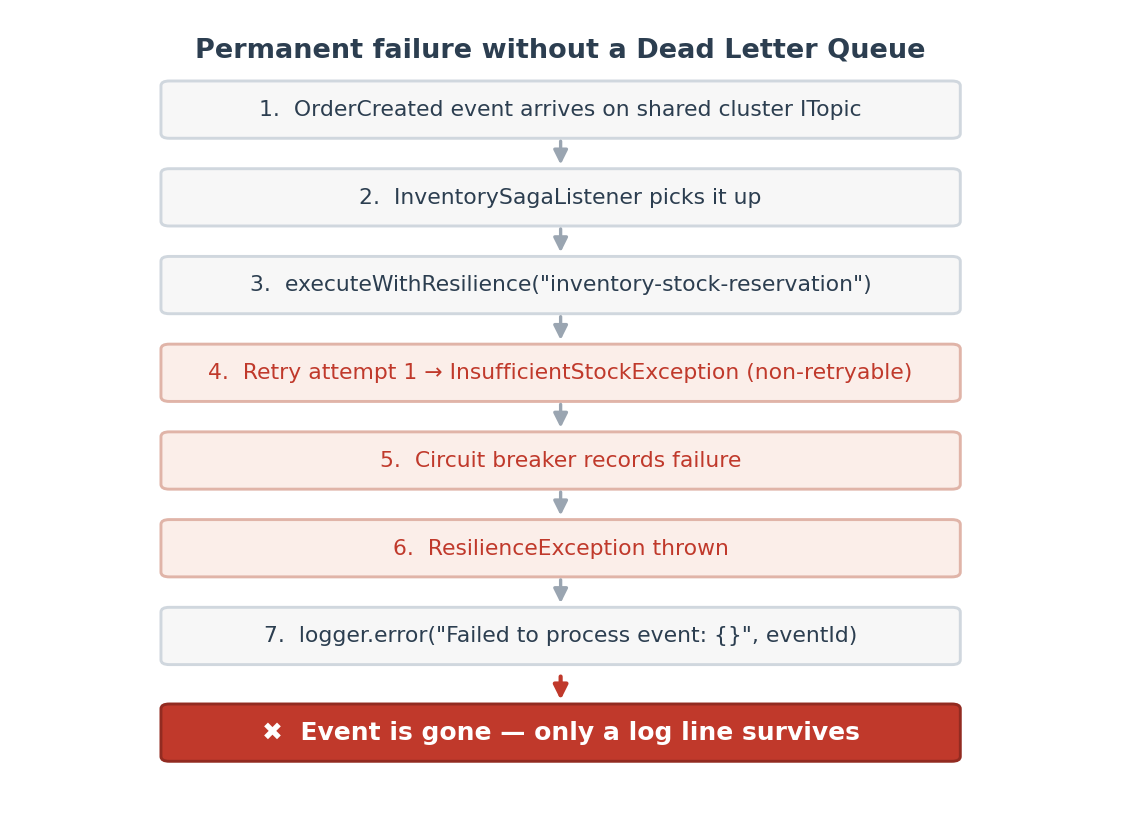
That log message? That’s all you’ve got. In production, recovering from this means searching logs for the event ID, reconstructing the event payload from other sources, manually fixing whatever went wrong, and then figuring out how to re-trigger the saga step.
A dead letter queue captures the failed event — payload, failure reason, saga context, source service, everything — in a durable store that you can actually query and act on.
The DeadLetterEntry
Each DLQ entry preserves the full failure context:
public class DeadLetterEntry {

    private String dlqEntryId;       // UUID — unique DLQ identifier
    private String originalEventId;  // The event that failed
    private String eventType;        // "OrderCreated", "StockReserved", etc.
    private String topicName;        // The ITopic where the event was published
    private GenericRecord eventRecord; // The complete event payload for replay
    private String failureReason;    // Why processing failed
    private Instant failureTimestamp; // When the failure occurred
    private String sourceService;    // Which service failed ("inventory-service")
    private String sagaId;           // Saga context for tracing
    private String correlationId;    // Correlation context for tracing
    private int replayCount;         // How many times this entry has been replayed
    private Status status;           // PENDING, REPLAYED, or DISCARDED

    public enum Status {
        PENDING,    // Awaiting review or replay
        REPLAYED,   // Re-published to original topic
        DISCARDED   // Manually discarded by administrator
    }
}
Construction at the failure site uses a builder:
DeadLetterEntry.builder()
    .originalEventId(eventId)
    .eventType(record.getString("eventType"))
    .topicName("OrderCreated")
    .eventRecord(record)
    .failureReason(error.getMessage())
    .sourceService("inventory-service")
    .sagaId(record.getString("sagaId"))
    .correlationId(record.getString("correlationId"))
    .build();
The eventRecord field is the important one — it holds the complete GenericRecord that was published to the ITopic. When you replay the entry, this exact record gets re-published to the original topic, picking the saga back up where it left off.
The DeadLetterQueueOperations Interface
Same interface-extraction pattern we used for ResilientOperations and ServiceClientOperations (Java 25 Mockito can’t mock concrete classes, so we keep extracting interfaces — it’s becoming a running theme):
public interface DeadLetterQueueOperations {

    void add(DeadLetterEntry entry);

    List<DeadLetterEntry> list(int limit);

    DeadLetterEntry getEntry(String dlqEntryId);

    void replay(String dlqEntryId);

    void discard(String dlqEntryId);

    long count();
}
HazelcastDeadLetterQueue: IMap-Backed Storage
The implementation stores DLQ entries as Compact-serialized GenericRecords in a Hazelcast IMap — same pattern as the HazelcastOutboxStore:
public class HazelcastDeadLetterQueue implements DeadLetterQueueOperations {

    private static final String SCHEMA_NAME = "DeadLetterEntry";
    private final HazelcastInstance hazelcast;
    private final IMap<String, GenericRecord> dlqMap;
    private final DeadLetterQueueProperties properties;
    private final MeterRegistry meterRegistry;

    public HazelcastDeadLetterQueue(HazelcastInstance hazelcast,
                                     DeadLetterQueueProperties properties,
                                     MeterRegistry meterRegistry) {
        this.hazelcast = hazelcast;
        this.dlqMap = hazelcast.getMap(properties.getMapName());
        // ...
    }
}
The DLQ map lives on the shared cluster (falling back to the embedded instance if there’s no shared cluster), so it’s accessible from any service’s admin endpoint. You don’t need to know which service failed — query the DLQ from anywhere and you’ll see everything.
POJO-to-GenericRecord Conversion
Like the outbox store, conversion happens at the boundary:
static GenericRecord toRecord(final DeadLetterEntry entry) {
    return GenericRecordBuilder.compact(SCHEMA_NAME)
            .setString("dlqEntryId", entry.getDlqEntryId())
            .setString("originalEventId", entry.getOriginalEventId())
            .setString("eventType", entry.getEventType())
            .setString("topicName", entry.getTopicName())
            .setGenericRecord("eventRecord", entry.getEventRecord())
            .setString("failureReason", entry.getFailureReason())
            .setInt64("failureTimestamp", entry.getFailureTimestamp().toEpochMilli())
            .setString("sourceService", entry.getSourceService())
            .setString("sagaId", entry.getSagaId())
            .setString("correlationId", entry.getCorrelationId())
            .setInt32("replayCount", entry.getReplayCount())
            .setString("status", entry.getStatus().name())
            .build();
}
Note setGenericRecord(“eventRecord”, …) — Compact serialization handles nested GenericRecords natively. The full event payload comes along for the ride without any special serialization work on our part.
Replay
This is where the DLQ earns its keep. Once you’ve figured out what went wrong and fixed it — restocked inventory, restarted a flaky service, whatever — you replay the entry:
@Override
public void replay(final String dlqEntryId) {
    final GenericRecord record = dlqMap.get(dlqEntryId);
    if (record == null) {
        throw new IllegalArgumentException("DLQ entry not found: " + dlqEntryId);
    }

    final DeadLetterEntry entry = fromRecord(record);

    if (entry.getStatus() != DeadLetterEntry.Status.PENDING) {
        throw new IllegalStateException(
                "Cannot replay entry in status " + entry.getStatus());
    }
    if (entry.getReplayCount() >= properties.getMaxReplayAttempts()) {
        throw new IllegalStateException(
                "Max replay attempts (" + properties.getMaxReplayAttempts() + ") exceeded");
    }

    // Re-publish to the original topic
    final GenericRecord eventRecord = entry.getEventRecord();
    if (eventRecord != null && entry.getTopicName() != null) {
        final ITopic<GenericRecord> topic = hazelcast.getTopic(entry.getTopicName());
        topic.publish(eventRecord);
    }

    // Update entry status
    entry.setReplayCount(entry.getReplayCount() + 1);
    entry.setStatus(DeadLetterEntry.Status.REPLAYED);
    dlqMap.set(dlqEntryId, toRecord(entry));

    meterRegistry.counter("dlq.entries.replayed").increment();
}
A few safety guards here. Only PENDING entries can be replayed — you can’t accidentally replay something that was already replayed or discarded. There’s a configurable max replay count (default 3) to prevent infinite replay loops if the underlying issue isn’t actually fixed. And if the eventRecord is somehow null (shouldn’t happen, but defensive coding), the status updates without attempting a publish.
Monitoring Queue Depth
The count() method uses a Hazelcast predicate to count only PENDING entries:
@Override
public long count() {
    final Collection<GenericRecord> pending = dlqMap.values(
            Predicates.equal("status", DeadLetterEntry.Status.PENDING.name()));
    return pending.size();
}
A DLQ count above zero for more than a few minutes is a flag that something needs attention. Wire this to an alert and you’ll know about failed events before anyone files a ticket.
Admin REST Endpoints
The DeadLetterQueueController exposes the DLQ through REST:
@RestController
@RequestMapping("/api/admin/dlq")
@Tag(name = "Dead Letter Queue")
public class DeadLetterQueueController {

    @GetMapping
    public ResponseEntity<List<DeadLetterEntry>> list(
            @RequestParam(defaultValue = "20") int limit) {
        return ResponseEntity.ok(deadLetterQueue.list(limit));
    }

    @GetMapping("/count")
    public ResponseEntity<Map<String, Long>> count() {
        return ResponseEntity.ok(Map.of("count", deadLetterQueue.count()));
    }

    @GetMapping("/{id}")
    public ResponseEntity<DeadLetterEntry> getEntry(@PathVariable String id) { ... }

    @PostMapping("/{id}/replay")
    public ResponseEntity<Map<String, String>> replay(@PathVariable String id) { ... }

    @DeleteMapping("/{id}")
    public ResponseEntity<Map<String, String>> discard(@PathVariable String id) { ... }
}
A typical investigation looks like this:
# How many pending entries?
curl http://localhost:8082/api/admin/dlq/count
# {"count": 2}

# What are they?
curl http://localhost:8082/api/admin/dlq
# [{"dlqEntryId":"abc-123", "originalEventId":"evt-456",
#   "eventType":"OrderCreated", "failureReason":"Insufficient stock for product PROD-789",
#   "sourceService":"inventory-service", "status":"PENDING", ...}]

# Get the full details on one
curl http://localhost:8082/api/admin/dlq/abc-123

# Fix the problem (restock inventory), then replay
curl -X POST http://localhost:8082/api/admin/dlq/abc-123/replay
# {"status":"replayed", "dlqEntryId":"abc-123"}

# Or discard if the saga already timed out and compensation ran
curl -X DELETE http://localhost:8082/api/admin/dlq/abc-123
# {"status":"discarded", "dlqEntryId":"abc-123"}
Integration with Saga Listeners
Each saga listener injects the DLQ as an optional dependency:
@Autowired(required = false)
public void setDeadLetterQueue(DeadLetterQueueOperations deadLetterQueue) {
    this.deadLetterQueue = deadLetterQueue;
}
Failed events get routed to the DLQ in the error handler:
private void sendToDeadLetterQueue(GenericRecord record, String topicName, Throwable error) {
    String eventId = record.getString("eventId");
    if (deadLetterQueue != null) {
        try {
            deadLetterQueue.add(DeadLetterEntry.builder()
                    .originalEventId(eventId)
                    .eventType(record.getString("eventType"))
                    .topicName(topicName)
                    .eventRecord(record)
                    .failureReason(error.getMessage())
                    .sourceService("inventory-service")
                    .sagaId(record.getString("sagaId"))
                    .correlationId(record.getString("correlationId"))
                    .build());
            logger.warn("Event {} sent to DLQ after failure: {}", eventId, error.getMessage());
        } catch (Exception dlqError) {
            logger.error("Failed to send event {} to DLQ: {}", eventId, dlqError.getMessage());
        }
    } else {
        // Fallback: existing behavior (log only)
        if (error instanceof ResilienceException) {
            logger.warn("Circuit breaker open, saga step deferred: eventId={}", eventId);
        } else {
            logger.error("Failed to process event: {}", eventId, error);
        }
    }
}
The try/catch around deadLetterQueue.add() is defensive. If the DLQ itself fails — shared cluster unreachable, say — we fall back to logging. The DLQ is best-effort, not a hard requirement. Losing an event and failing to capture it in the DLQ would be truly unlucky, but it shouldn’t bring the service down.
Part 2: Idempotency Guard
The Problem
The transactional outbox gives us at-least-once delivery. Combined with ITopic’s own delivery behavior (listeners that reconnect after a brief disconnection may receive messages again), the same event can arrive at a consumer more than once:
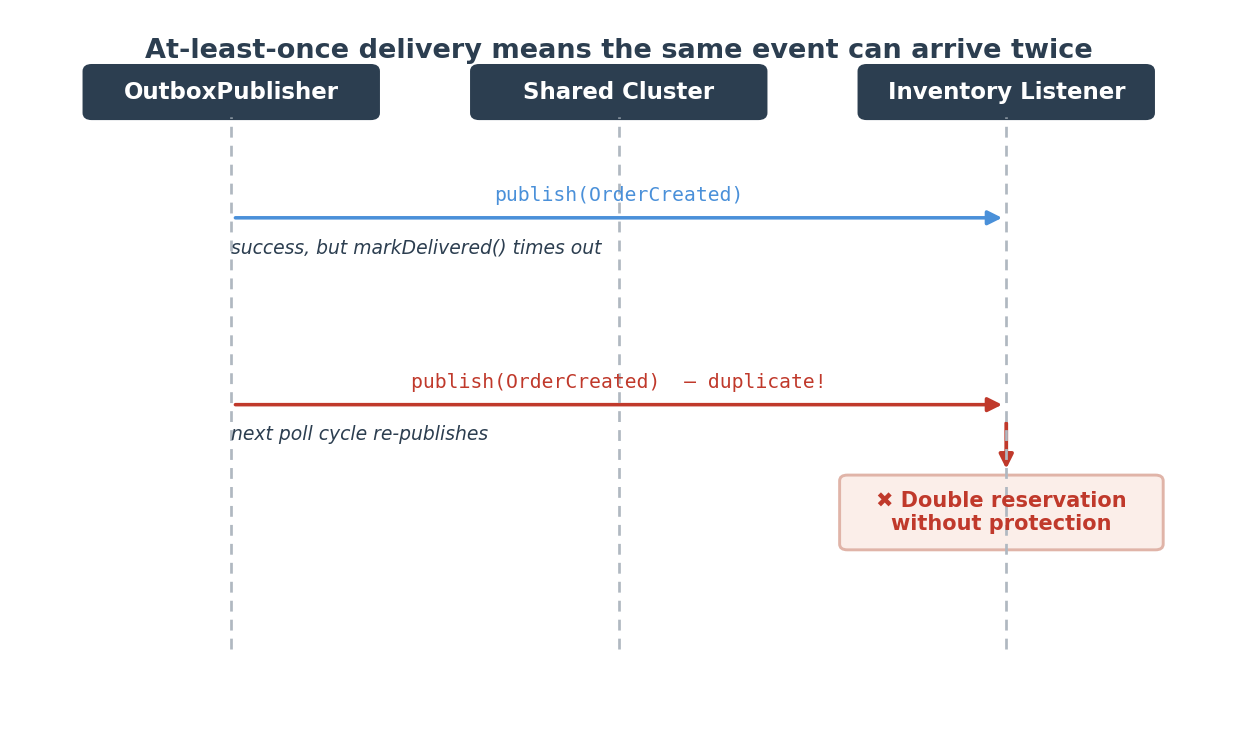
Without protection, inventory gets reserved twice. The customer gets charged twice. The order gets confirmed twice. Nobody wants that.
Atomic Check-and-Claim
The fix is Hazelcast’s putIfAbsent — an atomic, cluster-wide check-and-set that ensures each event ID gets processed exactly once:
public class HazelcastIdempotencyGuard implements IdempotencyGuard {

    private final IMap<String, Long> processedEventsMap;
    private final long ttlMillis;
    private final MeterRegistry meterRegistry;

    public HazelcastIdempotencyGuard(HazelcastInstance hazelcast,
                                      IdempotencyProperties properties,
                                      MeterRegistry meterRegistry) {
        this.processedEventsMap = hazelcast.getMap(properties.getMapName());
        this.ttlMillis = properties.getTtl().toMillis();
        this.meterRegistry = meterRegistry;
    }

    @Override
    public boolean tryProcess(final String eventId) {
        Long previous = processedEventsMap.putIfAbsent(
                eventId, System.currentTimeMillis(), ttlMillis, TimeUnit.MILLISECONDS);

        boolean firstTime = (previous == null);
        meterRegistry.counter("idempotency.checks",
                "result", firstTime ? "miss" : "hit").increment();

        if (!firstTime) {
            logger.debug("Duplicate event detected: eventId={}", eventId);
        }

        return firstTime;
    }
}
The interface is one method:
public interface IdempotencyGuard {
    boolean tryProcess(String eventId);
}
Returns true if this is the first time the event ID has been seen — go ahead and process it. Returns false if someone already claimed it — skip.
How putIfAbsent Works
IMap.putIfAbsent(key, value, ttl, timeUnit) is atomic. If the key doesn’t exist, it inserts the pair and returns null. If it does exist, it returns the existing value and does nothing. This atomicity holds across cluster members — two listeners on different nodes processing the same event simultaneously will never both get null. Exactly one wins, the other backs off.
TTL: Forgetting Old Events
The putIfAbsent includes a TTL (default: 1 hour). After that, the event ID is removed from the map, and the same event could theoretically be reprocessed if it somehow arrived again.
Why an hour? It’s a memory management decision. Without a TTL, the processed events map grows forever. With a 1-hour window, we hold at most an hour’s worth of event IDs, which is bounded and predictable. Since our outbox publisher has a 1-second poll interval with 5 retries, duplicates arrive within seconds — an hour of margin is more than sufficient.
Integration with Saga Listeners
Each saga listener checks the guard at the top of its message handler:
class OrderCreatedListener implements MessageListener<GenericRecord> {

    @Override
    public void onMessage(Message<GenericRecord> message) {
        GenericRecord record = message.getMessageObject();

        String eventId = record.getString("eventId");
        if (idempotencyGuard != null && eventId != null
                && !idempotencyGuard.tryProcess(eventId)) {
            logger.debug("Duplicate event {} already processed, skipping", eventId);
            return;
        }

        // ... proceed with normal processing
    }
}
Three null checks for graceful degradation: if idempotency isn’t configured, process everything (no deduplication). If the event doesn’t have an ID, skip the check. If tryProcess() returns false, it’s a duplicate — drop it silently.
The Processed Events Map
The map lives on the shared cluster, so deduplication works across all service instances:
| Key | Value | TTL |
|---|---|---|
| evt-abc-123 | 1738000000000 (timestamp) | 1 hour |
| evt-def-456 | 1738000001000 | 1 hour |
| evt-ghi-789 | 1738000002000 | 1 hour |
The value — a processing timestamp — is purely informational. Only the key’s presence or absence matters for deduplication. But the timestamp is handy for debugging: it tells you exactly when an event was first processed.
How the Three Patterns Work Together
The outbox, DLQ, and idempotency guard form a complete reliability pipeline:
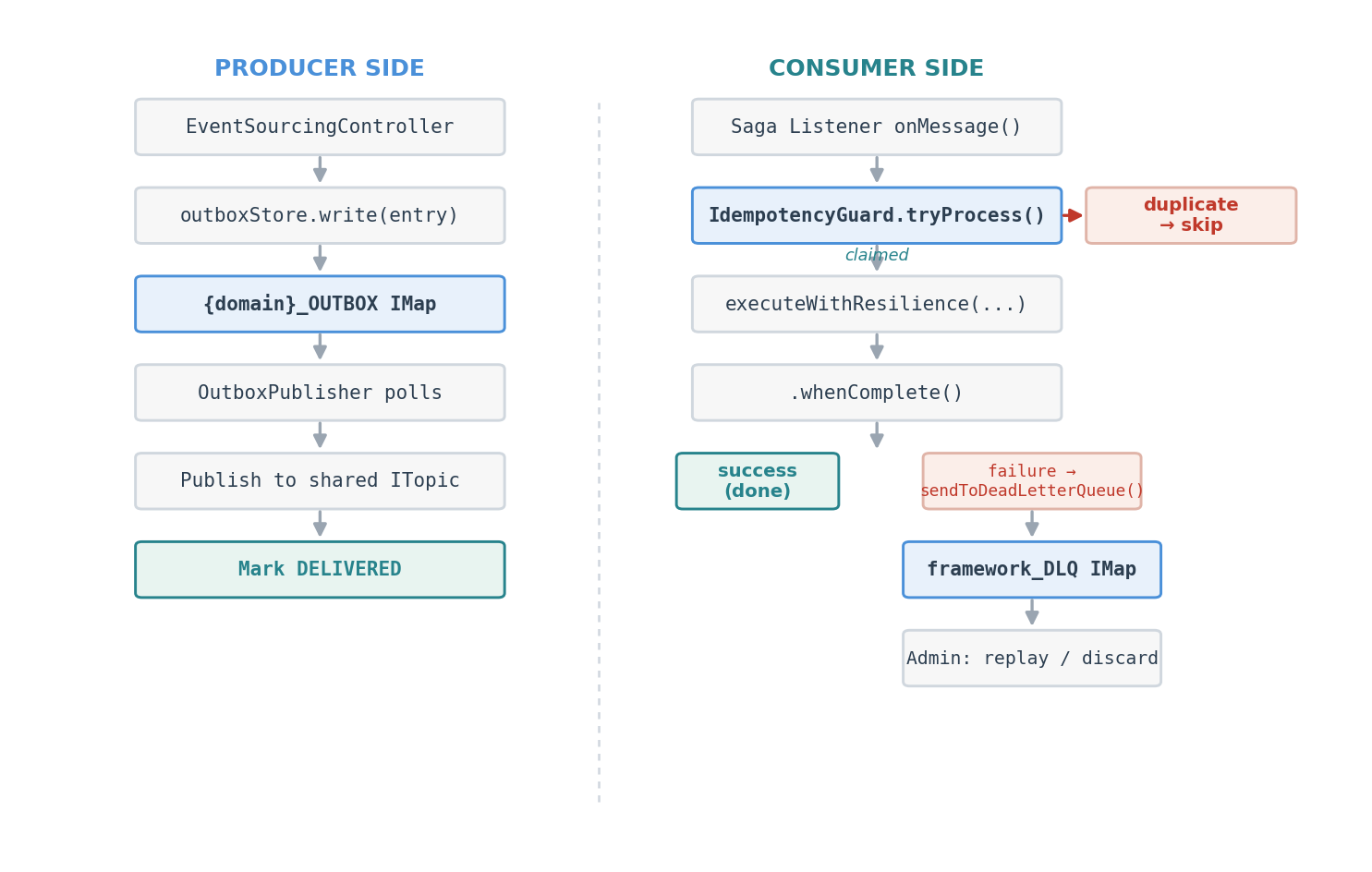
Let’s walk through what happens when things go wrong.
The OrderCreated event comes out of the Jet pipeline and gets written to the outbox. The OutboxPublisher picks it up, publishes to the shared cluster’s OrderCreated ITopic, and tries to mark it DELIVERED. But the markDelivered call times out. Next poll cycle, the publisher re-publishes the same event. Now it’s been delivered twice.
Over on the consumer side, the Inventory Service’s OrderCreatedListener receives both copies. The first call to idempotencyGuard.tryProcess(“evt-123”) returns true — process it. The second call returns false — duplicate, skip it. Only one stock reservation happens.
But that first delivery hits a problem: the product is out of stock. InsufficientStockException is non-retryable. The circuit breaker records the failure, ResilienceException propagates up to whenComplete(), and sendToDeadLetterQueue() captures everything — the full event payload, the failure reason, the saga ID, the source service. It’s all sitting in the framework_DLQ IMap, waiting.
An operator (or an LLM, as we’ll see in a moment) checks the DLQ, sees the pending entry, restocks the product, and replays the event. The OrderCreated record gets re-published to the ITopic, the saga picks up, and the order completes.
One wrinkle: the replayed event carries the same eventId as the original. If the 1-hour idempotency TTL hasn’t expired yet, the guard will block it as a duplicate. In practice this isn’t an issue — by the time you’ve investigated the failure, diagnosed the root cause, and fixed it, an hour has usually passed. It’s a deliberate trade-off: short-window deduplication versus immediate replay. We chose deduplication.
Configuration Reference
Dead Letter Queue: framework.dlq.*
| Property | Default | Description |
|---|---|---|
| enabled | true | Master toggle |
| map-name | framework_DLQ | IMap name on shared cluster |
| max-replay-attempts | 3 | Maximum replays before permanent block |
| entry-ttl | 168h | 7-day retention for DLQ entries |
Idempotency Guard: framework.idempotency.*
| Property | Default | Description |
|---|---|---|
| enabled | true | Master toggle |
| map-name | framework_PROCESSED_EVENTS | IMap name on shared cluster |
| ttl | 1h | How long to remember processed event IDs |
Metrics
| Metric | Type | Description |
|---|---|---|
| dlq.entries.added | Counter | Events added to the DLQ |
| dlq.entries.replayed | Counter | Events replayed from the DLQ |
| dlq.entries.discarded | Counter | Events discarded from the DLQ |
| idempotency.checks | Counter (tagged: result=hit|miss) | Deduplication checks |
The Complete Resilience Stack
Across Parts 7, 8, and 9, we’ve built five interlocking patterns:
| Pattern | Layer | Purpose | Protects Against |
|---|---|---|---|
| Circuit Breaker | Consumer | Automatic service isolation | Cascade failures |
| Retry + Backoff | Consumer | Transient failure recovery | Network blips, brief outages |
| Transactional Outbox | Producer | Guaranteed delivery | Shared cluster unavailability |
| Dead Letter Queue | Consumer | Failure capture and replay | Permanent processing failures |
| Idempotency Guard | Consumer | Exactly-once processing | Duplicate delivery |
They’re all optional — enabled by default, disabled with a single property toggle. They’re all auto-configured by Spring Boot. They all expose Micrometer metrics. And when disabled, the framework falls back to its previous behavior without breaking anything.
Three articles ago, we had a fire-and-forget event pipeline where a network blip could lose an event forever. Now we have guaranteed delivery, deduplication, failure capture, and replay. Same pipeline, five patterns later.
Try It Yourself
The demo script includes a complete DLQ investigation scenario — fault injection, failure capture, investigation, and replay — in 11 guided steps:
./scripts/demo-scenarios.sh 7
That’s the curl-based version. No LLM required.
The AI-Powered Version
This is more fun. Connect the MCP server from Part 6 to your LLM client — Claude Desktop, Claude Code, ChatGPT, whatever you’ve got — and try this prompt:
The LLM calls runDemo to set up the scenario, then listDlqEntries and inspectDlqEntry to investigate. It tells you what happened — which event failed, at which service, and why — and suggests a fix. You say “replay it.” It calls replayDlqEntry, the saga completes, and you’ve just done incident response through a conversation.
No curl commands. No JSON parsing. No copy-pasting UUIDs. The LLM handles the plumbing while you make the decisions.
If the LLM already has context from earlier in the session, a shorter version works:
Next up: Choreography vs Orchestration: Two Saga Patterns
Previous: Hazelcast Transactional Outbox: Guaranteed Delivery


Leave a Reply