Tag: materialized views

  • Materialized Views for Fast Queries

    Part 3 in the “Building Event-Driven Microservices with Hazelcast” series


    Introduction

    We’ve established that events are the source of truth (Part 1) and built a Jet pipeline to process them (Part 2). But we’ve been dancing around a question that anyone who’s thought about event sourcing for more than five minutes will ask:

    If everything is stored as a sequence of events, how do you actually query anything?


    The Problem with Raw Events

    The naive answer is “replay them.” Want the current state of customer 123? Walk through every event that ever happened to customer 123 and apply them in order:

    public Customer getCustomer(String customerId) {
        List<Event> events = eventStore.getEventsForKey(customerId);
    
        Customer customer = null;
        for (Event event : events) {
            customer = event.apply(customer);
        }
        return customer;
    }
    

    This works. It’s also terrible. A customer with 10 events takes 10x longer to load than a brand-new customer with 1. A customer who’s been active for three years and has 1,000 events? Good luck serving that from an API endpoint with a latency SLA.

    You need O(1) lookups, not O(n) replays on every GET request.


    CQRS: The Pattern You Don’t Get to Opt Out Of

    This is where event sourcing stops being a standalone pattern and starts demanding an architectural partner.

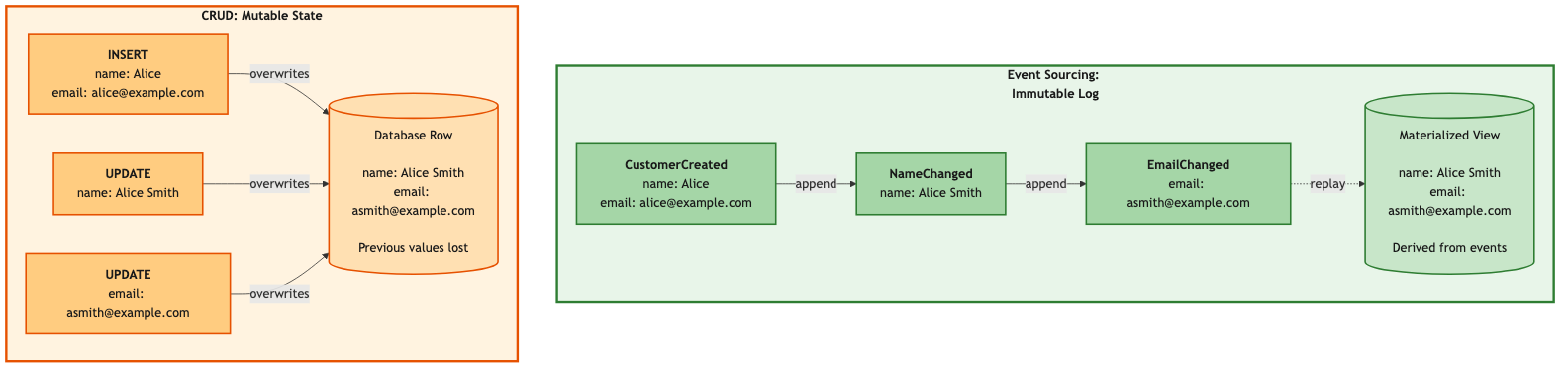
    In a CRUD system, one table does everything. You INSERT into it, UPDATE it, and SELECT from it. The read model and the write model are the same thing — a row in a database. Simple.

    Event sourcing breaks that. Your write model is an append-only event log. Great for durability, great for auditing, terrible for queries. You can’t SELECT a customer’s current address from a log of every change that’s ever happened to them. Not efficiently, anyway.

    So you need a separate read model. A structure that’s optimized for the queries your application actually needs. This separation — commands go to the write model, queries go to the read model — is CQRS: Command Query Responsibility Segregation.

    We didn’t choose CQRS because it appeared on a list of architecture buzzwords. Event sourcing forced us into it. Once your source of truth is an event log, you need a separate read path. There’s no way around it.

    Now, CQRS is a general pattern. The read model could be a relational database you project events into for complex SQL queries. It could be Elasticsearch for full-text search, or a data warehouse for analytics. In our framework, we project into Hazelcast IMaps — materialized views that update in real-time as events flow through the Jet pipeline. The IMap gives us sub-millisecond lookups and keeps the read model co-located with the processing engine. No network hop, no separate database to manage.

    Materialized views are our implementation of the read side of CQRS.


    What is a Materialized View?

    A materialized view is a pre-computed projection. Instead of computing state on every query, you compute it once — when the event is processed in Stage 4 of the pipeline — and store the result. Queries just look up the stored result. In event sourcing literature, the component responsible for maintaining these projections is sometimes called a projection engine. In our framework, that’s the Jet pipeline from Part 2.
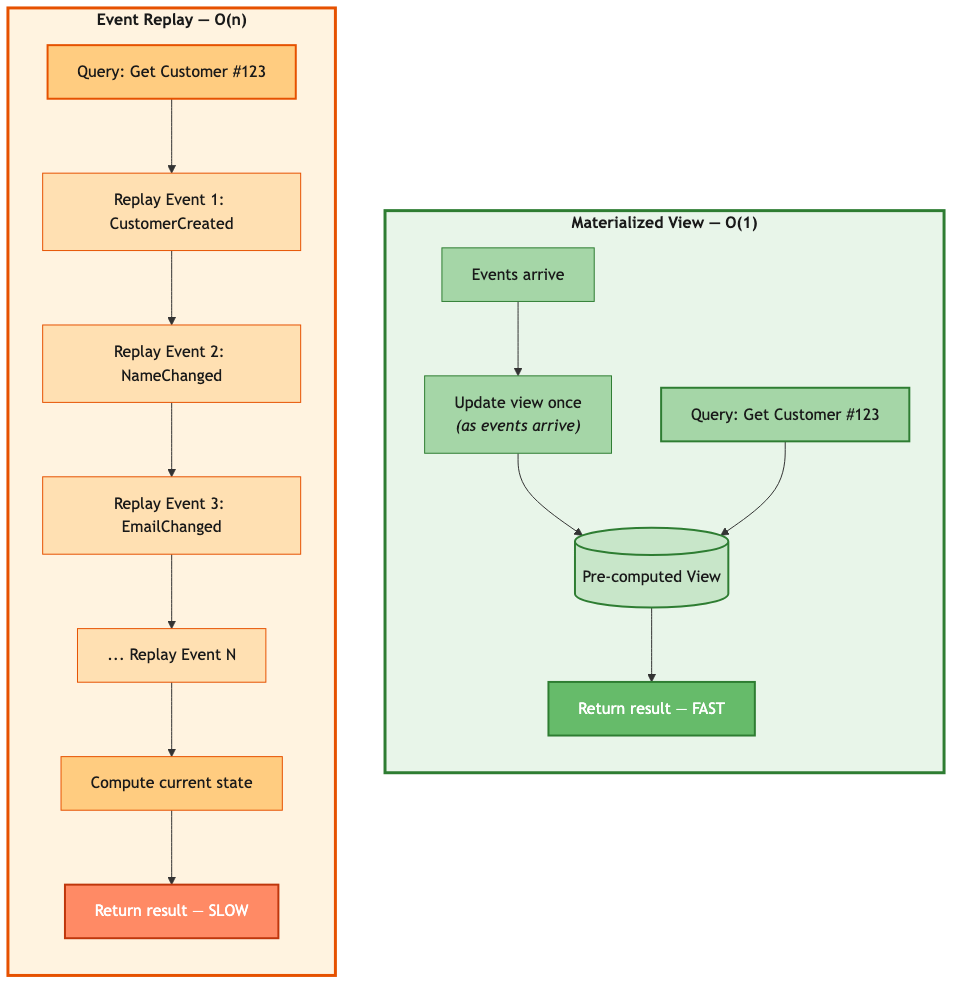
    Event replay O(n) vs materialized view O(1)

    The write path pays the cost once. Every subsequent read is free. The more reads you have per write — and most systems are read-heavy — the bigger the win.


    The ViewStore

    The HazelcastViewStore wraps an IMap:

    public class HazelcastViewStore<K> {
    
        private final IMap<K, GenericRecord> viewMap;
        private final String viewName;
    
        public HazelcastViewStore(HazelcastInstance hazelcast, String viewName) {
            this.viewName = viewName + "_VIEW";
            this.viewMap = hazelcast.getMap(this.viewName);
        }
    
        public Optional<GenericRecord> get(K key) {
            return Optional.ofNullable(viewMap.get(key));
        }
    
        public void put(K key, GenericRecord value) {
            viewMap.set(key, value);
        }
    
        public void remove(K key) {
            viewMap.delete(key);
        }
    
        public GenericRecord executeOnKey(K key,
                EntryProcessor<K, GenericRecord, GenericRecord> processor) {
            return viewMap.executeOnKey(key, processor);
        }
    }
    

    We use GenericRecord for the values — Hazelcast’s schema-flexible format that doesn’t require Java classes on the cluster. The executeOnKey method gives us atomic updates through Hazelcast’s EntryProcessor. As we discussed in Part 2, the EntryProcessor runs on the partition thread for that key — the same single-threaded-per-partition model that makes our pipeline ordering work. It reads current state, applies the change, and writes the result, all on one thread with no possibility of a concurrent modification. Atomic by architecture, not by locking.


    The ViewUpdater

    The ViewUpdater is the abstract class that each domain implements. It defines two things: how to extract the key from an event, and how to apply the event to produce new state.

    public abstract class ViewUpdater<K> implements Serializable {
    
        protected final transient HazelcastViewStore<K> viewStore;
    
        protected abstract K extractKey(GenericRecord eventRecord);
    
        protected abstract GenericRecord applyEvent(
            GenericRecord eventRecord,
            GenericRecord currentState);
    
        public GenericRecord updateDirect(GenericRecord eventRecord) {
            K key = extractKey(eventRecord);
            if (key == null) {
                logger.warn("Could not extract key from event");
                return null;
            }
    
            GenericRecord currentState = viewStore.get(key).orElse(null);
            GenericRecord updatedState = applyEvent(eventRecord, currentState);
    
            if (updatedState != null) {
                viewStore.put(key, updatedState);
            } else if (currentState != null) {
                viewStore.remove(key);
            }
    
            return updatedState;
        }
    }
    

    Returning null from applyEvent is the deletion convention. The updater removes the entry from the view. Everything else either creates a new entry or updates an existing one.


    Example: Customer View

    Here’s what a concrete implementation looks like:

    public class CustomerViewUpdater extends ViewUpdater<String> {
    
        public static final String VIEW_NAME = "Customer";
    
        public CustomerViewUpdater(HazelcastViewStore<String> viewStore) {
            super(viewStore);
        }
    
        @Override
        protected String extractKey(GenericRecord eventRecord) {
            return eventRecord.getString("key");
        }
    
        @Override
        protected GenericRecord applyEvent(GenericRecord event, GenericRecord current) {
            String eventType = getEventType(event);
    
            return switch (eventType) {
                case "CustomerCreated" -> createCustomer(event);
                case "CustomerUpdated" -> updateCustomer(event, current);
                case "CustomerStatusChanged" -> changeStatus(event, current);
                case "CustomerDeleted" -> null;
                default -> {
                    logger.debug("Unknown event type: {}", eventType);
                    yield current;
                }
            };
        }
    
        private GenericRecord createCustomer(GenericRecord event) {
            Instant now = Instant.now();
            return GenericRecordBuilder.compact(VIEW_NAME)
                .setString("customerId", event.getString("key"))
                .setString("email", event.getString("email"))
                .setString("name", event.getString("name"))
                .setString("address", event.getString("address"))
                .setString("phone", getStringField(event, "phone"))
                .setString("status", "ACTIVE")
                .setInt64("createdAt", now.toEpochMilli())
                .setInt64("updatedAt", now.toEpochMilli())
                .build();
        }
    
        private GenericRecord updateCustomer(GenericRecord event, GenericRecord current) {
            if (current == null) {
                logger.warn("Update event for non-existent customer: {}",
                    event.getString("key"));
                return null;
            }
    
            return GenericRecordBuilder.compact(VIEW_NAME)
                .setString("customerId", current.getString("customerId"))
                .setString("email", coalesce(event.getString("email"),
                                             current.getString("email")))
                .setString("name", coalesce(event.getString("name"),
                                            current.getString("name")))
                .setString("address", coalesce(event.getString("address"),
                                               current.getString("address")))
                .setString("phone", coalesce(getStringField(event, "phone"),
                                             current.getString("phone")))
                .setString("status", current.getString("status"))
                .setInt64("createdAt", current.getInt64("createdAt"))
                .setInt64("updatedAt", Instant.now().toEpochMilli())
                .build();
        }
    
        private GenericRecord changeStatus(GenericRecord event, GenericRecord current) {
            if (current == null) return null;
    
            return GenericRecordBuilder.compact(VIEW_NAME)
                .setString("customerId", current.getString("customerId"))
                .setString("email", current.getString("email"))
                .setString("name", current.getString("name"))
                .setString("address", current.getString("address"))
                .setString("phone", current.getString("phone"))
                .setString("status", event.getString("newStatus"))
                .setInt64("createdAt", current.getInt64("createdAt"))
                .setInt64("updatedAt", Instant.now().toEpochMilli())
                .build();
        }
    
        private String coalesce(String newValue, String currentValue) {
            return newValue != null ? newValue : currentValue;
        }
    }
    

    The coalesce pattern in updateCustomer handles partial updates — if the event only includes a new email but not a new name, we keep the existing name. The updatedAt timestamp always advances, which is useful for staleness checks later.


    Cross-Service Views: Denormalization Without the Guilt

    This is where materialized views get genuinely powerful.

    Consider displaying an order. The raw order data has a customer ID and product IDs, but no names, no emails, no SKUs. To show a complete order in the UI, you need data that lives in two other services.

    The traditional approach:

    Order order = orderRepository.findById(orderId);
    Customer customer = accountService.getCustomer(order.getCustomerId());  // HTTP call
    for (LineItem item : order.getItems()) {
        Product product = inventoryService.getProduct(item.getProductId());  // HTTP call
        item.setProductName(product.getName());
    }
    

    Three services involved at query time. If Account is slow, your order page is slow. If Inventory is down, your order page is broken. And you’ve just coupled three services together at runtime, which is exactly what microservices were supposed to prevent.

    With event sourcing, you build an enriched view that bakes in the data from other services at write time:

    public class EnrichedOrderViewUpdater extends ViewUpdater<String> {
    
        private final IMap<String, GenericRecord> customerView;
        private final IMap<String, GenericRecord> productView;
    
        @Override
        protected GenericRecord applyEvent(GenericRecord event, GenericRecord current) {
            String eventType = getEventType(event);
    
            if ("OrderCreated".equals(eventType)) {
                return createEnrichedOrder(event);
            }
            return current;
        }
    
        private GenericRecord createEnrichedOrder(GenericRecord event) {
            String customerId = event.getString("customerId");
    
            // Look up customer from local view — no HTTP call
            GenericRecord customer = customerView.get(customerId);
            String customerName = customer != null ?
                customer.getString("name") : "Unknown";
            String customerEmail = customer != null ?
                customer.getString("email") : "";
    
            List<GenericRecord> enrichedItems = new ArrayList<>();
            // ... iterate through items, look up products from productView
    
            return GenericRecordBuilder.compact("EnrichedOrder")
                .setString("orderId", event.getString("key"))
                .setString("customerId", customerId)
                .setString("customerName", customerName)
                .setString("customerEmail", customerEmail)
                .setArrayOfGenericRecord("lineItems",
                    enrichedItems.toArray(new GenericRecord[0]))
                .setString("status", "PENDING")
                .build();
        }
    }
    

    The result is a single IMap entry with everything you need:

    {
      "orderId": "order-123",
      "customerId": "cust-456",
      "customerName": "Alice Smith",
      "customerEmail": "alice@example.com",
      "lineItems": [
        {
          "productId": "prod-789",
          "productName": "Gaming Laptop",
          "sku": "LAPTOP-001",
          "quantity": 2,
          "unitPrice": 49.99
        }
      ],
      "status": "PENDING"
    }
    

    One lookup. Zero service calls. Works if Account and Inventory are both down for maintenance.

    If you’re from a relational database background, denormalization feels wrong — it violates third normal form, it duplicates data, your DBA would glare at you. But in an event-sourced system, the events are the normalized source of truth. Views are disposable projections. Denormalize all you want. If Alice changes her name, the CustomerUpdated event flows through, and you can update the enriched order view to reflect it. Or not, depending on whether you care — the order was placed when she was “Alice Smith,” and that’s what the event says.


    View Rebuilding

    One of the benefits we mentioned in Part 1 — and it’s worth seeing in practice. Found a bug in your view update logic? Fix the code, clear the view, replay the events:

    public <D extends DomainObject<K>, E extends DomainEvent<D, K>> long rebuild(
            EventStore<D, K, E> eventStore) {
    
        logger.info("Starting view rebuild for {} from {}",
            viewStore.getViewName(), eventStore.getStoreName());
    
        viewStore.clear();
    
        AtomicLong count = new AtomicLong(0);
        eventStore.replayAll(eventRecord -> {
            updateDirect(eventRecord);
            count.incrementAndGet();
        });
    
        logger.info("Rebuild complete. Processed {} events", count.get());
        return count.get();
    }
    

    Same mechanism handles schema migrations, new view types (write a new ViewUpdater, replay existing events — instant backfill), and disaster recovery. With CRUD, corrupted data is permanently corrupted. With event sourcing, the correct data is always recoverable from the event stream.


    View Patterns

    Not every view is a 1:1 entity projection. Here are the patterns we use:

    Entity View — one entry per domain object. Customer events produce one Customer view entry, keyed by customer ID. This is the default.

    Lookup View — index by an alternate key. A Customer-by-Email view maps email → customerId, so you can find a customer by email without scanning. When a customer changes their email, the old entry gets deleted and a new one created.

    Summary View — aggregate across entities. A Customer Order Summary view tracks customerId → { totalOrders, totalSpent }, incrementing on OrderCreated and decrementing on OrderCancelled.

    Enriched View — denormalization across services, as we just covered. Order events plus customer and product data produce a self-contained order view.

    Time-Series View — track changes over time. Daily inventory snapshots keyed by date + productId, updated by stock reservation and release events.

    You can maintain as many views as you need from the same event stream. They’re independent — a bug in one doesn’t affect the others, and each can be rebuilt separately.


    Handling View Staleness

    Views are updated asynchronously by the pipeline. There’s a brief window — usually measured in milliseconds — where the view might not reflect the very latest event. Three ways to deal with it:

    Accept it. For most reads, a few milliseconds of staleness is fine. Just read the view.

    Customer customer = customerView.get(customerId);
    

    Wait for it. When you need to read your own writes — like returning a newly created customer right after creating them — wait for the pipeline to complete:

    CompletableFuture<EventCompletion> future = controller.handleEvent(event, correlationId);
    future.join();
    
    // Now the view is guaranteed to reflect this event
    Customer customer = customerView.get(customerId);
    

    Check it. Include a version or timestamp and verify the view is current enough:

    long expectedVersion = event.getTimestamp().toEpochMilli();
    Customer customer = customerView.get(customerId);
    if (customer.getUpdatedAt() < expectedVersion) {
        // View not yet updated — wait or return the event data directly
    }
    

    Our framework’s handleEvent returns a CompletableFuture specifically to make the “wait for it” path easy. Most API endpoints use it.


    Performance

    Materialized view reads are IMap lookups. On a single laptop (M4 MacBook Pro, 16GB, Docker Compose):

    Operation Latency
    View read (local partition) < 0.1ms
    View read (remote partition) < 0.5ms
    View read (near cache) < 0.01ms
    View update (pipeline Stage 4) < 1ms

    For views that get read far more often than they’re written — which is most of them — near cache is worth enabling:

    hazelcast:
      map:
        Customer_VIEW:
          near-cache:
            name: customer-near-cache
            time-to-live-seconds: 30
            max-idle-seconds: 10
            eviction:
              eviction-policy: LRU
              max-size-policy: ENTRY_COUNT
              size: 10000
    

    This caches view entries locally on the client side. Reads drop to microseconds. The TTL ensures stale entries get refreshed, and LRU eviction keeps memory bounded.


    Predefined Queries vs. Ad-Hoc Access

    Everything we’ve built so far serves predefined query patterns — get customer by ID, get enriched order, look up product stock. The services expose exactly the queries their API needs, and those queries are fast because the views are designed for them.

    Sooner or later, though, someone from the business side is going to want more. “Show me all orders over $500 in the last 30 days.” “Which customers changed their address this quarter?” Hazelcast supports SQL queries against IMaps — through Management Center, the command-line client, or third-party tools like DBeaver. The capability is there.

    But I wouldn’t be eager to have my production throughput impacted by someone’s exploratory query with a broad predicate scanning thousands of entries. An analyst’s ad-hoc join returning ten thousand rows is a very different workload than a targeted key lookup, and it can absolutely affect the latency your customers see.

    If you want to give analysts this kind of access — and there are good reasons to — consider WAN replication (a Hazelcast Enterprise feature) to duplicate your IMap data into a secondary cluster dedicated to analytics. Analysts query to their heart’s content; production stays untouched. This is really just CQRS taken one step further. We already separated the write model (events) from the operational read model (views). WAN replication separates the operational read model from the analytical read model. Same principle, another level of isolation.


    Practical Advice

    Keep your views focused. A CustomerView for profile queries, a CustomerByEmailView for authentication, a CustomerOrderSummary for order history. Don’t build a CustomerEverythingView that tries to serve every possible query pattern — it’ll be expensive to update and awkward to query.

    Document what events feed each view. When someone asks “why does the order view show the wrong customer name?” you want to be able to trace it: “The order view is updated by OrderCreated events, and it reads customer data from the Customer view at enrichment time. If the customer name changed after the order was created, the order view still shows the name at order time.”

    Handle missing data gracefully. When the enriched order view looks up a customer and gets null — maybe the customer was deleted, maybe the customer event hasn’t propagated yet — don’t crash. Use a sensible default:

    GenericRecord customer = customerView.get(customerId);
    String customerName = customer != null ?
        customer.getString("name") : "Customer " + customerId;
    

    And think about rebuild cost before your event history gets large. Replaying a million events to rebuild a view takes time. Strategies include periodic snapshots (save the view state and replay only from the snapshot forward), incremental rebuilds (track the last processed event sequence), and parallel rebuilds for independent views.


    That covers the read side of CQRS — how we turn an append-only event stream into fast, queryable state. The views are disposable, rebuildable, and independent. Denormalization is a feature, not a compromise. And the whole thing runs at IMap speed because the read model lives in the same platform as the processing engine.

    Next we’ll move from a single service to many. When a business operation has to update state in two or three different services and any one of them can fail, two-phase commit is off the table and you need a different answer. That’s the saga pattern.


    Next up: The Saga Pattern for Distributed Transactions

    Previous: Building the Event Pipeline with Hazelcast Jet

    Code: github.com/myawnhc/hazelcast-microservices-framework — clone it, docker-compose up, and the framework boots locally with sample data.
  • Building the Event Pipeline with Hazelcast Jet

    Part 2 in the “Building Event-Driven Microservices with Hazelcast” series


    Introduction

    In Part 1 we talked about event sourcing — what it is, why it matters, and how events flow through our framework. What we didn’t talk much about is the thing that actually makes the events flow: the Hazelcast Jet pipeline sitting in the middle of everything.

    Jet is Hazelcast’s stream processing engine, and it’s doing all the heavy lifting here. It reads events as they arrive, pushes them through six processing stages — persist, update view, publish, and so on — and it does this with backpressure handling and sub-millisecond latency because everything stays in-memory. No external message broker. No separate stream processor. Jet is embedded right in Hazelcast, which means your event processing pipeline has direct, local access to the same IMaps that store your events and views.

    Let’s walk through how it works.


    The 6-Stage Pipeline

    Six-stage Hazelcast Jet pipeline

    Six stages, each with one task. An event enters on the left and comes out the other side persisted, applied to a view, published to subscribers, and marked complete. If any stage fails, the context carries that information forward so downstream stages can react (usually by skipping).


    Stage 1: Source — Reading from Event Journal

    The pipeline reads events from the pending events IMap, but not by polling it. That would be terrible — you’d burn CPU checking for new entries, you’d introduce latency, and you’d probably miss things under load. Instead, we use the Event Journal.

    The Event Journal is a ring buffer that Hazelcast maintains on each IMap. Every write to the map is recorded in the journal, and Jet can stream directly from it. You configure it on the map:

    Config config = new Config();
    config.getMapConfig("Customer_PENDING")
        .getEventJournalConfig()
        .setEnabled(true)
        .setCapacity(10000);
    

    And then the pipeline reads from it:

    Pipeline pipeline = Pipeline.create();
    
    StreamStage<Map.Entry<PartitionedSequenceKey<K>, GenericRecord>> source = pipeline
        .readFrom(Sources.<PartitionedSequenceKey<K>, GenericRecord>mapJournal(
            pendingMapName,
            JournalInitialPosition.START_FROM_OLDEST
        ))
        .withIngestionTimestamps()
        .setName("1-source-pending-events");
    

    START_FROM_OLDEST means after a restart the pipeline picks up from the beginning of the journal — no events lost. withIngestionTimestamps() stamps each event as it enters the pipeline, which we use later for latency tracking.

    PartitionedSequenceKey: Why the Map Key Isn’t a Simple String

    You probably noticed the key type is PartitionedSequenceKey rather than, say, a customer ID. There’s a reason for that, and it took us a bit to figure out we needed it.

    Jet guarantees that events within the same Hazelcast partition are processed in order. Events across different partitions? No ordering guarantee. They can arrive in any order.

    That’s fine as long as all events for a given entity share the same key. But consider this: you create an account keyed by customer ID, then immediately deposit funds into it keyed by transaction ID. Those two keys might hash to different partitions. Jet could process the deposit before the account exists. The deposit fails. The customer calls support. Nobody’s having a good day.

    PartitionedSequenceKey separates two concerns that are easy to conflate — the event’s unique identity and the partition it should land on:

    public class PartitionedSequenceKey<K>
            implements PartitionAware<K>, Comparable<PartitionedSequenceKey<K>>,
                       Serializable {
    
        private final long sequence;     // Globally unique FlakeId for ordering
        private final K partitionKey;    // Domain object ID for co-location
    
        @Override
        public K getPartitionKey() {
            return partitionKey;  // Hazelcast routes by this, not the full key
        }
    }
    

    The sequence comes from Hazelcast’s FlakeIdGenerator — globally unique, monotonically increasing. The partitionKey is the domain object’s ID (customer ID, not transaction ID). Because the key implements PartitionAware, Hazelcast uses getPartitionKey() for partition assignment instead of hashing the whole composite key. So the account creation and the deposit both route to the customer’s partition, and Jet processes them in sequence order.

    Why This Is Lock-Free

    There’s something worth understanding about why partition-aware routing gives us ordered, atomic processing — and it’s not locking.

    Hazelcast distributes data across 271 partitions (by default), and each partition is owned by exactly one thread — the partition thread. All operations on keys in that partition are executed by that single thread, sequentially. There’s no concurrent access to fight over, so there’s no need for locks, CAS operations, or synchronized blocks. Two events for customer-123 arrive a millisecond apart? They both route to the same partition, and the partition thread processes them one after the other. Ordering and atomicity come from the threading architecture itself.

    This carries through to the materialized view layer too. When we call executeOnKey with an EntryProcessor in Part 3, that processor runs on the partition thread for that key. It reads the current state, applies the event, writes the new state — all in one shot, on one thread, with no possibility of a conflicting update sneaking in between. It’s atomic by construction, not by locking.

    The practical payoff is concurrency without contention. Thousands of events per second can flow through the pipeline, and as long as they’re for different entities, they’re processed in parallel across different partition threads. Events for the same entity are serialized — but by the architecture, not by a bottleneck. You get high throughput and strict per-entity ordering at the same time, and you didn’t write a single line of synchronization code to get it.


    Stage 2: Enrich — Adding Metadata

    Before we do anything with the event, we stamp it with pipeline entry time and extract identification fields. This gives us latency tracking from the moment the event enters the pipeline, not just from when it was created.

    StreamStage<EventContext<K>> enriched = source
        .map(EventSourcingPipeline::enrichEvent)
        .setName("2-enrich-metadata");
    
    private static <K> EventContext<K> enrichEvent(
            Map.Entry<PartitionedSequenceKey<K>, GenericRecord> entry) {
    
        Instant pipelineEntryTime = Instant.now();
        PartitionedSequenceKey<K> key = entry.getKey();
        GenericRecord eventRecord = entry.getValue();
    
        String eventType = extractEventType(eventRecord);
        String eventId = extractEventId(eventRecord);
    
        return new EventContext<>(key, eventRecord, eventType, eventId, pipelineEntryTime);
    }
    

    (Note the static method — that’s not accidental. We’ll come back to why in the architecture section.)

    The EventContext is the envelope that carries the event through all remaining stages:

    private static class EventContext<K> implements Serializable {
    
        final PartitionedSequenceKey<K> key;
        final GenericRecord eventRecord;
        final String eventType;
        final String eventId;
        final Instant pipelineEntryTime;
    
        // Stage completion flags
        boolean persisted;
        boolean viewUpdated;
        boolean published;
    
        // Stage timing
        Instant persistTime;
        Instant viewUpdateTime;
        Instant publishTime;
    }
    

    Each stage sets its own flag and timestamp. If persist fails, persisted stays false, and the view update stage sees that and skips. No event gets partially applied without the context knowing about it.


    Stage 3: Persist — Writing to the Event Store

    This is the durability step. Once an event is in the event store, it’s the permanent record of what happened. Everything else — views, notifications, completions — can be rebuilt from events. This one can’t.

    EventStoreServiceCreator<D, K, E> eventStoreCreator =
        new EventStoreServiceCreator<>(domainName);
    
    ServiceFactory<?, HazelcastEventStore<D, K, E>> eventStoreFactory =
        ServiceFactories.<HazelcastEventStore<D, K, E>>sharedService(eventStoreCreator)
            .toNonCooperative();
    
    StreamStage<EventContext<K>> persisted = enriched
        .mapUsingService(eventStoreFactory, (store, ctx) -> {
            try {
                Instant start = Instant.now();
                store.append(ctx.key, ctx.eventRecord);
                return ctx.withPersisted(true, start);
            } catch (Exception e) {
                return ctx.withPersisted(false, Instant.now());
            }
        })
        .setName("3-persist-event-store");
    

    The ServiceFactory Pattern

    Why the ServiceFactory indirection instead of just passing in an EventStore reference? Because Jet pipelines are distributed. The pipeline definition gets serialized and shipped to whatever nodes Jet decides to run it on. If your lambda captures a reference to a Spring-managed EventStore bean — which holds a HazelcastInstance, database connections, and who knows what else — that serialization is going to fail spectacularly at runtime.

    ServiceFactory solves this: you give Jet a recipe for creating the service, and it creates an instance on each node where the pipeline actually runs.

    public class EventStoreServiceCreator<D extends DomainObject<K>, K,
            E extends DomainEvent<D, K>>
            implements FunctionEx<ProcessorSupplier.Context, HazelcastEventStore<D, K, E>> {
    
        private final String domainName;
    
        @Override
        public HazelcastEventStore<D, K, E> applyEx(ProcessorSupplier.Context ctx) {
            HazelcastInstance hz = ctx.hazelcastInstance();
            return new HazelcastEventStore<>(hz, domainName);
        }
    }
    

    The creator itself is just a domain name string — easily serializable. The heavy objects get created on the target node using that node’s local HazelcastInstance.


    Stage 4: Update View — Applying to Materialized View

    With the event persisted, we update the materialized view. This is where the event’s apply logic runs — transforming the event into current state.

    ViewUpdaterServiceCreator<K> serviceCreator =
        new ViewUpdaterServiceCreator<>(domainName, viewUpdaterClass);
    
    ServiceFactory<?, ViewUpdater<K>> viewUpdaterServiceFactory =
        ServiceFactories.<ViewUpdater<K>>sharedService(serviceCreator)
            .toNonCooperative();
    
    StreamStage<EventContext<K>> viewUpdated = persisted
        .mapUsingService(viewUpdaterServiceFactory, (viewUpdater, ctx) -> {
            if (!ctx.persisted) {
                return ctx;  // Skip if persist failed
            }
            try {
                Instant start = Instant.now();
                viewUpdater.updateDirect(ctx.eventRecord);
                return ctx.withViewUpdated(true, start);
            } catch (Exception e) {
                logger.warn("Failed to update view for event: {}", ctx.eventId, e);
                return ctx.withViewUpdated(false, Instant.now());
            }
        })
        .setName("4-update-materialized-view");
    

    The ViewUpdater is an abstract class — each domain implements its own:

    public abstract class ViewUpdater<K> implements Serializable {
    
        protected final transient HazelcastViewStore<K> viewStore;
    
        protected abstract K extractKey(GenericRecord eventRecord);
    
        protected abstract GenericRecord applyEvent(
            GenericRecord eventRecord,
            GenericRecord currentState);
    
        public GenericRecord updateDirect(GenericRecord eventRecord) {
            K key = extractKey(eventRecord);
            GenericRecord currentState = viewStore.get(key).orElse(null);
            GenericRecord updatedState = applyEvent(eventRecord, currentState);
    
            if (updatedState != null) {
                viewStore.put(key, updatedState);
            } else if (currentState != null) {
                viewStore.remove(key);  // Deletion event
            }
    
            return updatedState;
        }
    }
    

    And here’s what a concrete one looks like for customers:

    public class CustomerViewUpdater extends ViewUpdater<String> {
    
        @Override
        protected String extractKey(GenericRecord eventRecord) {
            return eventRecord.getString("key");
        }
    
        @Override
        protected GenericRecord applyEvent(GenericRecord event, GenericRecord current) {
            String eventType = event.getString("eventType");
    
            return switch (eventType) {
                case "CustomerCreated" -> createCustomerView(event);
                case "CustomerUpdated" -> updateCustomerView(event, current);
                case "CustomerStatusChanged" -> changeStatus(event, current);
                case "CustomerDeleted" -> null;  // Return null to delete
                default -> current;
            };
        }
    
        private GenericRecord createCustomerView(GenericRecord event) {
            return GenericRecordBuilder.compact("Customer")
                .setString("customerId", event.getString("key"))
                .setString("email", event.getString("email"))
                .setString("name", event.getString("name"))
                .setString("address", event.getString("address"))
                .setString("status", "ACTIVE")
                .setInt64("createdAt", Instant.now().toEpochMilli())
                .build();
        }
    }
    

    Returning null from applyEvent is the deletion convention — the updater removes the entry from the view. Everything else either creates or modifies the view record.


    Stage 5: Publish — Notifying Other Services via ITopic

    Once the view is updated, we publish the event so other services can react. This is where cross-service communication happens. Saga listeners subscribe to topics like “OrderCreated” or “StockReserved” and kick off their own workflows when those events arrive.

    EventTopicPublisherServiceCreator publisherCreator = new EventTopicPublisherServiceCreator();
    ServiceFactory<?, EventTopicPublisherServiceCreator.TopicPublisher> publisherFactory =
        ServiceFactories.<EventTopicPublisherServiceCreator.TopicPublisher>sharedService(publisherCreator)
            .toNonCooperative();
    
    StreamStage<EventContext<K>> published = viewUpdated
        .mapUsingService(publisherFactory, (publisher, ctx) -> {
            if (!ctx.viewUpdated) {
                return ctx;
            }
            try {
                publisher.publish(ctx.eventType, ctx.eventRecord);
                return ctx.withPublished(true, Instant.now());
            } catch (Exception e) {
                logger.warn("Failed to publish event {} to topic: {}",
                    ctx.eventId, ctx.eventType, e);
                return ctx.withPublished(false, Instant.now());
            }
        })
        .setName("5-publish-to-subscribers");
    

    The TopicPublisher is thin — it resolves the ITopic by event type name and publishes:

    public class EventTopicPublisherServiceCreator
            implements FunctionEx<ProcessorSupplier.Context, TopicPublisher> {
    
        @Override
        public TopicPublisher applyEx(ProcessorSupplier.Context ctx) {
            return new TopicPublisher(ctx.hazelcastInstance());
        }
    
        public static class TopicPublisher {
            private final HazelcastInstance hazelcast;
    
            public void publish(String topicName, GenericRecord record) {
                ITopic<GenericRecord> topic = hazelcast.getTopic(topicName);
                topic.publish(record);
            }
        }
    }
    

    Each event type gets its own ITopic. The Order service subscribes to StockReserved and PaymentProcessed; the Inventory service subscribes to OrderPlaced. Nobody hears events they can’t act on.


    Stage 6: Complete — Signaling Completion (and Smuggling Out Metrics)

    The last stage writes a completion record so the calling code knows the event made it through. But there’s a twist.

    Jet pipelines run inside Hazelcast’s execution engine. They don’t have access to Spring’s MeterRegistry, or any external metrics system. The pipeline can time every stage internally — it does, that’s what all those Instant.now() calls are for — but it has no way to report those timings to Prometheus or Grafana directly.

    So we cheat. The completion record carries the timestamps out:

    published.map(ctx -> {
        long completionMs = Instant.now().toEpochMilli();
        GenericRecord completion = GenericRecordBuilder.compact("PipelineCompletion")
                .setString("eventId", ctx.eventId)
                .setString("eventType", ctx.eventType)
                .setBoolean("persisted", ctx.persisted)
                .setBoolean("viewUpdated", ctx.viewUpdated)
                .setBoolean("published", ctx.published)
                .setInt64("pipelineEntryMs", ctx.pipelineEntryTime.toEpochMilli())
                .setInt64("persistStartMs",
                    ctx.persistTime != null ? ctx.persistTime.toEpochMilli() : 0L)
                .setInt64("viewUpdateStartMs",
                    ctx.viewUpdateTime != null ? ctx.viewUpdateTime.toEpochMilli() : 0L)
                .setInt64("publishTimeMs",
                    ctx.publishTime != null ? ctx.publishTime.toEpochMilli() : 0L)
                .setInt64("completionMs", completionMs)
                .build();
        return Map.entry(ctx.eventId, completion);
    })
    .writeTo(Sinks.map(completionsMapName))
    .setName("6-signal-completion");
    

    The controller picks up the completion, extracts the timestamps, and reports them to Micrometer. The pipeline instruments itself; the controller publishes the metrics. It also gets the stage success flags — persisted, viewUpdated, published — so it knows whether the event made it through clean or had partial failures along the way.

    The controller side looks like this:

    public CompletableFuture<EventCompletion> handleEvent(DomainEvent event, UUID correlationId) {
        pendingEventsMap.set(key, eventRecord);
    
        return CompletableFuture.supplyAsync(() -> {
            int maxWait = 5000;
            int elapsed = 0;
    
            while (elapsed < maxWait) {
                GenericRecord completion = completionsMap.get(key);
                if (completion != null) {
                    return EventCompletion.success(eventId);
                }
                Thread.sleep(10);
                elapsed += 10;
            }
            throw new TimeoutException("Event processing timeout");
        });
    }
    

    Write the event to the pending map, then poll the completions map until the pipeline writes the result. Five seconds is plenty — the pipeline usually finishes in under a millisecond.


    Jet Pipeline Traps (and How We Avoid Them)

    If you’re used to writing normal Java code, Jet pipelines will surprise you in a few unpleasant ways. These are the ones that cost us the most time.

    The Serialization Trap

    Every lambda in the pipeline must be serializable, because Jet ships the pipeline definition to whichever nodes it decides to run on. If your lambda captures this, and this has a HazelcastInstance field, or a Spring ApplicationContext, or anything else that doesn’t serialize — you get a NotSerializableException at runtime. Not at compile time. At runtime. In production, ideally on a Friday.

    Three rules keep you out of trouble:

    Use static methods as pipeline stages (they don’t capture this). Use ServiceFactory for anything that needs a Hazelcast instance or other heavy resource. And if you must capture a value, make sure it’s a final local variable that’s actually serializable.

    // This will ruin your weekend
    .map(event -> this.eventStore.append(event))
    
    // This will not
    .mapUsingService(eventStoreFactory, (store, event) -> store.append(event))
    

    The Try-Catch That Catches Nothing

    This one’s sneaky. Your instinct when writing the pipeline is to wrap the whole thing in a try-catch:

    try {
        Pipeline pipeline = Pipeline.create();
        // ... define all six stages ...
        hazelcast.getJet().newJob(pipeline, jobConfig);
    } catch (Exception e) {
        logger.error("Pipeline failed!", e);  // This catches almost nothing useful
    }
    

    That try-catch protects you during pipeline assembly — if you misspell a map name or pass an invalid config, you’ll catch it. But assembly isn’t where things go wrong. Things go wrong during execution, and by that point your code is somewhere else entirely.

    When you call newJob(), Jet takes your pipeline definition, converts each stage into a processor, and distributes those processors across the cluster. The actual event processing happens inside those distributed processors, on whichever nodes Jet assigned them to. You’re not just off the end of that try-catch block — you might not even be on the same machine.

    That’s why every stage in our pipeline has its own try-catch inside the lambda:

    .mapUsingService(eventStoreFactory, (store, ctx) -> {
        try {
            store.append(ctx.key, ctx.eventRecord);
            return ctx.withPersisted(true, Instant.now());
        } catch (Exception e) {
            logger.error("Persist failed for event {}", ctx.eventId, e);
            return ctx.withPersisted(false, Instant.now());
        }
    })
    

    The error handling has to live where the code actually runs — inside each processor, on whatever node Jet put it on. Downstream stages check the context flags before doing work. If persist failed, the view update skips. If the view update failed, publish skips. The completion record captures exactly what happened, so you can diagnose partial failures from the metrics.

    Cooperative, Non-Cooperative, Shared, and Non-Shared

    Jet services have two dimensions you need to get right, and they’re independent of each other.

    Cooperative vs. non-cooperative is about blocking. Jet’s default threading model is cooperative — stages share a thread pool and are expected to yield quickly. If a stage does I/O (writes to the event store, makes a network call, publishes to ITopic), it blocks the thread. Mark it non-cooperative so Jet gives it a dedicated thread:

    ServiceFactory<?, EventStore> factory = ServiceFactories
        .sharedService(creator)
        .toNonCooperative();
    

    Forget this and your pipeline stalls under load. The cooperative thread pool gets monopolized by I/O-bound stages that never yield, and throughput craters.

    Shared vs. non-shared is about thread safety. A shared service creates one instance per node and hands it to all processors on that node — multiple threads will call it concurrently. A non-shared service creates a separate instance for each processor, so no concurrent access.

    Our EventStore and TopicPublisher are backed by Hazelcast data structures (IMap, ITopic), which are thread-safe, so they’re shared. But if you had a service that accumulated state in a local buffer, or maintained a non-thread-safe connection like a raw JDBC Connection, you’d mark it non-shared:

    // Thread-safe service — one instance shared across processors on this node
    ServiceFactories.sharedService(creator).toNonCooperative();
    
    // NOT thread-safe — each processor gets its own instance
    ServiceFactories.nonSharedService(creator).toNonCooperative();
    

    Get the combination wrong and you get either unnecessary memory overhead (non-shared when shared would do) or, worse, data corruption from concurrent access to a non-thread-safe service (shared when it shouldn’t be). That second one is the kind of bug that shows up intermittently under load and makes you question your career choices.


    Lifecycle Management

    Starting and stopping the pipeline:

    public class EventSourcingPipeline<D, K, E> {
    
        private volatile Job pipelineJob;
    
        public Job start() {
            if (pipelineJob != null && !pipelineJob.isUserCancelled()) {
                logger.warn("Pipeline already running");
                return pipelineJob;
            }
    
            Pipeline pipeline = buildPipeline();
            JobConfig jobConfig = new JobConfig()
                .setName(domainName + "-EventSourcingPipeline");
    
            pipelineJob = hazelcast.getJet().newJob(pipeline, jobConfig);
            logger.info("Started pipeline for {}, jobId: {}",
                domainName, pipelineJob.getId());
            return pipelineJob;
        }
    
        public void stop() {
            if (pipelineJob != null) {
                pipelineJob.cancel();
                logger.info("Stopped pipeline for {}", domainName);
            }
        }
    }
    

    Each domain (Customer, Order, Inventory) gets its own pipeline instance running as a Jet job. They’re independent — you can restart the Order pipeline without affecting Customers.


    Performance

    All of this runs on a single Apple MacBook Pro (M4, 16GB) with three Hazelcast instances in Docker Compose:

    Metric Value
    Throughput 100,000+ events/sec
    P50 Latency < 0.3ms
    P99 Latency < 1ms
    P99.9 Latency < 5ms

    That’s the materialized view layer — events flowing through the pipeline and out the other side. It’s fast because everything is in-memory, Jet parallelizes across partitions, the Event Journal provides non-blocking streaming, and views and events live on the same cluster (no network hop for the view update).

    We verify it with a load test that submits 100K events and waits for all completions:

    // Load test
    @Test
    void loadTest_100KEvents() {
        int eventCount = 100_000;
        List<CompletableFuture<?>> futures = new ArrayList<>();
        long start = System.nanoTime();
    
        for (int i = 0; i < eventCount; i++) {
            CustomerCreatedEvent event = createTestEvent(i);
            futures.add(controller.handleEvent(event, UUID.randomUUID()));
        }
    
        CompletableFuture.allOf(futures.toArray(new CompletableFuture[0])).join();
    
        long duration = System.nanoTime() - start;
        double tps = eventCount / (duration / 1_000_000_000.0);
        System.out.printf("Processed %d events in %dms (%.0f TPS)%n",
            eventCount, duration / 1_000_000, tps);
    }
    

    Monitoring

    The pipeline metrics — events processed, processing time histograms, pending event counts — feed into Micrometer and from there to Prometheus and Grafana. We’ll dig into the observability setup in a later post, but here’s the shape of it:

    public class PipelineMetrics {
    
        private final Counter eventsProcessed;
        private final Timer eventProcessingTime;
    
        public PipelineMetrics(MeterRegistry registry, String domainName) {
            this.eventsProcessed = Counter.builder("events.processed")
                .tag("domain", domainName)
                .register(registry);
    
            this.eventProcessingTime = Timer.builder("events.processing.time")
                .tag("domain", domainName)
                .register(registry);
        }
    }
    

    Remember how Stage 6 smuggles timing data out in the completion record? This is where it ends up — the controller reads the timestamps, calculates durations, and records them here.


    That’s the pipeline. Six stages, each with one task, connected by an EventContext that carries the event and its processing history all the way through. The design decisions that matter most: PartitionedSequenceKey for ordering, ServiceFactory for distributed service access, static methods to dodge serialization traps, and a completion record that doubles as a metrics transport.

    Next up we’ll look at what happens after Stage 4 in more detail — how materialized views are designed, queried, and rebuilt.


    Next up: Materialized Views for Fast Queries

    Previous: Event Sourcing with Hazelcast: A Practical Introduction

    Code: github.com/myawnhc/hazelcast-microservices-framework — clone it, docker-compose up, and the framework boots locally with sample data.
  • Event Sourcing with Hazelcast: A Practical Introduction

    Part 1 in the “Building Event-Driven Microservices with Hazelcast” series


    Introduction

    Here’s something that should bother you more than it probably does: every time you run an UPDATE statement against a database, you’re destroying information.

    UPDATE customers SET address = '456 Oak Ave' WHERE id = 'cust-123';
    

    That customer used to live at 123 Main St. Now they don’t. And you have no idea that 123 Main St ever existed, because you just overwrote it. The old address is gone. The audit trail is gone. If someone asks “where did this customer live six months ago?” you shrug and check if maybe somebody logged it somewhere.

    We’ve been building systems like this for decades, and honestly, it mostly works. Until it doesn’t. Until you need to debug a production issue and you can’t figure out what sequence of changes got the system into this state. Until compliance asks for a history of every change to customer PII. Until Service A goes down and takes Services B, C, and D with it because they all need to call A synchronously to get data they should already have.

    Event sourcing flips this model. Instead of storing current state, you store the sequence of events that produced it. The current state becomes something you derive — a view that you can rebuild from events at any time.

    In this post, we’ll look at how to implement event sourcing with Hazelcast, which turns out to be a remarkably good fit for this pattern. Fast writes for the event stream, real-time processing with Jet pipelines, and sub-millisecond reads from materialized views — it’s basically the whole event sourcing infrastructure in one platform.


    What is Event Sourcing?

    The core idea is simple enough to state in three lines:

    1. Every state change is captured as an immutable event
    2. Current state is computed by replaying those events
    3. The complete history is preserved forever

    That third point is the one that makes people nervous. “Forever? Really? Every event?” Yes. That’s the deal. And it turns out to be the source of most of the pattern’s power.

    A Quick Example

    Take that customer we just destroyed with an UPDATE. In event sourcing, there is no UPDATE. There are only events:

    Event 1: CustomerCreatedEvent { customerId: 'cust-123', address: '123 Main St' }
    Event 2: CustomerAddressChangedEvent { customerId: 'cust-123', address: '456 Oak Ave' }
    

    The current address is still 456 Oak Ave. But the old address is still there in Event 1. Nothing was overwritten. Nothing was lost. You can reconstruct the customer’s state at any point in time by replaying events up to that moment.


    Why Event Sourcing?

    I get it — the first time you encounter event sourcing, the reaction is usually something like “you want me to store every event forever instead of just updating a row? That sounds like a lot more work.” And honestly, it does feel unfamiliar, and unfamiliar feels like ick. You need a compelling reason to push past that.

    There are several.

    Microservices Need Decoupling, and Events Actually Deliver It

    The whole pitch for microservices is services that can be developed, deployed, and scaled independently. Beautiful theory. In practice, the independence evaporates the moment one service makes a synchronous REST call to another to get data it needs.

    Think about it. The Account service goes down — does the Order service go down with it? If Order is making HTTP calls to Account to look up customer names, then yes. Probably yes. You’ve built yourself a distributed monolith: all the operational complexity of microservices with none of the resilience benefits. Congratulations.

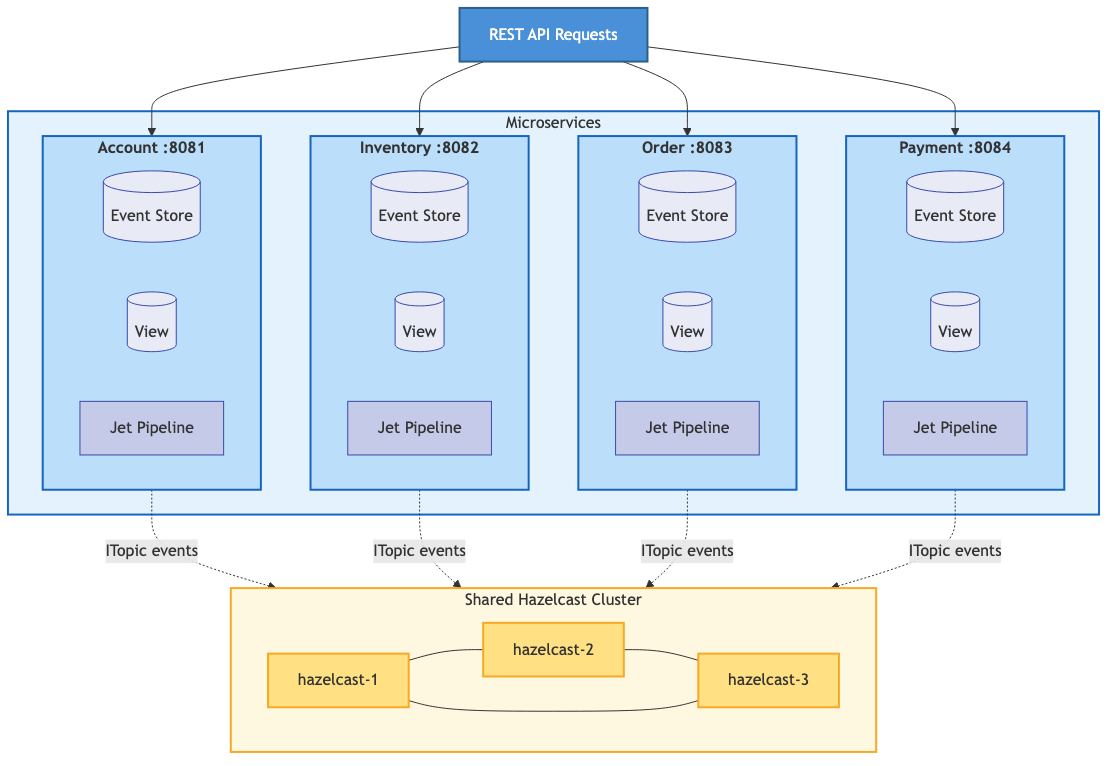
    Event sourcing solves this at an architectural level, not with duct tape. When a customer is created, the Account service publishes a CustomerCreatedEvent. The Order service subscribes to those events and builds its own local materialized view of customer data. No HTTP call. No dependency on Account being up. No shared database.

    If Account goes down for maintenance on a Tuesday afternoon, Order keeps running. It already has the customer data it needs. The services are actually decoupled — not just deployed to separate containers while secretly depending on each other for every request.

    Events Capture What Actually Happened

    Here’s a distinction that seems pedantic until it saves you during a production incident. A database transaction log records what changed:

    UPDATE customers SET address = '456 Oak Ave' WHERE id = 'cust-123';
    

    A domain event records what happened in business terms:

    CustomerMovedEvent { customerId: 'cust-123', previousAddress: '123 Main St',
                         newAddress: '456 Oak Ave', reason: 'RELOCATION' }
    

    The transaction log tells you a column changed. The domain event tells you a customer moved, where they moved from, and why. That business context gets captured once, at the moment it happens, and it’s preserved forever.

    When someone asks “why did this order ship to the wrong address?” you can trace the exact sequence: here’s when the customer moved, here’s the order that was placed two hours before the address change propagated, here’s why the old address was used. With CRUD, you’d be spelunking through application logs and hoping somebody thought to log the right thing.

    Event Streams Are AI-Ready Data

    This one has been sneaking up on us.

    An event-sourced system doesn’t just store what the world looks like right now. It stores how it got there — a sequence of business actions, ordered in time, with context attached. That turns out to be exactly the kind of data that AI systems are hungry for.

    Look at what an AI agent sees when it queries a traditional database: customer has address X, has ordered Y items, has a balance of Z. A flat snapshot. Static. Not much to work with beyond simple lookups.

    Now look at what it sees in an event stream:

    CustomerCreatedEvent        → new customer in Seattle
    ProductViewedEvent (×12)    → browsed camping gear heavily
    CartUpdatedEvent (×4)       → added/removed items, compared prices
    OrderPlacedEvent            → bought mid-range tent, not the premium one
    CustomerMovedEvent          → relocated to Denver
    ProductViewedEvent (×8)     → browsing ski equipment
    

    That’s a behavioral narrative. Purchase hesitation patterns. Geographic lifestyle shifts. Seasonal interest changes. None of that exists in a snapshot of current state.

    Now, I should be honest here — databases have transaction logs, and you can do analytics on those. But transaction logs record row-level mutations: SET column = value. Domain events record business actions with semantic meaning. The difference is the difference between “field changed” and “customer moved to Denver and started shopping for ski gear.” One is plumbing. The other is insight.


    Why Hazelcast?

    So you’re sold on event sourcing (or at least willing to keep reading). Why Hazelcast as the platform?

    Because event sourcing needs three things to work well, and Hazelcast handles all of them:

    Fast writes for the event stream. Events go into an IMap — in-memory, sub-millisecond. You’re not waiting for a disk flush on the critical path.

    Real-time processing. Hazelcast’s Event Journal streams events to Jet pipelines as they arrive. No polling, no batch windows. Events flow through processing stages — persist to event store, update materialized view, publish to subscribers — as a continuous pipeline.

    Fast reads from materialized views. Once the pipeline updates a view, queries against it are sub-millisecond IMap lookups. No joins, no aggregation at query time.

    Add ITopic for pub/sub event distribution across services and native horizontal scaling across cluster nodes, and you’ve got a complete event sourcing infrastructure without bolting together five different technologies.


    Core Concepts

    Domain Events

    A domain event represents something meaningful that happened in your business. In our framework, events extend DomainEvent:

    public abstract class DomainEvent<D extends DomainObject<K>, K>
            implements UnaryOperator<GenericRecord>, Serializable {
    
        // Event identification
        protected String eventId;        // Unique ID (UUID)
        protected String eventType;      // e.g., "CustomerCreated"
        protected String eventVersion;   // For schema evolution
    
        // Event metadata
        protected String source;         // Service that created it
        protected Instant timestamp;     // When it happened
    
        // Domain object reference
        protected K key;                 // Key of affected entity
    
        // Traceability
        protected String correlationId;  // Links related events
    
        // The key method: how does this event change state?
        public abstract GenericRecord apply(GenericRecord currentState);
    }
    

    The apply() method is the interesting part — it defines how this event transforms current state into new state. Each event type implements its own version of this, which means the logic for “what does this event do?” lives with the event itself, not in some giant switch statement somewhere.

    If you’ve spent time with Domain-Driven Design, you’ll notice that our DomainObject is what DDD calls an aggregate root. Every event is scoped to exactly one aggregate — CustomerCreatedEvent belongs to the Customer aggregate, OrderPlacedEvent belongs to the Order aggregate. Consistency is enforced within the aggregate boundary: all events for a given customer are ordered and processed sequentially (we’ll see how Hazelcast’s partition threading makes this work in Part 2). Across aggregates — between a customer and an order, say — we accept eventual consistency and coordinate through sagas. We don’t go deep into DDD vocabulary in this series, but if you know the terminology, you’ll see the boundaries everywhere.

    A Concrete Example

    Here’s CustomerCreatedEvent from our eCommerce implementation:

    public class CustomerCreatedEvent extends DomainEvent<Customer, String> {
    
        public static final String EVENT_TYPE = "CustomerCreated";
    
        private String email;
        private String name;
        private String address;
        private String phone;
    
        public CustomerCreatedEvent(String customerId, String email,
                                     String name, String address) {
            super(customerId);  // Sets the key
            this.eventType = EVENT_TYPE;
            this.email = email;
            this.name = name;
            this.address = address;
        }
    
        @Override
        public GenericRecord apply(GenericRecord currentState) {
            // For creation events, ignore current state and create new
            return GenericRecordBuilder.compact("Customer")
                .setString("customerId", key)
                .setString("email", email)
                .setString("name", name)
                .setString("address", address)
                .setString("status", "ACTIVE")
                .setInt64("createdAt", Instant.now().toEpochMilli())
                .build();
        }
    }
    

    Notice that apply() for a creation event ignores currentState entirely — there is no current state, we’re creating it. Update events would read from currentState and modify specific fields.

    The Event Store

    The event store is append-only. Events go in and they don’t come out (well, they come out for reads, but they’re never modified or deleted). It’s the permanent, immutable record of everything that happened.

    public interface EventStore<D extends DomainObject<K>, K,
                                E extends DomainEvent<D, K>> {
    
        void append(K key, GenericRecord eventRecord);
    
        List<GenericRecord> getEventsForKey(K key);
    
        void replayByKey(K key, Consumer<GenericRecord> eventConsumer);
    
        long getEventCount();
    }
    

    Materialized Views

    If events are the source of truth, how do you actually query current state without replaying the entire event history every time someone calls GET /customers/123? You don’t. You maintain materialized views.

    A materialized view is a pre-computed projection — it gets updated incrementally as each event flows through the pipeline. Think of it as a cache that’s always consistent with the event stream, because it’s derived from it.

    Events update a materialized view

    The view always reflects the latest state. Reads are instant — it’s just an IMap lookup.


    The Event Flow

    Here’s the full lifecycle of an event in our framework:

    Event processing pipeline

    A REST request comes in. The service creates an event and drops it into the pending events IMap. The Jet pipeline picks it up via the Event Journal, then processes it through four stages: persist to the event store, update the materialized view, publish to subscribers via ITopic, and write a completion record. The API returns the customer data from the now-updated view.

    That’s eight steps for what CRUD does in one database write. And yeah, that’s more moving parts. But each of those parts is doing something valuable — you get an audit trail, a materialized view, cross-service notification, and async completion tracking, all from a single event submission.


    The Service Layer

    Here’s what it looks like from the service code’s perspective:

    @Service
    public class AccountService {
    
        private final EventSourcingController<Customer, String,
                        DomainEvent<Customer, String>> controller;
    
        public CompletableFuture<Customer> createCustomer(CustomerDTO dto) {
            CustomerCreatedEvent event = new CustomerCreatedEvent(
                UUID.randomUUID().toString(),
                dto.getEmail(),
                dto.getName(),
                dto.getAddress()
            );
    
            UUID correlationId = UUID.randomUUID();
            return controller.handleEvent(event, correlationId)
                .thenApply(completion -> {
                    return getCustomer(event.getKey()).orElseThrow();
                });
        }
    
        public Optional<Customer> getCustomer(String customerId) {
            GenericRecord gr = controller.getViewMap().get(customerId);
            if (gr == null) return Optional.empty();
            return Optional.of(Customer.fromGenericRecord(gr));
        }
    }
    

    The service creates an event, not a database record. handleEvent() returns a CompletableFuture that completes when the pipeline has processed the event all the way through. And reads come from the materialized view — no event replay, just a fast IMap lookup.


    Benefits in Practice

    The architectural arguments are nice, but let’s see what this actually looks like when you’re debugging at 2am or fielding a compliance request.

    Audit Trail

    Every change is recorded. Every single one.

    List<GenericRecord> history = eventStore.getEventsForKey("cust-123");
    for (GenericRecord event : history) {
        System.out.println(event.getString("eventType") + " at " +
                           event.getInt64("timestamp"));
    }
    
    CustomerCreated at 1706374800000
    CustomerUpdated at 1706375100000
    CustomerAddressChanged at 1706461200000
    

    No special audit logging framework. No triggers on database tables. The event store is the audit trail, because it’s the source of truth.

    Time Travel

    Need to see what the data looked like last Thursday?

    GenericRecord pastState = null;
    for (GenericRecord event : eventStore.getEventsForKey("cust-123")) {
        if (event.getInt64("timestamp") > targetTime) break;
        pastState = applyEvent(event, pastState);
    }
    

    Replay events up to the timestamp you care about and stop. You now have the exact state of that entity at that moment. Try doing that with a database that only stores current state.

    View Rebuilding

    Found a bug in your view update logic? Fix the code and rebuild:

    viewUpdater.rebuild(eventStore);
    

    Clear the view, replay all events through the corrected logic, done. With CRUD, if your update logic had a bug that corrupted data, that data is just… corrupted. The correct values are gone. You’re restoring from backups and hoping for the best.

    Service Independence

    The Order service doesn’t call Account to get customer names. It has its own materialized view built from customer events:

    EnrichedOrderView {
        orderId: "order-456",
        customerId: "cust-123",
        customerName: "Alice Smith",  // From CustomerCreated/Updated events
        customerEmail: "alice@example.com",
        items: [...],
        total: 299.99
    }
    

    Each service maintains the views it needs for its own work. No cross-service calls at query time.


    Performance

    All the numbers here are from a single Apple MacBook Pro (M4 chip, 16GB RAM) running all services via Docker Compose. This is a baseline — the framework is designed to scale horizontally across Hazelcast cluster nodes and Kubernetes replicas, so treat these as a floor, not a ceiling.

    The materialized view layer — the raw speed of IMap operations inside the JVM, bypassing HTTP entirely:

    Metric Value
    View update throughput 100,000+ ops/second
    P99 latency < 1ms
    View read latency < 0.5ms

    End-to-end through the full pipeline (REST → event store → Jet → view update → ITopic publish):

    Metric Value
    Throughput ~300+ TPS

    That end-to-end number is using curl in bash subshells as the load driver, which is about the least efficient way to generate HTTP load (every request forks a process and opens a new connection). A proper load testing tool with connection pooling — wrk, k6, Gatling — would push that number higher for the same pipeline.


    What’s Next?

    This was the foundation — what event sourcing is, why you’d use it, and how it works with Hazelcast. The series continues with deeper dives into the individual components:

    • Building the event pipeline with Hazelcast Jet
    • Materialized views for fast queries
    • Observability in event-sourced systems
    • The saga pattern for distributed transactions
    • Vector similarity search with Hazelcast
    • AI-powered microservices with MCP
    • Circuit breakers and resilience patterns
    • Transactional outbox and exactly-once delivery
    • Dead letter queues and idempotency
    • Performance engineering at scale

    …and more as the framework evolves.


    Getting Started

    The complete framework is on GitHub — full source code, Docker Compose setup, a sample eCommerce application, load testing tools, and over 2,000 tests.

    git clone https://github.com/myawnhc/hazelcast-microservices-framework
    cd hazelcast-microservices-framework
    ./scripts/docker/start.sh
    ./scripts/load-sample-data.sh
    ./scripts/demo-scenarios.sh
    

    Event sourcing asks you to shift your thinking from “store what the world looks like” to “record what happened.” It’s a different mental model, and it takes some getting used to. But the payoff — real service decoupling, a complete audit trail, time travel debugging, views you can rebuild from scratch, and an event stream that’s ready for AI to mine — makes it worth the adjustment for a lot of systems.

    That’s where we’ll leave things for today.


    Next up: Building the Event Pipeline with Hazelcast Jet

    Code: github.com/myawnhc/hazelcast-microservices-framework — clone it, docker-compose up, and the framework boots locally with sample data.
  • Baseball Invented Event Sourcing 150 Years Ago

    I’ve spent the last few months building event-sourced microservices on the Hazelcast platform — immutable event logs, materialized views, CQRS, the whole stack. If you’ve been following along, you’ve seen the why and the how. Event Sourcing is elegant. It’s powerful. And it was invented in the 1870s.

    Not by a software engineer. By a baseball scorekeeper.

    The Scorecard Is an Event Log

    Here’s the thing about keeping score at a baseball game. You don’t write down “the score is 3-2.” You write down what happened: Acuna singled to left. Olson doubled to right-center, Acuna to third. Riley grounded to short, Acuna scored, Olson to third. Play by play, pitch by pitch, every event appended in order to the record.

    Sound familiar? It should. That’s an event log. Immutable, append-only, temporally ordered. The scorekeeper’s pencil is the world’s oldest event producer.

    And here’s the part that made me sit up straight the first time I really thought about it: the scorekeeper never records the score directly. The score — along with batting averages, on-base percentages, pitcher stat lines, and everything else you see on the broadcast — is derived by replaying those events. You don’t store state. You compute it.

    If you read the Hazelcast framework piece, you’ll recognize this immediately. We spent considerable effort setting up event stores and materialized views as separate concerns — events flow in, projections flow out. The scorekeeper has been doing this with a pencil and a printed card since before the lightbulb was invented.

    Materialized Views Are Everywhere at the Ballpark

    Once you see this pattern, you can’t unsee it. Every summary artifact at a baseball game is a materialized view — a read-optimized projection of the same underlying event stream.

    The box score is a materialized view. It takes the full play-by-play event log and projects it into a compact batting line per player: at-bats, runs, hits, RBI. A completely different shape than the source data, optimized for a specific read pattern.

    The line score is a materialized view. Same events, different projection — runs per inning instead of runs per player.

    The pitcher’s stat line is a materialized view. IP, hits, walks, strikeouts, earned runs — all derived from the same at-bat events, filtered by which pitcher was on the mound.

    The standings page is a materialized view built from an even larger event stream — every game’s final result across the entire season.

    This is CQRS in its purest form. The write side is the scorekeeper recording events. The read side is every statistical summary, broadcast graphic, and newspaper box score derived from those events. Multiple consumers, each projecting the same stream into the shape they need.

    Where It Gets Really Interesting

    The conceptual alignment goes deeper than “it’s a log and you read from it.” The hard problems are the same too.

    Temporal queries. “What was the score after five innings?” In an event-sourced system, you replay events up to a point in time. In baseball, you read the line score up to the fifth column. Same operation. A scorekeeper can reconstruct the exact game state — who was on base, how many outs, what the count was — at any point in the game by replaying events to that moment.

    Corrections and compensating events. The official scorer initially rules a play an error, then changes it to a hit. The original event isn’t erased — it’s annotated, and the downstream materialized views (batting averages, fielding percentages) recompute. If you’ve ever dealt with event versioning or compensating events in a production system, this should feel very familiar. The scorer is solving the same problem you are, just with a pencil eraser instead of an event migration framework.

    MLB’s replay challenge system makes this even more explicit. The umpire calls ball three — that’s an event. The catcher challenges — that’s a compensating event. The replay review overturns the call to strike three — that’s the resolution event. You don’t go back and pretend the original call never happened. You record the whole sequence: the call, the challenge, the outcome. The materialized views — the count, the at-bat result, the pitcher’s stat line — all reflect the final state, but the event log preserves the full history of how you got there. That’s not an analogy for event sourcing. That is event sourcing.

    Multiple independent consumers. The home team’s scorer, the visiting team’s scorer, the press box statistician, and the broadcast team are all consuming the same stream of game events and maintaining their own projections. They might format them differently, update at slightly different times, even disagree on a ruling until the official scorer weighs in. Independent materialized views with eventual consistency.

    Eventual consistency itself. The press box stats might lag a play behind the action. The official scorer’s ruling on a borderline hit-vs-error might not come until minutes after the play — sometimes not until after the game. During that window, different consumers have different projections of the truth. The system is eventually consistent. Always has been. Nobody panics about it because the mental model is intuitive: the ruling will come, the stats will update, and the final record will be correct.

    Where the Analogy Breaks Down

    Now, I’m not going to pretend this maps perfectly. The places where it doesn’t map are actually instructive — they highlight what makes distributed event sourcing genuinely hard.

    Ordering is free in baseball. One batter at a time. One pitch at a time. Events are naturally, globally ordered with no effort. In a distributed system, you fight for ordering. You need Lamport clocks, vector clocks, consensus protocols, or a centralized sequencer. Baseball gets this for free because the game is inherently single-threaded. Your microservices are not.

    Single source of truth. Baseball has an official scorer — one authoritative human who makes the final call. Distributed systems don’t get a benevolent dictator. They have to negotiate consensus across nodes that might disagree, might be partitioned, might be lying. The official scorer never has a network partition. (Though I’ve seen some calls that made me wonder.)

    Bounded, finite streams. A baseball game ends. The event stream is finite, relatively small, and complete. Production event stores grow without bound, need compaction strategies, deal with schema evolution over years. A scorekeeper’s biggest scaling challenge is a 19-inning game. Yours is a few billion events with a 5-year retention policy.

    These gaps are worth noting because they’re exactly the problems that make event sourcing hard to implement in software. Baseball had the luxury of solving the easy version first — sequential, single-authority, bounded. We got the distributed, multi-authority, unbounded version. Lucky us.

    So I Built an App

    This pattern recognition wasn’t just an intellectual exercise. I’ve been building BaseballScorer, an iOS app for scoring baseball games by hand — the way scorekeepers have always done it, but on a tablet instead of paper.

    The app’s data model is, naturally, event-sourced. Pitches, plays, and substitutions are the events. The score, the scorecard, the line score, the inning summaries — all materialized views, derived by replaying the event stream. It’s the same architecture I’ve been writing about in the Hazelcast series, just running on a single iPad instead of a distributed cluster.

    It’s available on the App Store now. If you’re the kind of person who keeps score at games — or the kind of person who’s curious why anyone would — I think you’ll find it interesting.

    If you think this sounds interesting but aren’t familiar with keeping score, we’ve got you covered – check out this detailed how-to score site that covers using the app or paper scorecards if that’s more your style.

    And if you want to see what event sourcing looks like when you don’t have the luxury of a single-threaded, globally-ordered event stream, check out the Hazelcast microservices framework. Same patterns, much harder problem.


    This is part of an ongoing series on event-driven microservices at Nodes and Edges. Previous posts: Why Event-Driven Microservices? and The Hazelcast Microservices Framework.

    Code: github.com/myawnhc/hazelcast-microservices-framework — clone it, docker-compose up, and the framework boots locally with sample data.